Walnut Exam Module

Run every examination in one place, from the question paper to signed results.

The Walnut Exam Module is Walnut’s examination platform for universities and institutions, part of Walnut LMS; the Online Proctored Examinations service runs on it. Set papers with your own teams, release them securely, supervise candidates with AI-assisted proctoring and a human proctor, then evaluate, tabulate and publish digitally signed results, so any change to them can be detected.

Try the full platform with sample data: sign in as a candidate, a proctor, a question setter or the Controller of Examinations. It’s a shared demo of a fictional “Demo University”, reset every night.

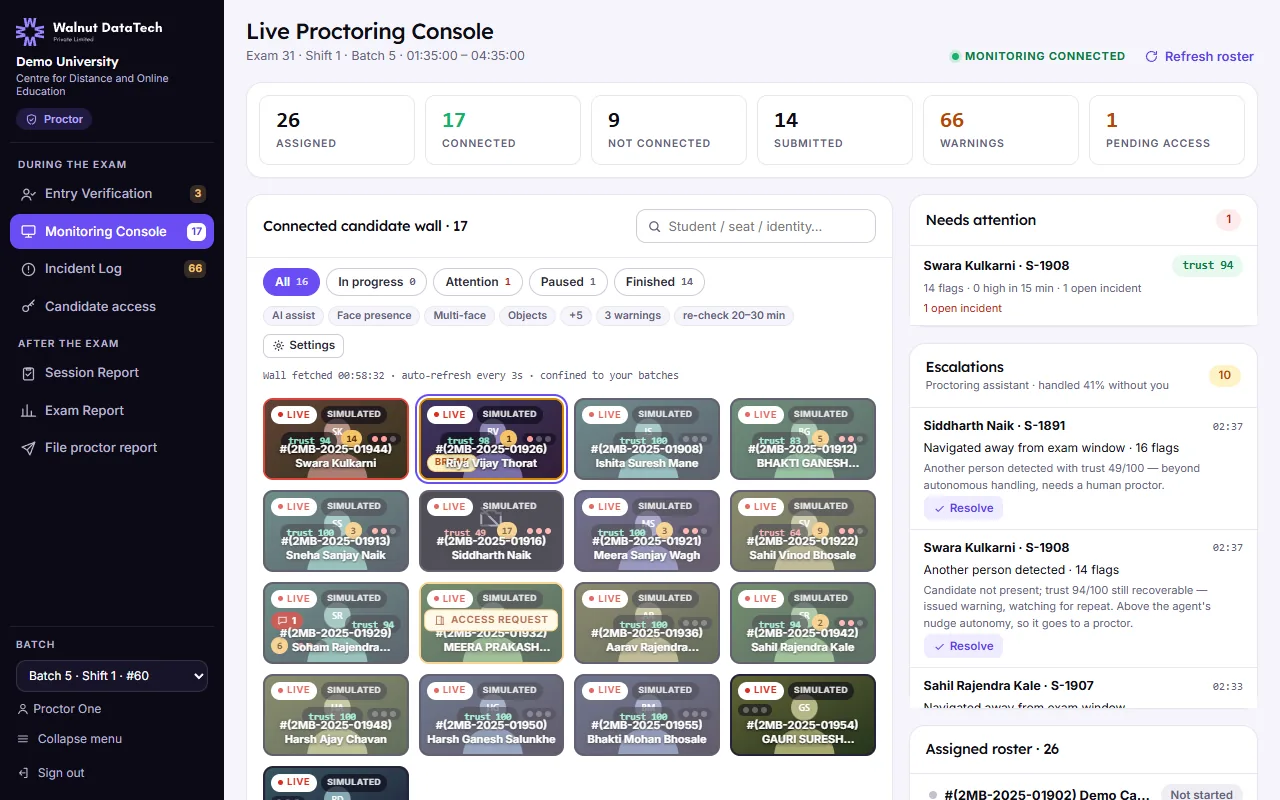
The Walnut Exam Module’s live proctoring console: counts of assigned, connected and submitted candidates and warnings, a wall of candidate tiles labelled simulated, and escalations for a human proctor to resolve. Sample data.
The university, candidates and figures shown are sample data from the Walnut Exam Module demo.

How it works

From the question paper to the published result.

Five steps, in one platform, with a person able to step in at every stage.

  1. 01

    Plan the examination

    Register subjects and their syllabus, schedule each examination and issue admit cards.

  2. 02

    Set the paper

    Build a blueprint, then setters write questions in a question bank tagged to Bloom’s levels, reviewed by a Head Examiner and moderators.

  3. 03

    Release it securely

    Question sets A, B and C are sealed. A set is released only when two controllers have signed for it.

  4. 04

    Supervise the exam

    Candidates pass a system check and an identity check-in; a proctor can issue an entry code to a candidate who can’t sign in. AI-assisted proctoring raises flags and warnings for a human proctor to act on.

  5. 05

    Evaluate and publish

    Evaluation and moderation lead to tabulated results, published signed. Candidates can challenge a question or ask for re-evaluation.

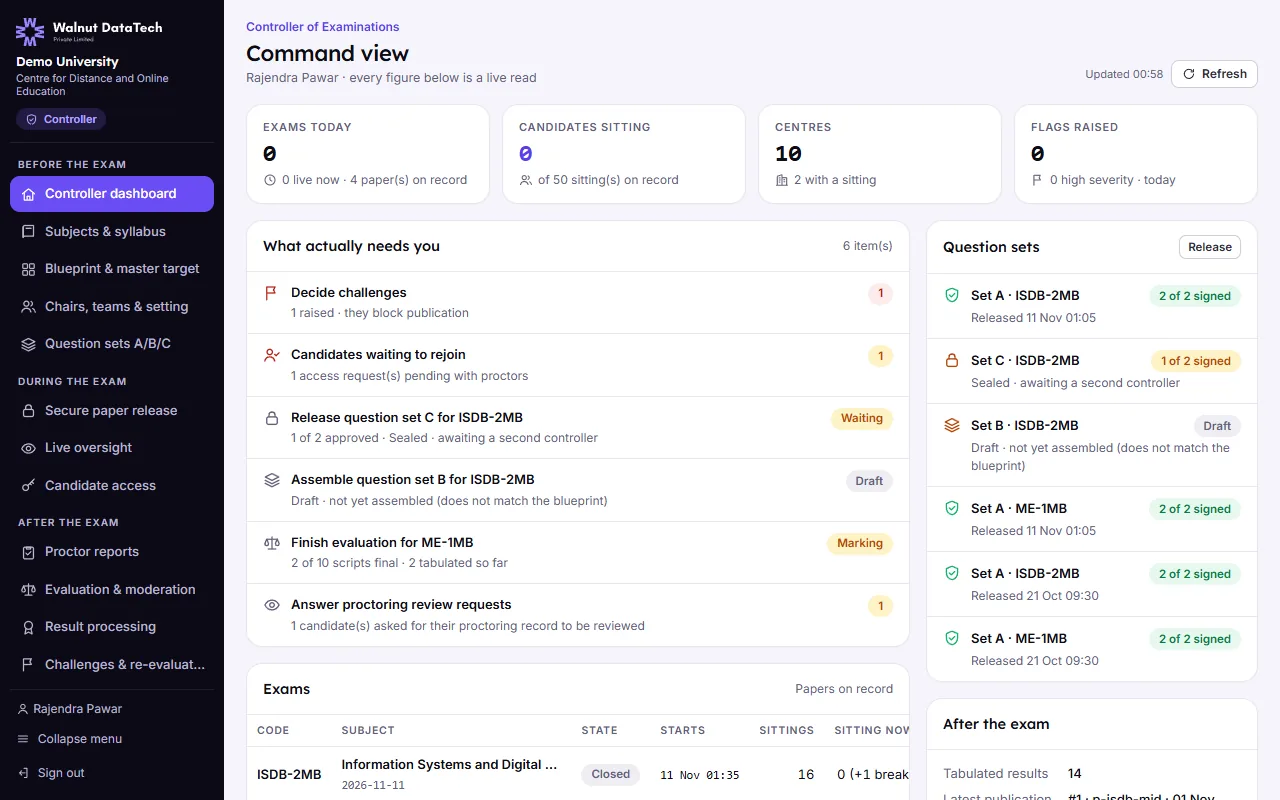
The Walnut Exam Module’s command view for the Controller of Examinations: what needs attention today, question sets with their signatures, and the examinations on record. Sample data.
The university, candidates and figures shown are sample data from the Walnut Exam Module demo.

For the Controller of Examinations

One command view of every examination, before, during and after.

  • A subject and syllabus registry, exam registration and scheduling, and admit cards.
  • A blueprint and question setting by teams of setters, a Head Examiner and moderators.
  • Question sets A, B and C, released only with two controller signatures.
  • Live oversight on exam day, with candidate access and proctor reports.
  • Result tabulation and signed publishing, with question challenges and re-evaluation.
Try it in the demo
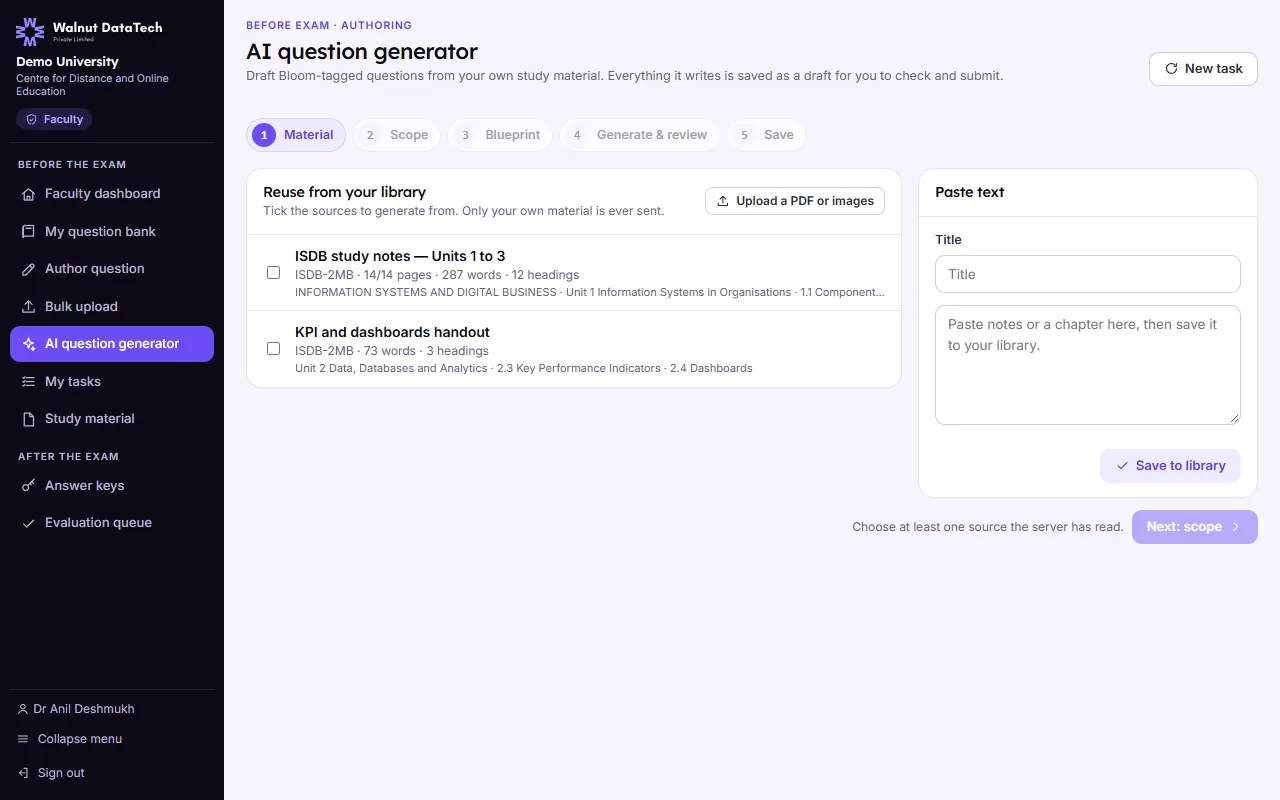
The Walnut Exam Module’s AI question generator, step one of five: choose study material from your library or paste text, then set the scope and blueprint. Sample data.
The university, candidates and figures shown are sample data from the Walnut Exam Module demo.

For question setters

Write better papers faster, from your own material.

  • A question bank of many question types, each tagged to Bloom’s levels, with bulk upload, answer keys and rubrics.
  • An AI question generator, powered by Anthropic’s Claude, that drafts questions from your institution’s own study material.
  • Every AI-drafted question is saved as a draft for a person to check before it’s submitted.
  • Tasks, answer keys and an evaluation queue in the same place.
Try it in the demo
The Walnut Exam Module’s proctoring console: a candidate wall with filters for attention, paused and finished, and the escalations a proctor resolves. Sample data.
The university, candidates and figures shown are sample data from the Walnut Exam Module demo.

For proctors

See every candidate, and act on what matters.

  • A live console with each candidate’s status, warnings and access requests.
  • AI-assisted flags for an absent face, more than one person, phones and books, looking away, voices and leaving full screen or the exam window.
  • Escalations that need a person, and an incident log of every decision.
  • Automatic termination is off by default: a third warning asks the proctor to confirm.
Try it in the demo
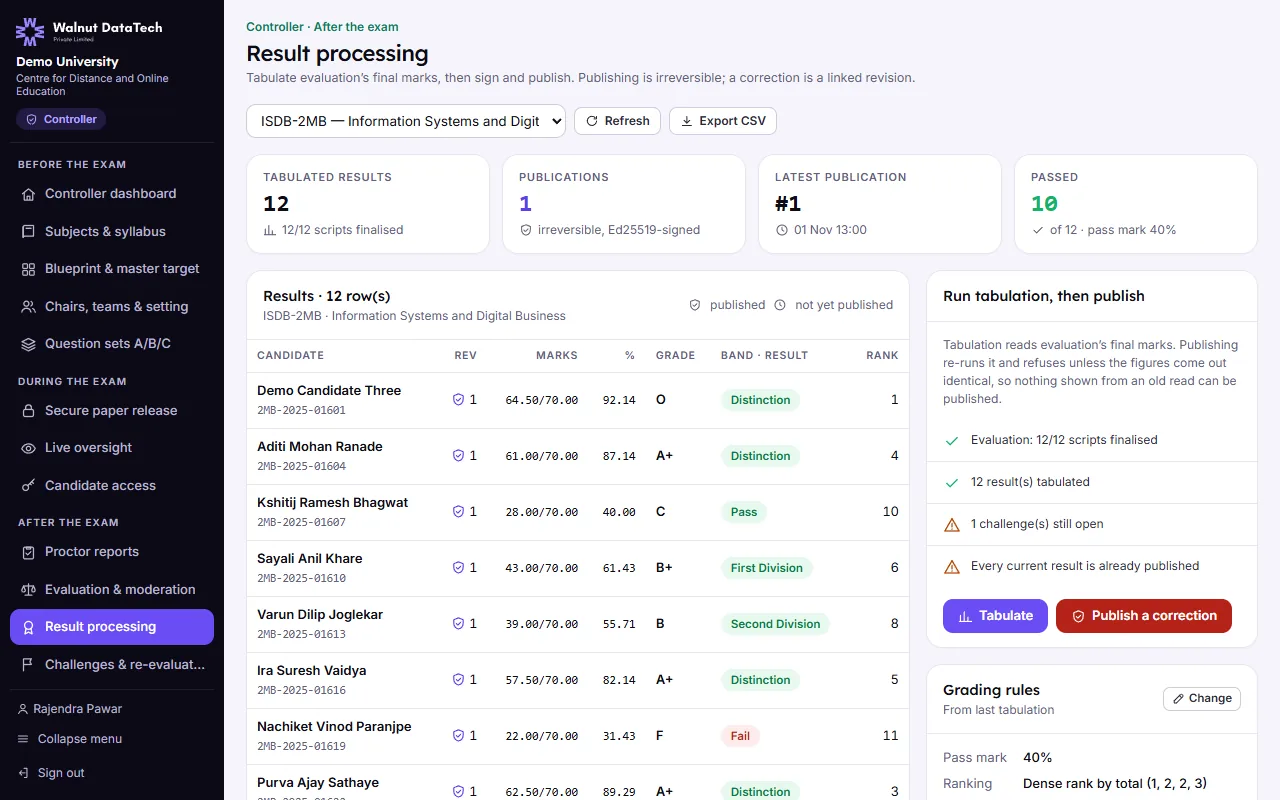
Walnut Exam Module result processing: tabulated results for a paper with marks, grades and ranks, signed publications and the steps to tabulate and publish. Sample data.
The university, candidates and figures shown are sample data from the Walnut Exam Module demo.

For results

From final marks to published results, with nothing changed on the way.

  • Evaluation and moderation, then tabulation of the final marks.
  • Publishing checks the figures again and refuses if anything has changed.
  • Digitally signed results, so any change can be detected; corrections are linked revisions.
  • Candidates can challenge a question or ask for re-evaluation, and practise first with a mock test.
Try it in the demo

Integrity

Results you can stand behind.

Every step leaves a record, and a change to the record shows.

  1. 01

    Two signatures to release a paper

    Question sets stay sealed until two controllers have signed. A sealed set can’t be released on one person’s signature.

  2. 02

    A human makes the call

    AI-assisted proctoring watches for an absent face, more than one person, phones and books, looking away, voices and leaving the exam window. It flags and warns, and a proctor decides whether to end an exam: automatic removal is off by default.

  3. 03

    Signed results

    Published results are digitally signed, so any change to them can be detected. A correction is published as a new, linked revision.

  4. 04

    A tamper-evident audit trail

    Each entry in the audit trail is linked to the one before it, so a change to the record shows.

Try the demo

Sign in as anyone in the examination.

Open the demo in a new tab and use one of these sign-ins. Staff sign in at the demo’s staff sign-in page, where clicking an account fills it in; the demo then shows the one-time code on screen.

Walnut Exam Module demo sign-ins
Sign in asWhat you’ll seeSign-in
Candidate (live exam)Candidate sign-in (opens in a new tab)Sit a live exam: system check, camera identity check-in and the paper. Allow the camera when asked.WLN2026001Password demo123
Candidate (results)Candidate sign-in (opens in a new tab)See a published result and challenge a question.WLN2026301Password demo123
ProctorStaff sign-in (opens in a new tab)The live proctoring console and escalations.proctor@walnut.demoPassword demo123
Question setterStaff sign-in (opens in a new tab)The question bank and the AI question generator.setter1@walnut.demoPassword demo123
Controller of ExaminationsStaff sign-in (opens in a new tab)Exams, the blueprint, question sets, secure paper release and results. Releasing a paper needs a second controller: controller2@walnut.demo.controller1@walnut.demoPassword demo123

The university, candidates and figures in the demo are made up, and no real messages are sent. But the demo is shared: when you sit the exam as a candidate, what your camera and screen show, and any photo you take at check-in, can be seen by other visitors signed in as staff until the nightly reset. Use a plain background, share a window rather than your whole screen, and don’t show or type a real ID document or number.

For universities and institutions

Request a demo

Tell us about your examinations. We’ll walk you through the Walnut Exam Module with sample data and show how it would run for your institution.

Talk to us

We use these details only to respond to your enquiry. See our privacy policy and terms.

Live demo

Tell us who you are, then open the demo.

The demo opens as soon as you send this. Our team may get in touch about the product.

We use these details only to follow up about Walnut. See our privacy policy.