
One learning platform, from enrolment, study, and exams to the final result.
Walnut LMS is a learning management system (LMS) for universities, colleges, schools and institutes that run online and blended programmes. Every course is built in the UGC four quadrants. Student management, live lectures, content approval, online proctored examinations with encrypted question papers, on-screen marking and a grievance system are all built in.
Request a demo
See it with sample data from your kind of programme.
Thank you. We’ve got it.
Your details are verified and with our team. A Walnut consultant will be in touch shortly.
LMS features most platforms leave to other systems.
Fifteen features of the Walnut learning management system, from the online classroom to the online examination. All built in.
UGC-DEB compliant
Every course is built in the UGC four quadrants: e-tutorial, e-content, web resources and discussion, and self-assessment. Proctored examinations are conducted as per prevailing UGC Regulations.
Live lectures and discussion
A virtual classroom for live lectures, with recordings and attendance on one timetable. Discussion spaces for peer interaction and doubt clearing keep the class talking afterwards.
Content approval
Nothing reaches students unapproved. Faculty review and approve study material before students see it, and track content that is pending, approved or rejected.
Grievance system
A student can question a question or a mark. Each grievance is routed by rule, decided with a reason and tracked to its close.
Online proctored examinations
An online examination system inside the LMS: question banks, exam committee, secure paper release, AI and human proctoring, evaluation and results.
Encrypted, sealed question papers
Question sets A, B and C are encrypted and sealed. A paper is released only with two-step verification.
Blueprints from your syllabus
Upload the syllabus. AI extracts its modules, units and topics into academic and examination blueprints.
On-screen marking and evaluation
Scanned answer sheets are marked on screen, step by step, with AI-suggested marks that faculty accept or override.
Signed results, tamper-evident audit trail
Published results are digitally signed, so any change to them can be detected. Each entry in the audit trail is linked to the one before it.
Learning analytics
One activity dashboard: engagement hours by subject, assessment attempts, study-hour distribution and hourly activity.
Verified certificates
Certificates that anyone can verify by number, printed or saved as a PDF.
Reports for regulators
Internal examination and verification reports, attendance and progress reports, with UGC/DEB and Academic Bank of Credit support through Walnut’s university services.
Student management and fees
Add and manage students, with attendance and progress reports. The fees dashboard, pending dues, finance report and student loans are in the same login.
Your brand, many institutions
A super admin runs many institutions, each with its own logo, colours, roles and settings.
Web and mobile app
Digital content is delivered through the LMS and the mobile application, in accordance with UGC Regulations.
Follow one course, from its first lecture to its final result.
Six stops. The first four are the UGC four quadrants, the way every online course on Walnut LMS is built.
Lectures
Audio and video lectures, animations, virtual labs and simulations, with full video transcriptions.
- Students
- Recorded and live video lectures
- Faculty
- Run live lectures and discussions for your courses
- Administrator
- Schedule live lectures, approve content and manage discussions
Reading
Self-instructional reading material, e-books, PDFs, illustrations, case studies, presentations and supplementary documents.
- Students
- PDFs, notes and e-books
- Faculty
- Review and approve study material before students see it. Track content that is pending, approved or rejected.
- Administrator
- Academic and examination blueprints, with AI extraction of modules, units and topics from an uploaded syllabus
Discussion
Curated web links, open-source content, historical overviews and further articles, with discussion spaces for peer interaction and doubt clearing.
- Students
- Discussion forums and learning engagement systems for students.
- Peer groups
- Peer groups form around the outcomes a class finds hard.
Practice
MCQs, quizzes and problem sets with solutions, assignments, FAQs and feedback that clears common misconceptions.
- Students
- MCQs, quizzes and practice tests. Assignments: view, submit and see marks.
- Administrator
- Assignments: create them for a programme and subject, filter by session, batch, semester and date, track submitted and pending work and marks
- Analytics
- Activity dashboard, engagement hours by subject, assessment attempts, study-hour distribution and hourly activity
Examination
A complete examination module inside the LMS: question banks, exam committee, secure paper release, AI and human proctoring, evaluation and results.
- Question paper
- Generated from the uploaded syllabus with AI, added manually or uploaded in bulk, in nine question types, reviewed by faculty.
- Proctoring
- AI proctoring that watches every candidate. Human proctors with a live view. Both together for high-stakes papers.
- Candidates
- An identity check-in with photo ID and a face match before entry, a verification lobby and liveness checks during the examination.
- Regulation
- Proctored examinations are conducted as per prevailing UGC Regulations.
Result
Learning Improvement Plans for students and faculty, peer groups and the next lesson, all tied to the same learning outcomes.
- Marking
- On-Screen Evaluation of scanned answer sheets, step by step, with AI-suggested marks that faculty accept or override.
- Students
- Progress report and results. Attendance record.
- Reports
- Internal examination and verification reports, attendance and progress reports, with UGC/DEB and Academic Bank of Credit support through Walnut’s university services.
- Certificates
- Certificates that anyone can verify by number.
One LMS, seven roles, each with its own work.
Four logins and three examination roles. Pick one to see its day on Walnut LMS and everything it gets.
Students
Learners in every programme
A student signs in and finds everything behind one login: courses, live and recorded lectures, study material, assignments, attendance, results and fees. In an examination, a guided screen shows the sections, the time left and the helpline. If a question or a mark looks wrong, the student raises a grievance and follows it to its close.
- My courses
- Enrolled courses and their study materials
- Lectures
- Recorded and live video lectures
- Reading
- PDFs, notes and e-books
- Assignments
- View, submit and see marks
- Self-assessment
- MCQs, quizzes and practice tests
- Attendance
- Attendance record
- Progress
- Progress report and results
- Fees
- Fees dashboard and payment history
Faculty
Teachers and course coordinators
Nothing reaches students until faculty approve it. A teacher opens the review list, filters it by session, batch, programme, semester and subject, and approves or rejects each piece of study material. The same login checks the syllabus subject by subject, runs live lectures and discussions, and marks answer sheets on screen, with results published outcome by outcome.
- Approvals
- Review and approve study material before students see it
- Filters
- Narrow the review list by session, batch, programme, semester and subject
- Status
- Track content that is pending, approved or rejected
- Syllabus
- Check syllabus alignment subject by subject
- Live teaching
- Run live lectures and discussions for your courses
- On-screen marking
- Mark on screen and publish outcome-wise results
Administrator
The institution’s academic and programme office
The academic office builds the programme: its level, duration, seats, semesters and session, then its courses, batches and faculty. AI reads the uploaded syllabus and drafts the academic and examination blueprints. From there the office schedules live lectures, approves content, sets assignments and follows every student’s attendance, fees and progress. Analytics, finance and the examination reports sit in the same login.
- Students
- Add and manage students, attendance, fees dashboard and pending dues, progress and self-assessment reports, transfers and cancelled applications
- Programmes
- Create programmes with level, duration, seats, semesters and session; manage courses, batches and faculty
- Blueprints
- Academic and examination blueprints, with AI extraction of modules, units and topics from an uploaded syllabus
- Assignments
- Create them for a programme and subject, filter by session, batch, semester and date, track submitted and pending work and marks
- Teaching
- Schedule live lectures, approve content and manage discussions
- Learning analytics
- Activity dashboard, engagement hours by subject, assessment attempts, study-hour distribution and hourly activity
- Finance
- Finance dashboard and report, student loans, MLC bifurcation
- Examinations
- Internal examination and verification reports
- Helpdesk and more
- Blogs, helpdesk tickets and employee search
Super admin
The platform owner, across institutions
One platform carries many institutions. The platform owner adds each institution, sets the roles and access of its administrators, faculty and students, and gives it its own logo, colours and branding, with its own configuration and permissions.
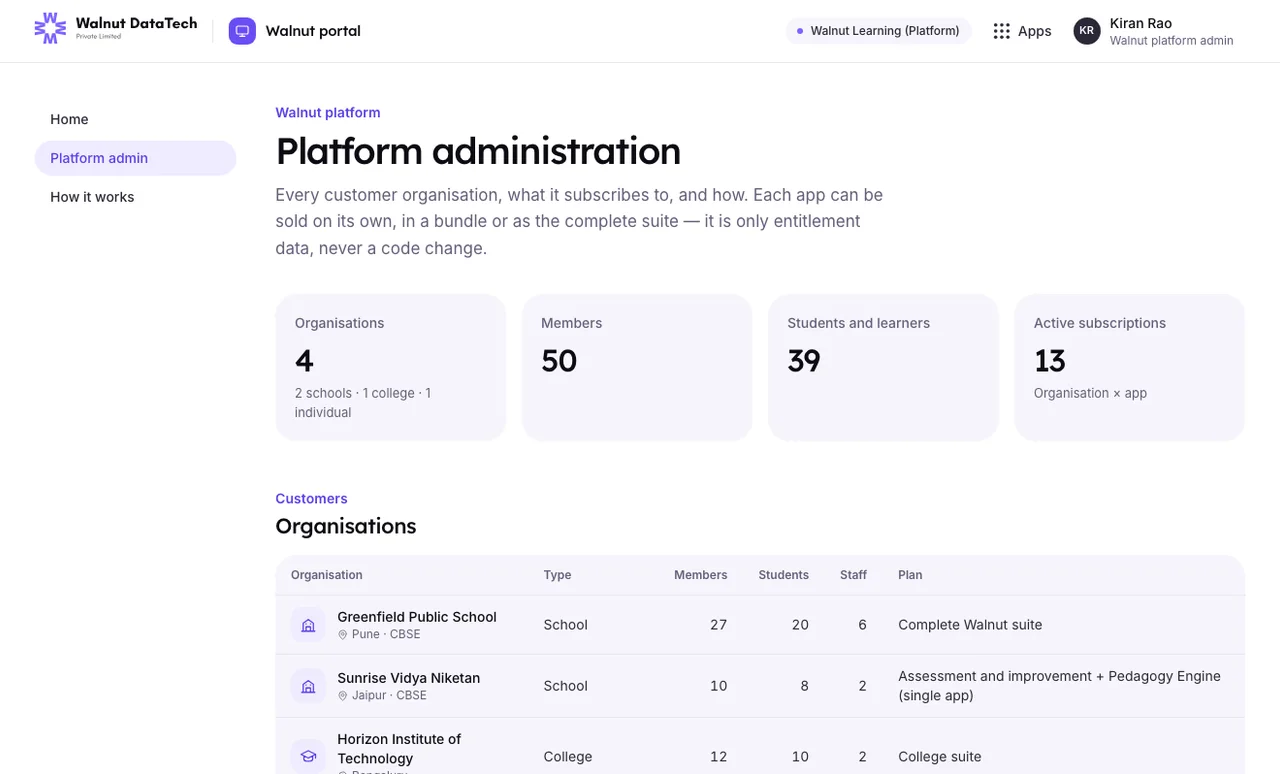
- Institutions
- Add and manage several institutions on one platform
- Roles and access
- Set roles and access for administrators, faculty and students
- Branding
- Each institution’s logo, colours and branding
- Configuration
- LMS configuration and permissions
Exam coordinator
Evaluation and grievances, for each examination
After the paper, objective answers are marked automatically. The rest need a person. The exam coordinator picks one of six ways to distribute the answer scripts and hands them to the evaluator pool. The coordinator also sees every question grievance in one view, assigns each marks grievance, approves any change of marks, and closes the examination once every grievance is closed and the final marks are verified.
- Allocation policy
- The exam coordinator chooses how answer scripts are distributed, then hands them to evaluators.
- Six ways to allocate
- Whole paper, question-wise, question creator, round robin, equal workload or manual.
- Evaluator pool
- Question setters, moderators, evaluators and the Head Examiner.
- Question grievances
- The coordinator sees all question grievances in one view, by question.
- Marks grievances
- The coordinator assigns each one to the faculty or the evaluator, and reviews and approves if the marks change.
- Closure
- Every grievance closed and the final marks verified, then the result is locked and the final result is published.
Committee chairperson
The head of the exam committee
Governance is built into the examination module. The chairperson and the committee’s faculty are named for each examination. Question sets A, B and C are set, encrypted and sealed, and a paper is released only with two-step verification. The committee keeps oversight across centres, and a question reported during the exam can go to the chairperson, who decides if it is valid.
- Exam committee
- The exam chairperson and the committee’s faculty are set in the module, for each examination.
- Question sets
- Question sets A, B and C are set, then encrypted and sealed.
- Paper release
- Secure paper release with two-step verification.
- Cross-centre oversight
- Oversight of the examination across centres.
- Question grievances
- A question a student reports can be routed to the chairperson, who decides if it is valid.
Committee faculty
The faculty on the exam committee
Question sets are allocated to setters and faculty. They write questions in a question bank tagged to Bloom’s levels, or let the AI question generator draft them from the institution’s own study material. Every draft is saved for a person to check. A Head Examiner and moderators review the questions. On a marks grievance, the faculty responds with a reason and a decision.
- Allocation
- Question sets are allocated to setters and faculty.
- Question bank
- Setters write questions in a question bank of many question types, each tagged to Bloom’s levels, with bulk upload, answer keys and rubrics.
- AI drafts, checked by hand
- An AI question generator drafts questions from your institution’s own study material. Every draft is saved for a person to check before it is submitted.
- Review
- A Head Examiner and moderators review the questions the setters write.
- Marking
- With the question-creator policy, each answer is routed to the faculty who authored that question.
- Grievances
- On a marks grievance, the faculty responds with a reason and a decision.
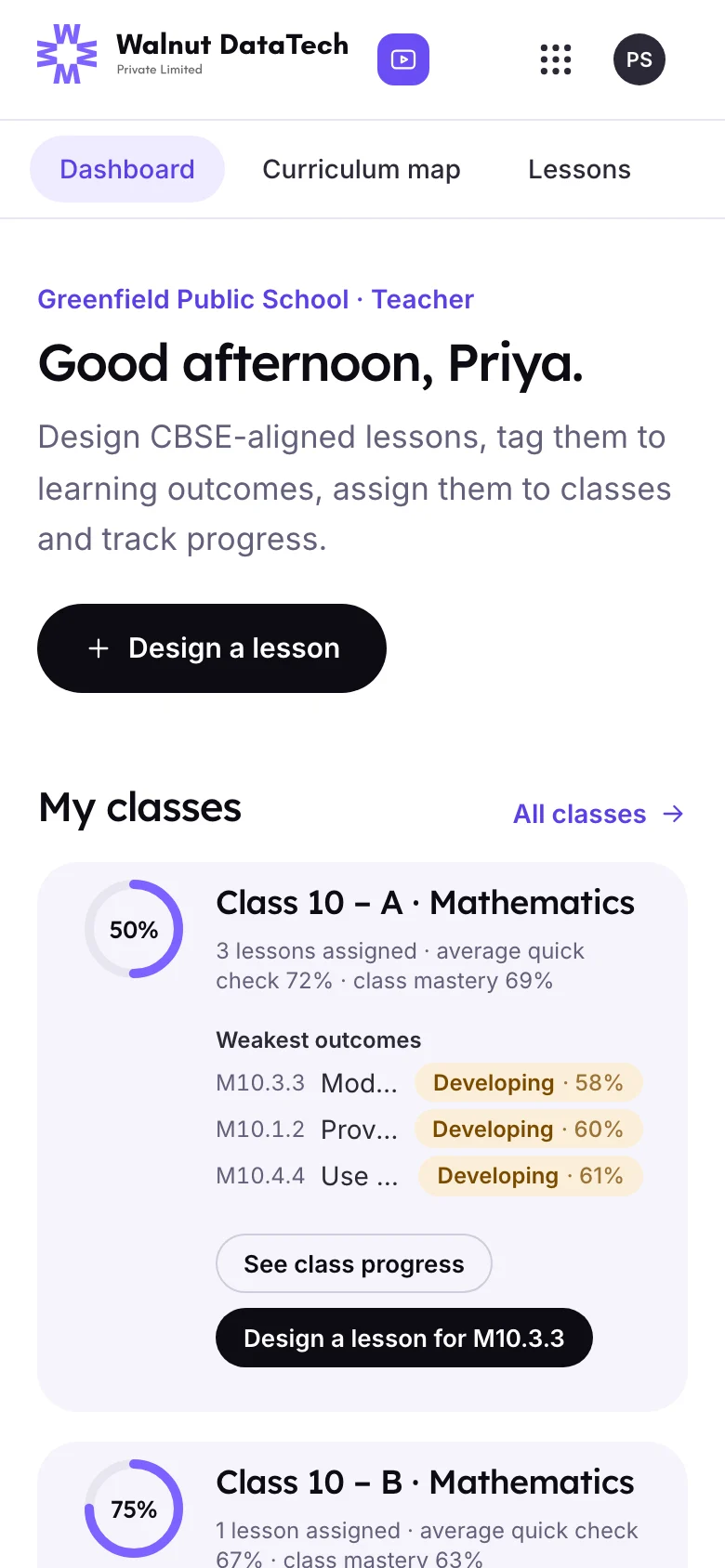
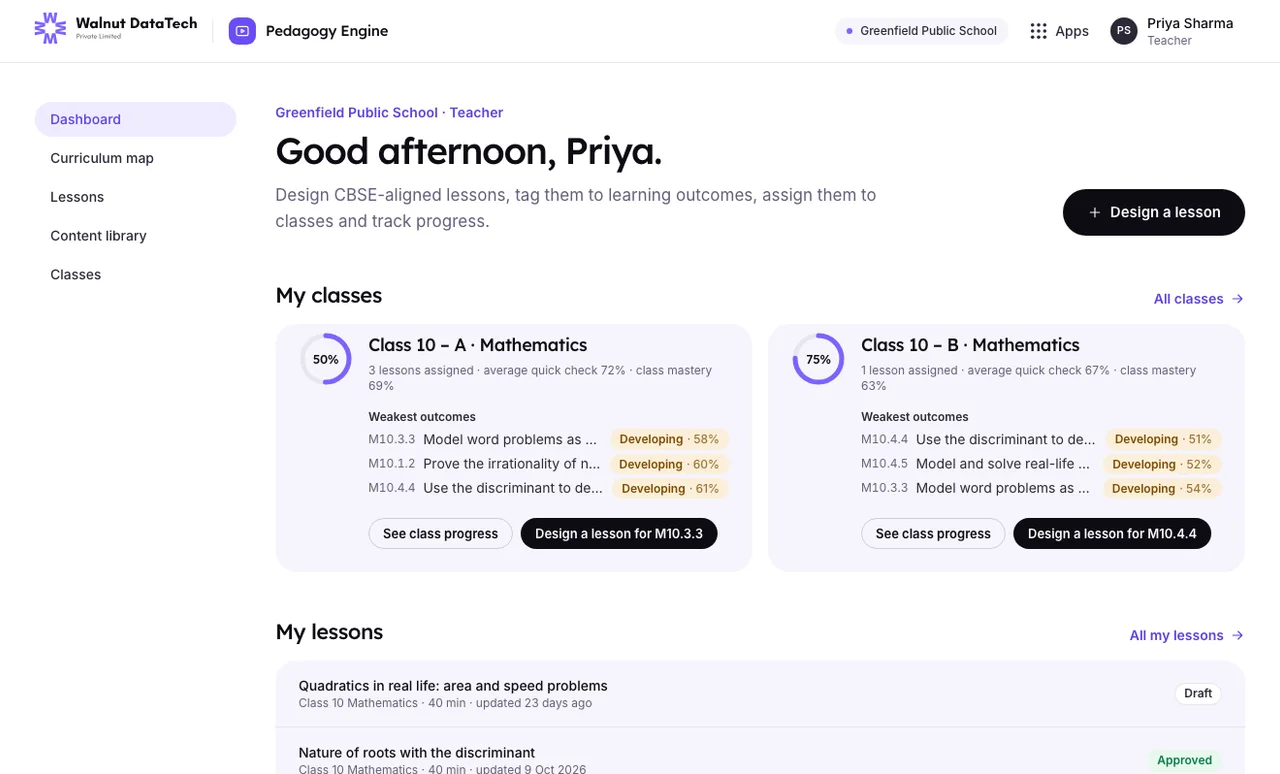
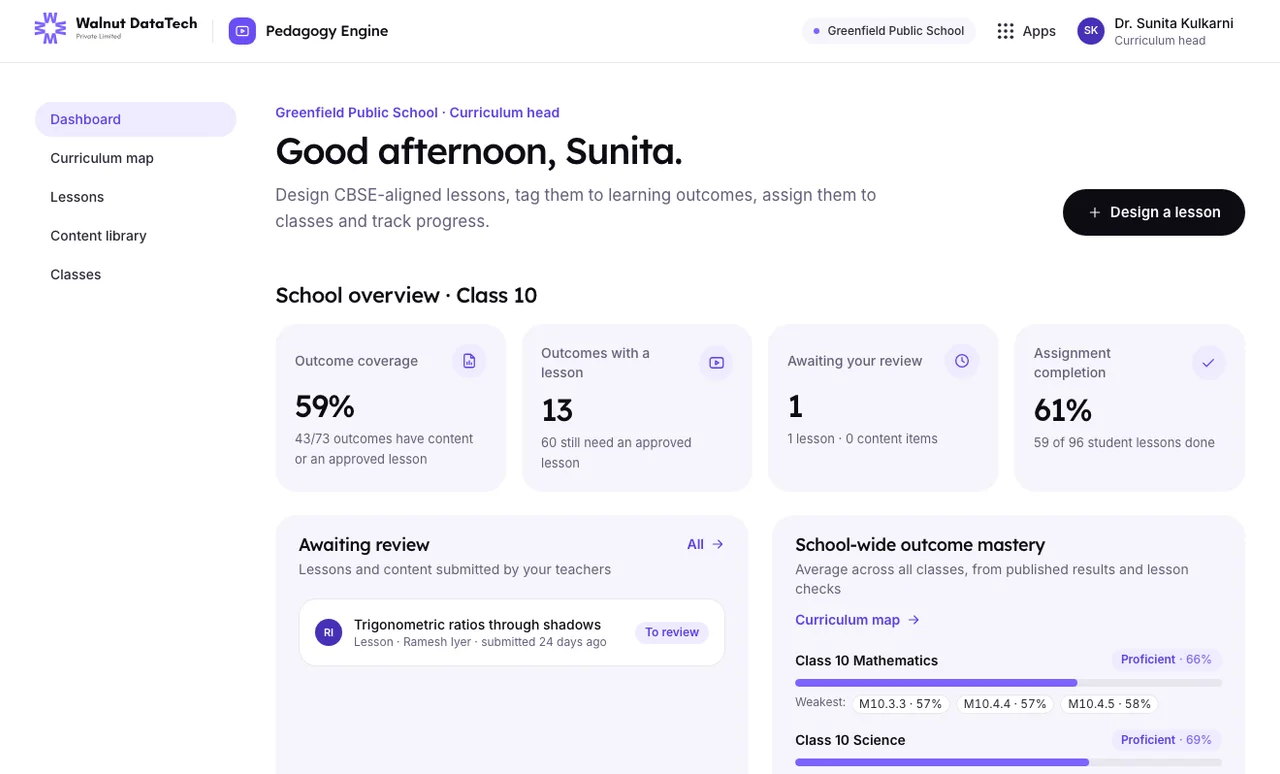
See it on a laptop and on a phone.
Thirteen real screens with sample data. Pick a screen, then tap a number to see what that part does.
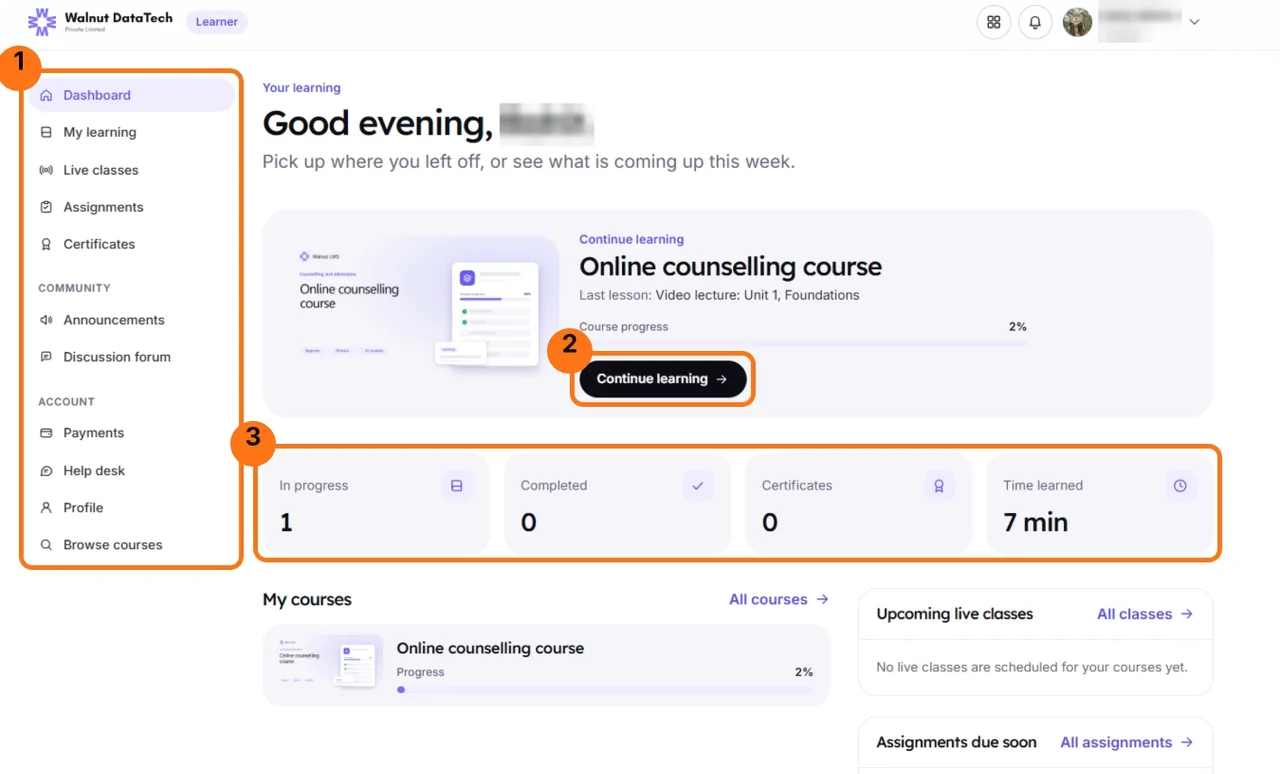
Sign in and pick up where you stopped.
The first screen a student sees: the course in progress, one button to continue it, and progress at a glance.
No hunting for the next lesson. One button takes the student back to it.
Everything a student getsReal screens, unedited. Six are Walnut LMS itself, from the learner walkthrough, with the student’s name blurred. Seven are the teaching apps with sample data: the school, the people and the marks on them are examples.
Grievances: raised, reviewed and closed.
A student can question a question or a mark. Each grievance is routed by rule, decided with a reason and tracked to its close.
Question grievance
During the exam
- The student reports a questionFrom the exam screen, while the paper is on.
- The coordinator sees them togetherAll grievances in one view, by question.
- An expert decidesRouted to the faculty, the chairman or a subject expert, who decides if it is valid.
- Action is takenChange the answer key, drop the question or give the marks.
Marks grievance
After the result
- The student raises a grievanceAfter viewing the evaluated paper, and tracks its status.
- The coordinator assigns itTo the faculty or the evaluator.
- The faculty respondsWith a reason and a decision. Re-evaluation can go to a different evaluator, with an optional blind review.
- Changed or closedIf the marks change, the coordinator reviews and approves. If not, the grievance is closed.
Every grievance closed and the final marks verified, then the result is locked and the final result is published.
Examinations and teaching apps, built in.
A complete examination module inside the LMS: question banks, exam committee, secure paper release, AI and human proctoring, evaluation and results.
The examination module, in seven parts
Proctoring
Choose the invigilation each examination needs.
- AI proctoring that watches every candidate
- Human proctors with a live view
- Both together for high-stakes papers
Candidate verification
The right person sits the paper.
- Identity check-in with photo ID
- Face match before entry
- Verification lobby with document and AI checks
- Liveness during the exam, incident log and secure entry
Question bank
Upload the syllabus, then build the paper.
- Questions generated with AI from the syllabus
- Manual and bulk upload
- Nine question types, from MCQ to long-form
Exam committee
Governance built into the module.
- Set the exam chairperson and faculty
- Set question sets
- Cross-centre oversight
Administration and delivery
From question-set allocation to the exam window.
- Allocation to setters and faculty
- Secure paper release with two-step verification
- Controller dashboard and exam window
Command centre
Every candidate, tracked individually.
- Add students to each examination
- Analytics that flag absence and candidates who leave the exam window
- Admit cards and readiness checks
Evaluation and results
Structured evaluation for academic teams.
- Evaluation queue
- Answer key unlock
- My result and post-exam workflows
Proctored examinations are conducted as per prevailing UGC Regulations.
Five apps for teaching, marking and improvement
Each app works on its own, and they become more useful together: results from evaluation shape improvement plans, lessons and peer groups. Take one app, a bundle or all five.
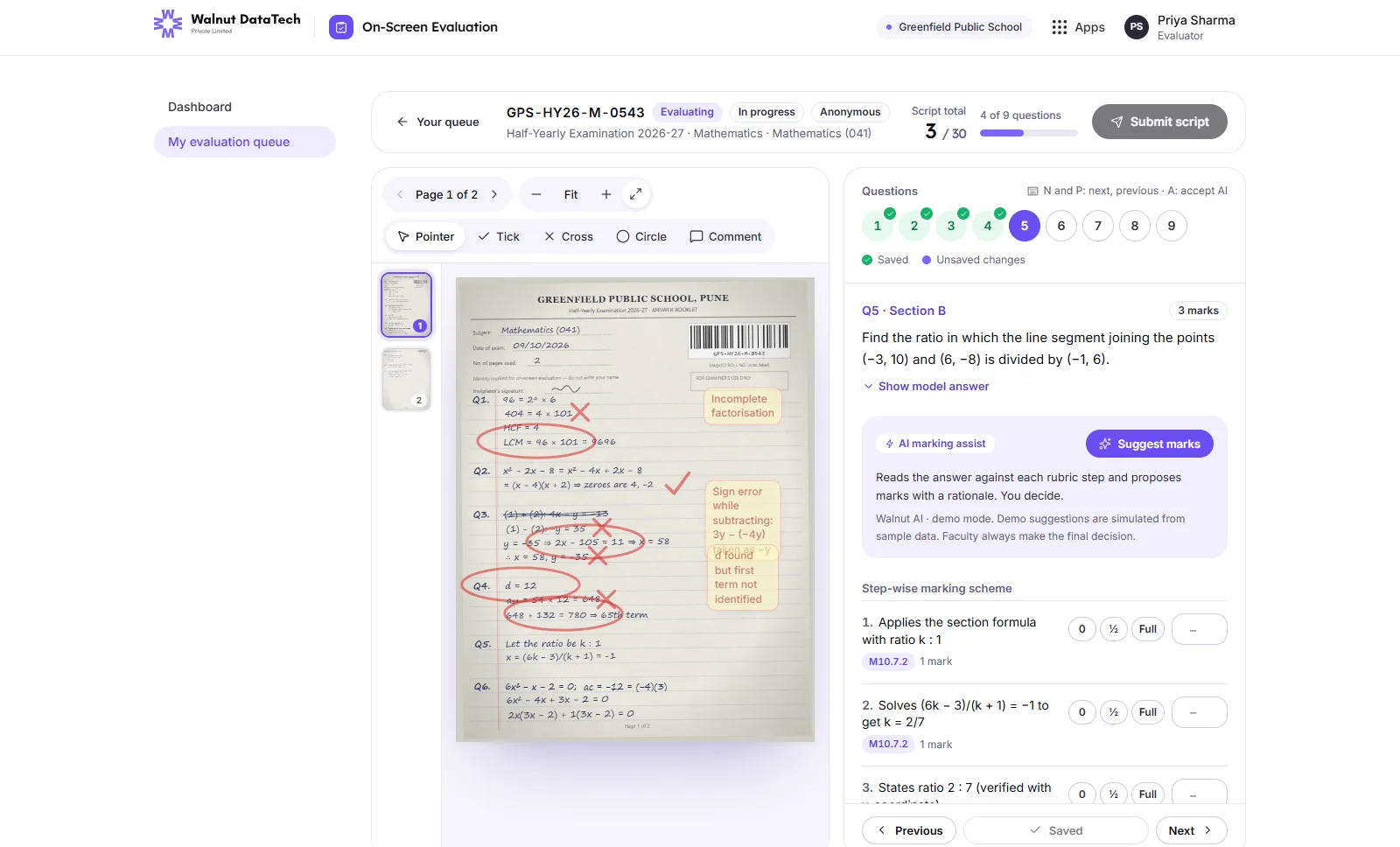
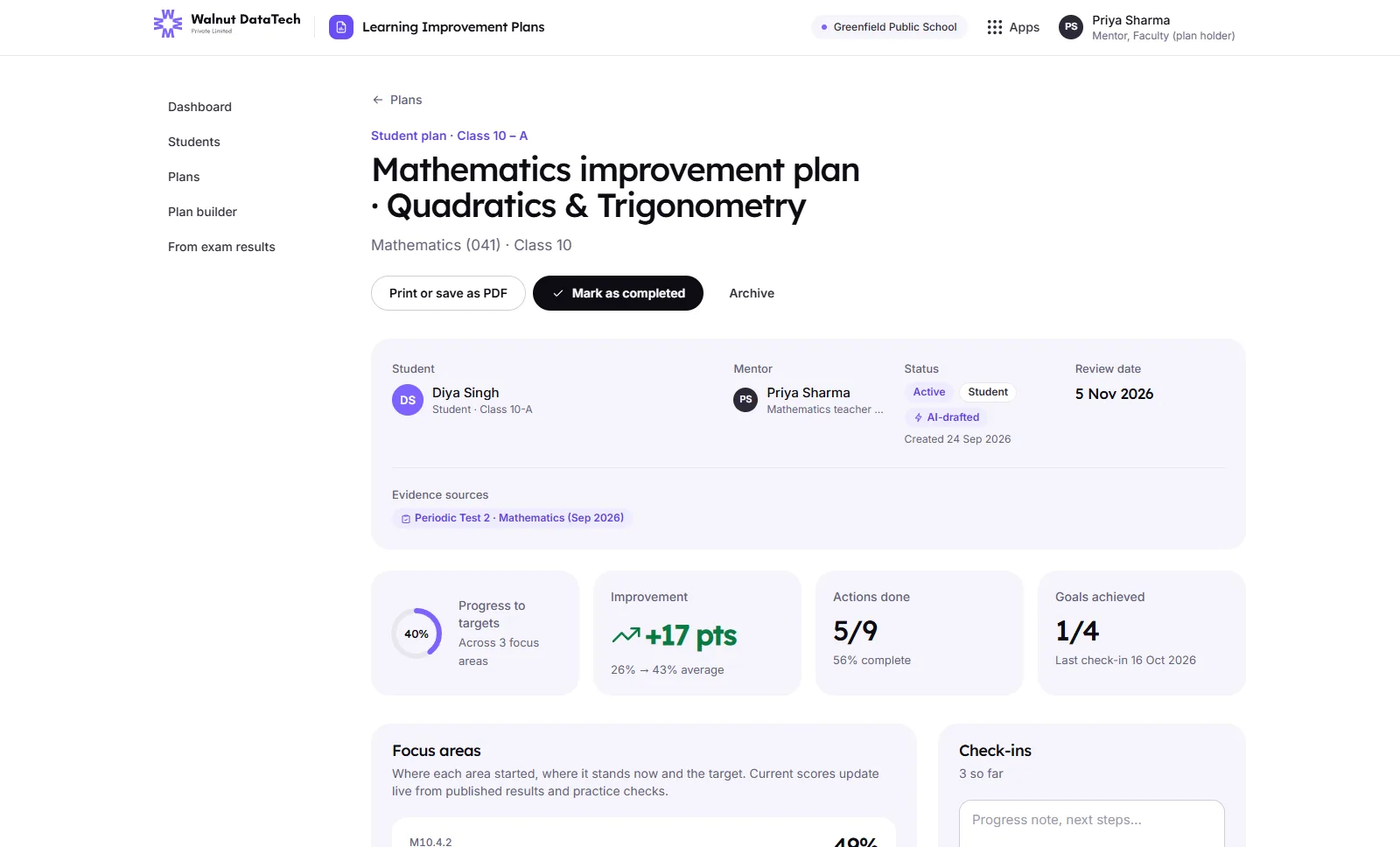
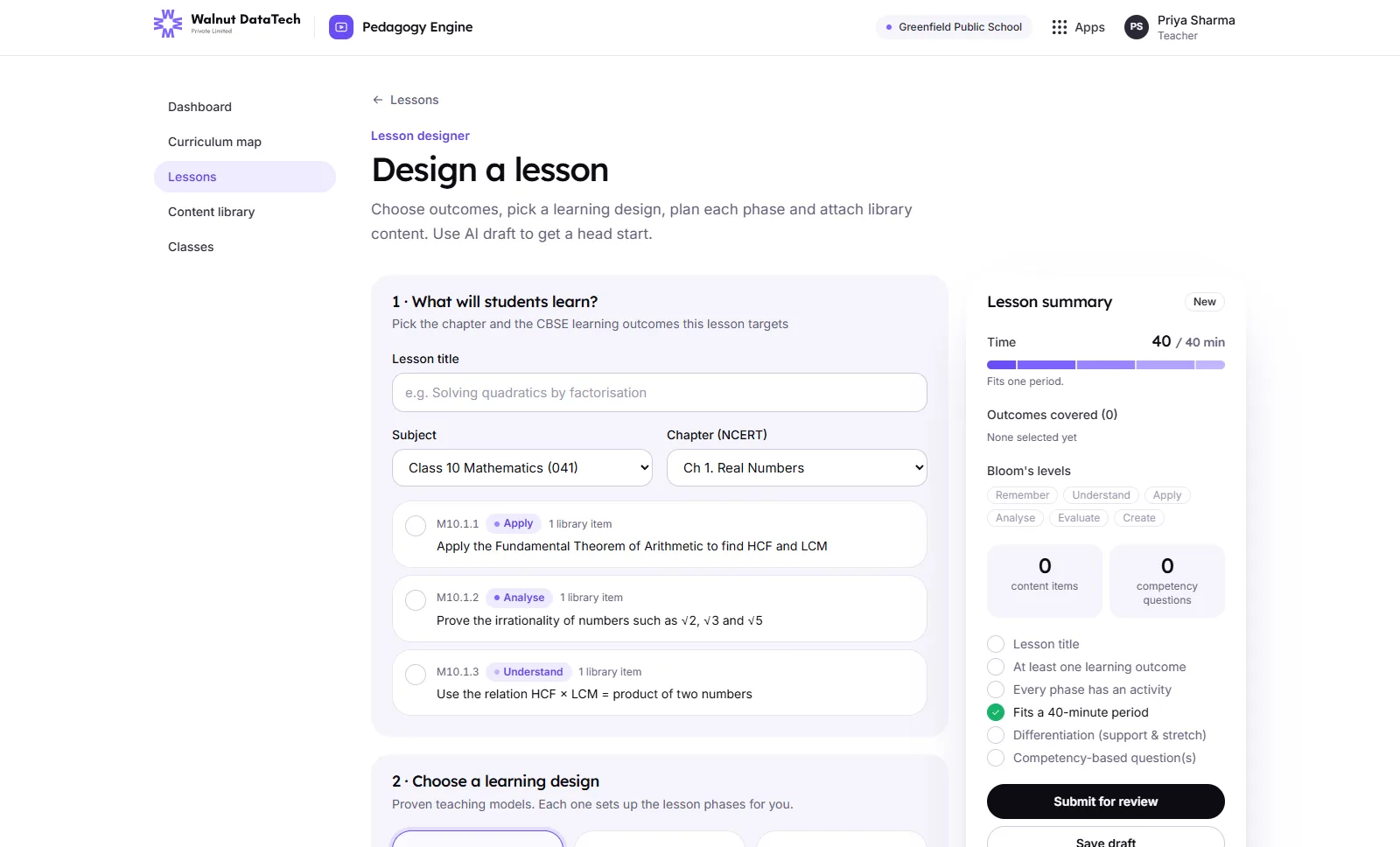
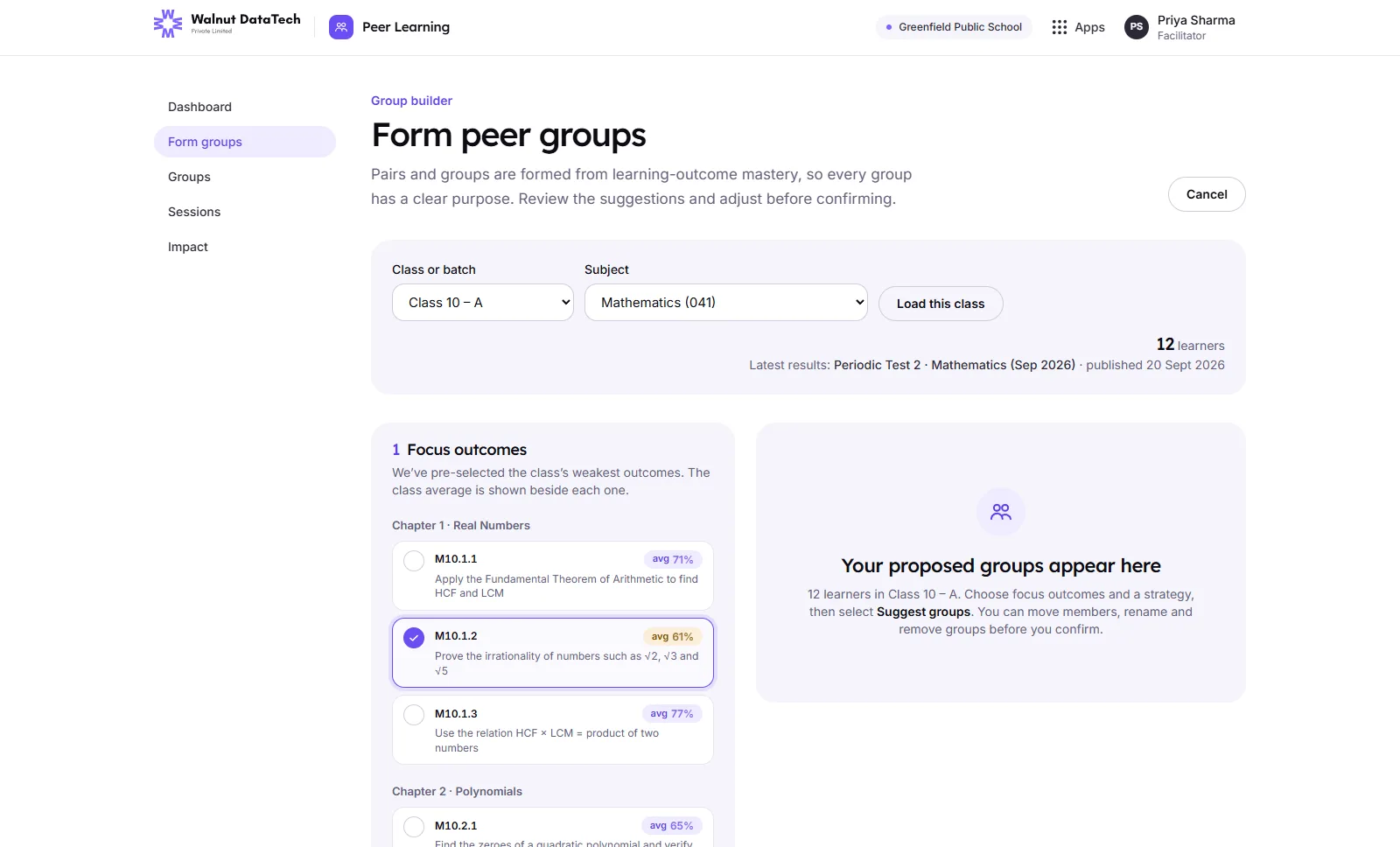
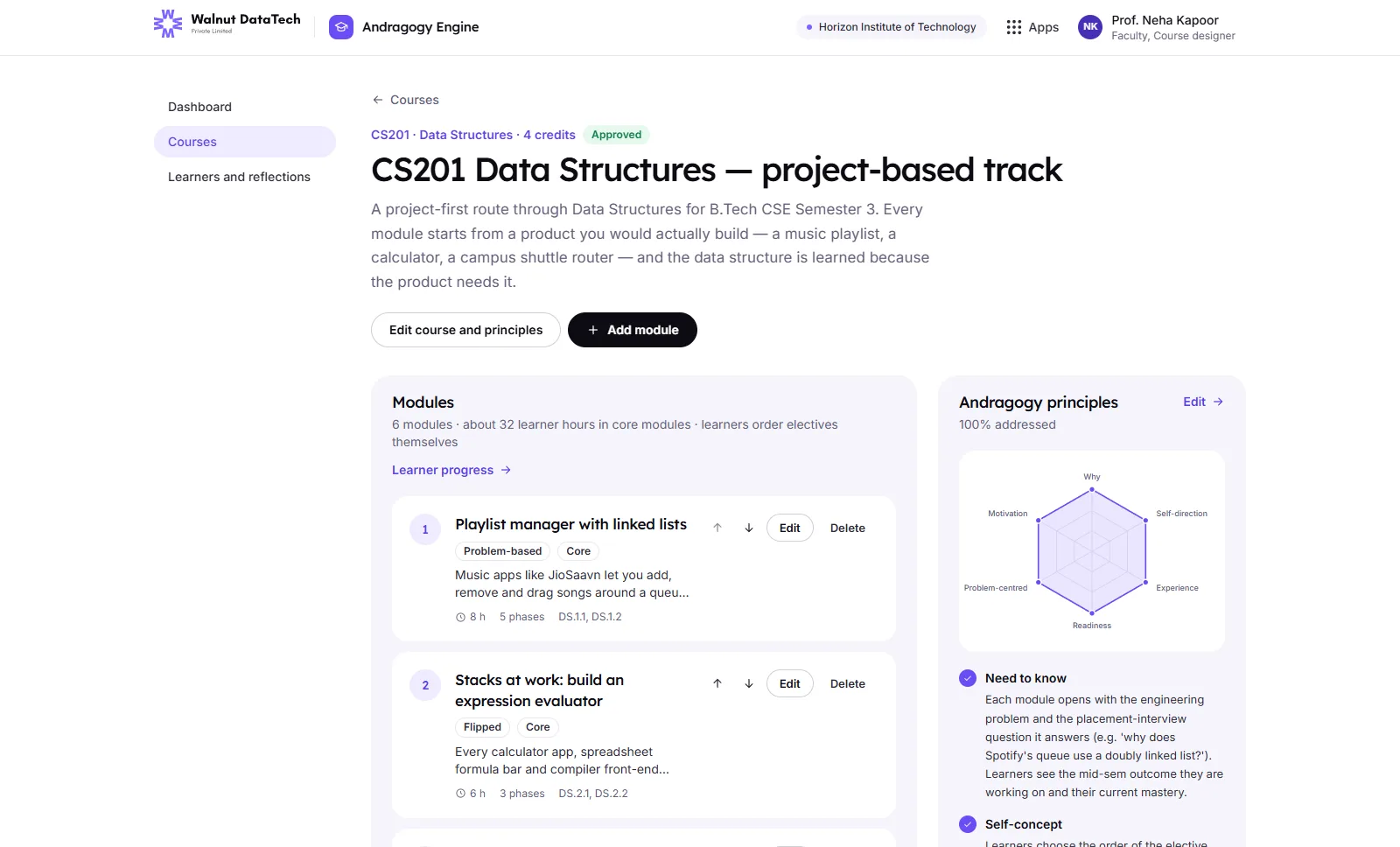
For exam cells, evaluators and moderators in schools and colleges.
How it differs from a typical LMS
Three steps to a proposal you can compare.
- 1
Tell us about your institution
Leave your details in the form. We confirm them with a one-time code, and a Walnut consultant gets in touch.
- 2
See it with your kind of programme
We show you Walnut LMS with sample data from your kind of programme, with the exam module and the teaching apps, and help you choose what to switch on.
- 3
Review your proposal
What you chose to switch on, with its price: as a share of programme revenue, or as a one-time payment.
Two ways to pay
- Revenue sharing. Pay as your programmes grow.
- One-time payment. A fixed price, agreed up front.
The price is shared in your proposal.
An LMS for universities, colleges, schools and institutes.
Pick your kind of institution to see the problem it brings and what Walnut LMS does about it.
The problem
Online and distance programmes have to satisfy UGC and DEB norms: four-quadrant content for every course, proctored examinations, records for the regulators and the Academic Bank of Credit, and fee collection at scale, often across several systems that do not talk to each other.
What Walnut LMS does
Walnut LMS structures every course in the four quadrants, runs examinations through its own examination module with AI and human proctoring, keeps admissions, fees, loans and examination data on one student record, and produces the internal examination, verification and finance reports your office is asked for.
- UGC four-quadrant content for every course
- Proctored examinations with identity checks
- Programme, semester, session and batch structure
- Internal examination, verification and finance reports
The problem
Many batches, many faculty and study material that nobody formally approves. Answer sheets are marked by hand, and a result rarely changes what is taught next.
What Walnut LMS does
Walnut LMS gives each batch its own courses and faculty, and routes study material through a faculty approval workflow. The exam cell marks scanned answer sheets on screen, every result feeds an improvement plan, and students set their own goals in self-directed courses.
- Batch management with faculty assigned per course
- Content approval by session, batch, programme, semester and subject
- On-screen evaluation for exam cells, evaluators and moderators
- Self-directed courses with the Andragogy Engine
The problem
Teaching, marking and improvement live in separate places. Marks are entered by hand, a result rarely changes the next lesson, and parents see little of how their child is doing.
What Walnut LMS does
Walnut LMS closes that loop. Answer sheets are marked on screen with AI assistance, every result feeds a learning improvement plan, lessons are designed on the NCERT curriculum map, and peer groups form around the outcomes a class finds hard.
- On-screen evaluation of scanned answer sheets
- An improvement plan for every student and teacher
- CBSE-aligned lesson design with the Pedagogy Engine
- Attendance, assignments and progress that parents can follow
The problem
Learners who need skills they can show an employer, courses that should carry your own name, and little sight of how anyone is doing before the final test.
What Walnut LMS does
Walnut LMS runs your courses under your own logo and colours, with live and recorded lectures, assignments and self-assessment. It tracks assessment attempts and study hours, and issues certificates that anyone can verify by number.
- Your own logo, colours, roles and settings
- Live lectures scheduled by the administrator, recorded lectures for later
- Learning analytics: engagement hours, assessment attempts and study-hour distribution
- Certificates verified on Walnut LMS
Questions, before you get in touch.
Something we haven’t answered? Ask it in the form and a consultant replies.
What is Walnut LMS?
Walnut LMS is a learning management system (LMS) for universities, colleges, schools and institutes that run online and blended programmes. Every course is built in the UGC four quadrants. Student management, live lectures, content approval, online proctored examinations with encrypted question papers, on-screen marking and a grievance system are all built in. It covers the whole programme: adding students, teaching, assignments, examinations, results and what follows a result.
Does Walnut LMS follow the UGC’s requirements?
Every course is organised in the UGC four quadrants: e-tutorial, e-content, web resources and discussion, and self-assessment. Digital content is delivered through the LMS and mobile app in accordance with UGC Regulations, and proctored examinations are conducted as per prevailing UGC Regulations.
Is Walnut LMS only for universities?
No. Colleges and institutes get batch management with faculty assigned per course, a faculty approval workflow for study material, self-directed courses and certificates anyone can verify by number.
Can the LMS carry our own branding?
Yes. A super admin runs many institutions on one platform, each with its own logo, colours, roles and settings.
Are examinations part of the LMS?
Yes. A complete examination module inside the LMS: question banks, exam committee, secure paper release, AI and human proctoring, evaluation and results. Proctored examinations are conducted as per prevailing UGC Regulations.
Can a student contest a question or a mark?
Yes. A student can report a question during the exam, or raise a grievance after viewing the evaluated paper. Each grievance is routed by rule, decided with a reason and tracked to its close. Re-evaluation can go to a different evaluator.
Can we start with one app?
Yes. Each app works fully on its own, so a school can start with one and add the others later.
I am a student. How do I get Walnut LMS?
Through your university, college, school or institute, which gives you a student login. Behind it are your courses, recorded and live lectures, notes and e-books, assignments, self-assessment, attendance, results and fees.
Can anyone check my certificate?
Yes. Certificates are verified on Walnut LMS, by their number.
How is it priced?
In one of two ways: revenue sharing, where each service is priced as a percentage of programme revenue, or a one-time payment, where each service has a fixed price agreed up front. The price of each service is shared in your proposal.
What happens after we send the form?
A Walnut consultant gets in touch to understand what you need, shows you Walnut LMS with sample data from your kind of programme, and sends a proposal for what you choose to switch on.
See one course run on Walnut LMS.
A free walk-through with sample data from your kind of programme. No commitment.
Prefer to talk? Call or WhatsApp us toll-free on 9667502212, or write to support@walnutdatatech.com.