
Walnut Exam Module
Conducted as per prevailing UGC Regulations
Online examinations you can stand behind.
From the question paper to digitally signed results, in one module. Papers sealed until two controllers sign, every candidate verified, and AI-assisted proctoring that flags for a trained proctor to decide.
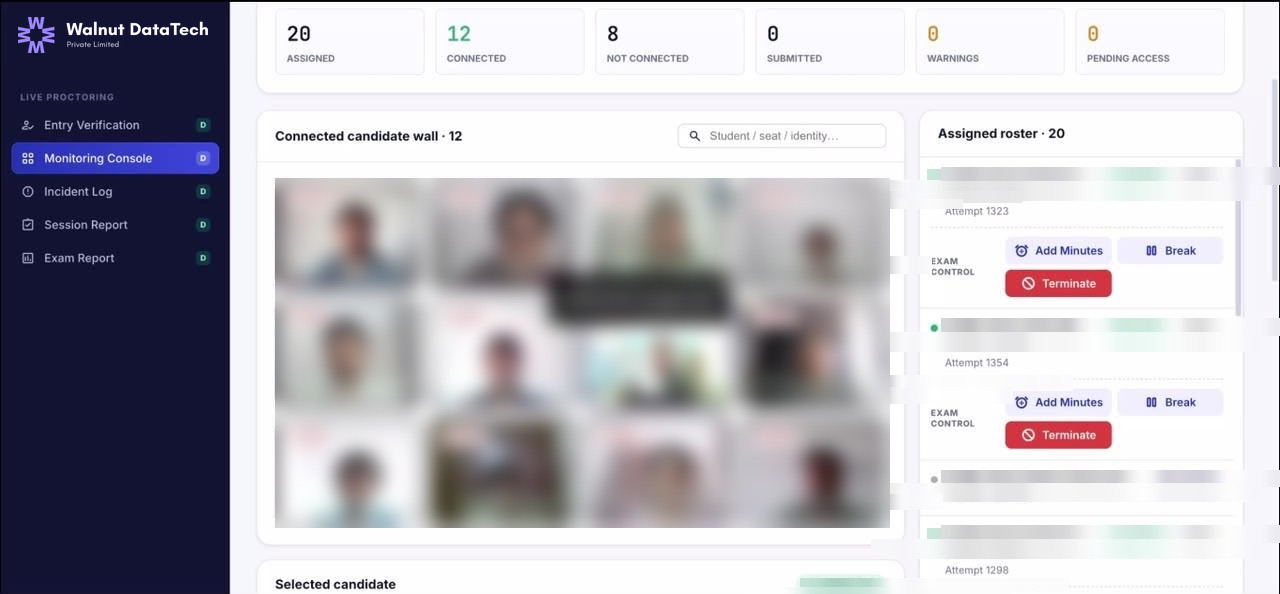
Every candidate, on one console.
The module as it runs, with sample data. Candidates are blurred.
- 3 ways to proctor
- AI, human, or both together
- 2 signatures to release a paper
- One controller cannot do it alone
- 9 question types
- Set by hand, in bulk or with AI
- 6 allocation policies
- For handing scripts to evaluators
The four questions
Every online examination is asked these. Here is what you can answer.
- Was it really the candidate?
- An identity check-in with photo ID and a face match before entry, a verification lobby and liveness checks during the examination.
- Could the paper have got out early?
- Question sets A, B and C are encrypted and sealed. Question sets stay sealed until two controllers have signed. A sealed set can’t be released on one person’s signature.
- Did a machine decide who was removed?
- AI-assisted proctoring watches for an absent face, more than one person, phones and books, looking away, voices and leaving the exam window. It flags and warns, and a proctor decides whether to end an exam: automatic removal is off by default.
- Could a result have been changed afterwards?
- Published results are digitally signed, so any change to them can be detected. A correction is published as a new, linked revision. Each entry in the audit trail is linked to the one before it, so a change to the record shows.
How an exam runs
Follow one examination, from the blueprint to the last grievance.
Five chapters. Choose one to see what happens in it, and who does it.
Before exam day: how the paper is set
For the Controller of Examinations and question setters
Your own teams set the paper, and it stays sealed until two controllers have signed for it.
- Plan the examinationRegister subjects and their syllabus, schedule each examination and issue admit cards.
- Build the blueprintAn examination blueprint for each paper, with AI extraction of modules, units and topics from an uploaded syllabus.
- Tag to Bloom’s taxonomySetters write questions in a question bank of many question types, each tagged to Bloom’s levels, with bulk upload, answer keys and rubrics.
- Draft with AI, check by handAn AI question generator drafts questions from your institution’s own study material. Every draft is saved for a person to check before it is submitted.
- Review and moderateA Head Examiner and moderators review the questions the setters write.
- Encrypt, seal and releaseQuestion sets A, B and C are encrypted and sealed. A set is released only when two controllers have signed for it.
Before the paper: how a student gets in
For the students who sit the paper
Every candidate is checked before the paper opens, so the right person sits it.
- System checkThe candidate signs in, passes a system check and allows the camera when asked.
- Photo ID checkAn identity check-in with photo ID, before the paper opens.
- Live face matchAn identity check-in on camera: the face is matched before entry.
- Verification lobbyDocument and AI checks in a verification lobby. A candidate who cannot enter automatically asks the proctor, who checks the camera and approves or rejects, or issues an entry code.
- The paper opensA guided exam screen, with liveness checks during the examination.
On exam day: live proctoring, your way
For proctors, and the students who sit the paper
Trained proctors supervise every live batch, each with an assigned set of candidates, while a shared wall display gives the whole team one view of the examination. AI flags what it sees; a person decides.
Choose the invigilation each examination needs.
- AI proctoring that watches every candidate
- Human proctors with a live view
- Both together for high-stakes papers
The module, live, in five parts
- Live monitoringEvery candidate, on one console.
- Integrity, automaticallyAI flags; proctors decide.
- Proctor controlsTime, breaks, access and resumes.
- Talking to studentsPrivate chat, in real time.
- The student’s examWhat candidates see.
After the paper: evaluation and results
For exam coordinators, evaluators and the Controller of Examinations
Objective answers are auto-marked; only the rest need a human.
Allocation policy
The exam coordinator chooses how answer scripts are distributed, then hands them to evaluators. Six ways:
- Whole paperOne candidate’s entire script goes to one evaluator.
- Question-wiseEach question is marked by one evaluator across every script.
- Question creatorEach answer is routed to the faculty who authored that question.
- Round robinScripts are dealt out in rotation for an even count each.
- Equal workloadBalanced by estimated marking effort rather than script count.
- ManualThe coordinator assigns every script by hand.
The evaluator pool: question setters, moderators, evaluators and the Head Examiner.
From final marks to published results
- Evaluate, moderate, tabulate
- Evaluation and moderation, then tabulation of the final marks.
- Checked again at publishing
- Publishing checks the figures again and refuses if anything has changed.
- Digitally signed results
- Any change to a published result can be detected. A correction is published as a new, linked revision.
- Challenges and re-evaluation
- Candidates can challenge a question or ask for re-evaluation.
- A tamper-evident audit trail
- Each entry in the audit trail is linked to the one before it, so a change to the record shows.
Every grievance is routed, decided and closed
For students, exam coordinators and faculty
A student can question a question or a mark. Each grievance is routed by rule, decided with a reason and tracked to its close.
During the exam
Question grievance
- The student reports a questionFrom the exam screen, while the paper is on.
- The coordinator sees them togetherAll grievances in one view, by question.
- An expert decidesRouted to the faculty, the chairman or a subject expert, who decides if it is valid.
- Action is takenChange the answer key, drop the question or give the marks.
After the result
Marks grievance
- The student raises a grievanceAfter viewing the evaluated paper, and tracks its status.
- The coordinator assigns itTo the faculty or the evaluator.
- The faculty respondsWith a reason and a decision. Re-evaluation can go to a different evaluator, with an optional blind review.
- Changed or closedIf the marks change, the coordinator reviews and approves. If not, the grievance is closed.
Closure: every grievance closed and the final marks verified, then the result is locked and the final result is published.
The exam room
What the proctor and the student see, screen by screen.
How Walnut runs and monitors every online examination, from the candidate wall to the final answer. This is the module as it runs today for a state university’s online and distance programmes: trained proctors, automatic integrity checks and a guided exam screen, operated end to end by Walnut.
Every candidate, on one console.
- Live counts
- Assigned, connected, not connected, submitted, warnings and pending access, at the top of the console.
- Candidate wall
- A live camera tile for every connected candidate. A tile turns dark when a camera is off and a Break label shows who is paused.
- Assigned roster
- Each candidate’s status and exam controls, with a one-click Resume Exam for a paused candidate.
- Camera, screen and mic
- Select a candidate to open the session: the webcam on the left, the entire screen on the right, and the microphone, all live, so the proctor sees exactly what they are doing.
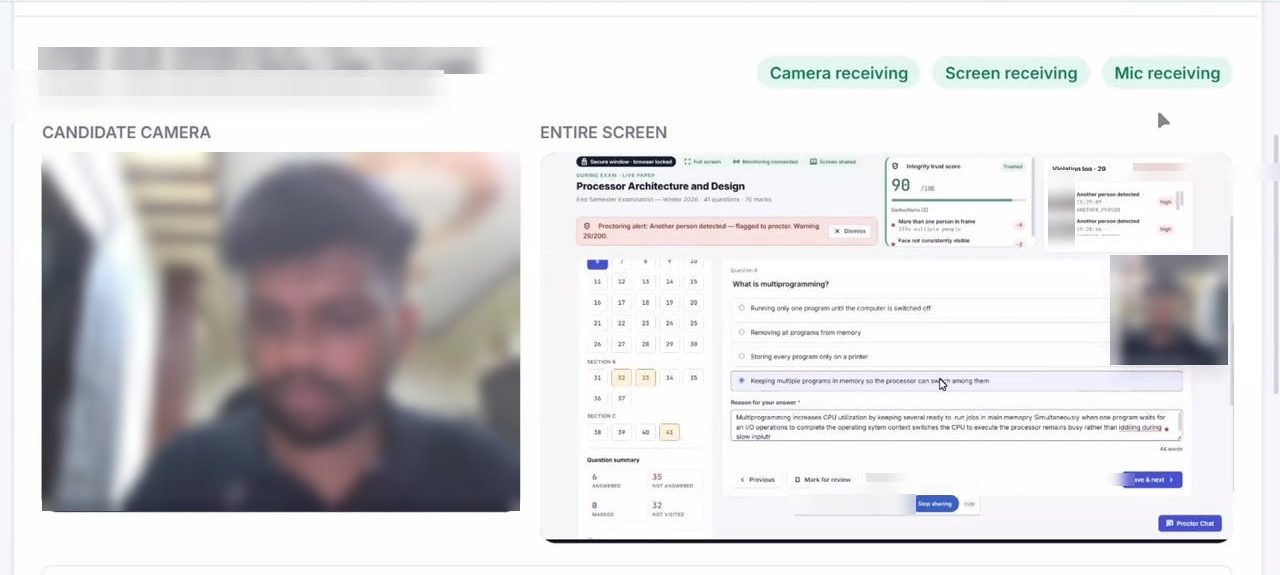
AI flags; proctors decide.
- Proctoring alerts
- Another person detected, candidate not present, left the exam window, looking away from the screen. Each is flagged to the proctor and shown to the candidate with the reason and a running warning count.
- Integrity trust score
- A live score out of 100 with every deduction listed: face not consistently visible, left the exam window and for how long. Deductions are proportionate; a small issue costs a little, nothing is an automatic penalty.
- Violation log
- Every event time-stamped with a snapshot, kept for review.
- Review threshold
- When the score falls below the threshold the session is marked for review, and a human proctor decides; automatic termination is off by default.
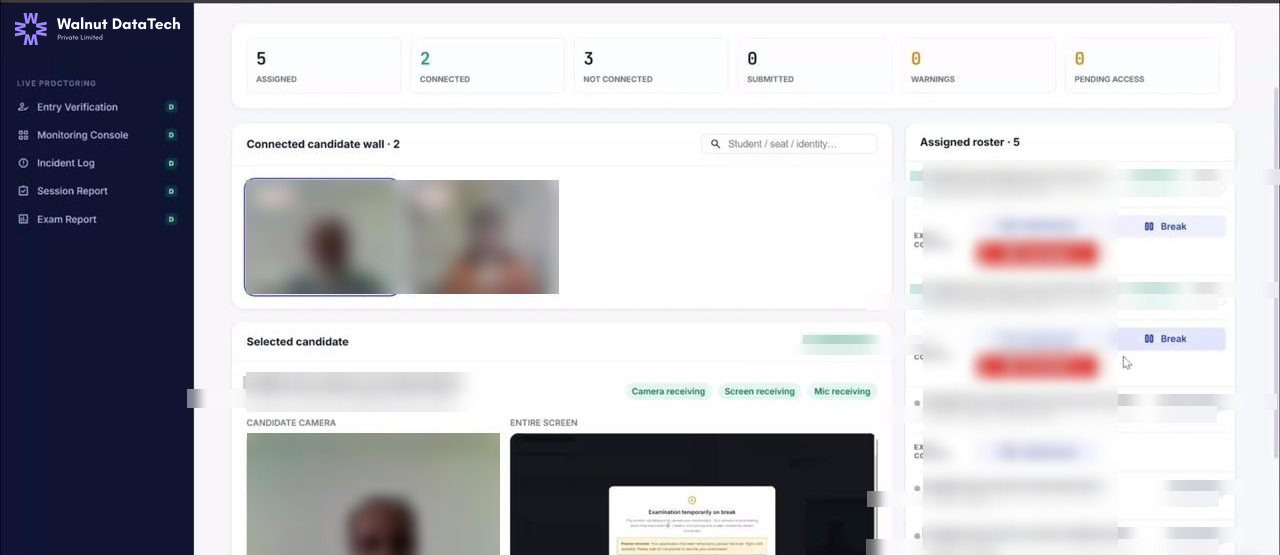
Time, breaks, access and resumes.
- Add minutes, break, terminate
- For every candidate in the roster: extra minutes for genuine delays, a Break that locks the exam screen while monitoring stays connected, and Terminate in serious cases.
- Manual access requests
- A candidate who cannot enter automatically asks the proctor, who checks the camera and chooses Approve or Reject.
- Resume with a remark
- A session closed for a violation can be resumed if the proctor finds it justified. Every resume needs a written reason, so there is an audit trail of who resumed which exam and why.
- Status at a glance
- Not started, in process, on break, submitted, closed due to violation.
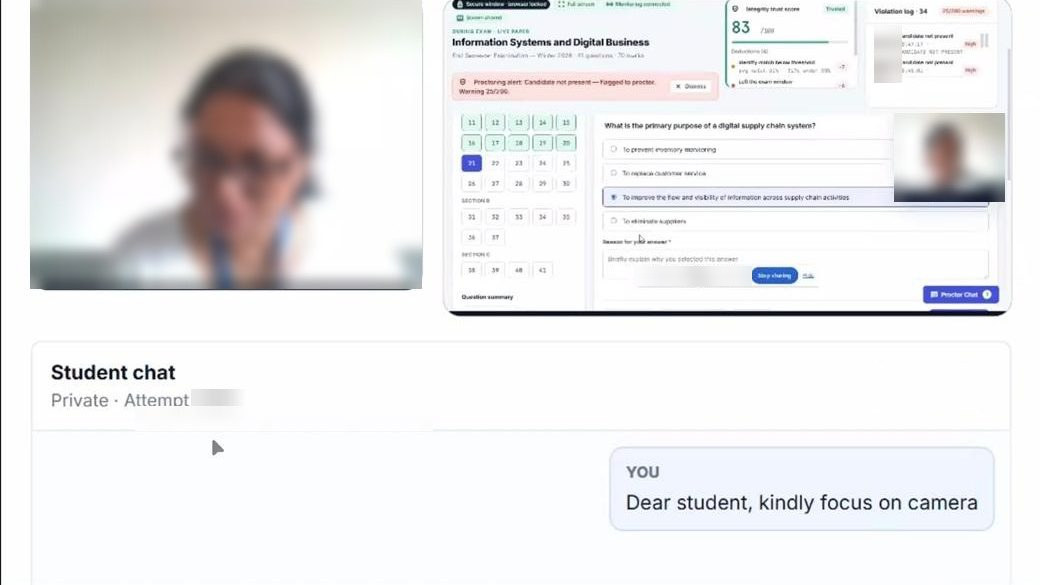
Private chat, in real time.
- One private chat per attempt
- Proctors and candidates talk without disturbing the rest of the batch.
- Clear, polite guidance
- “Dear student, kindly focus on camera.” “Speaking in the exam is not allowed.”
- Help with problems
- “Kindly use a stable internet connection and re-login.” Access and connection issues are sorted in the chat.
- Questions answered
- Students can ask about their score and their warnings, and get an answer during the exam.
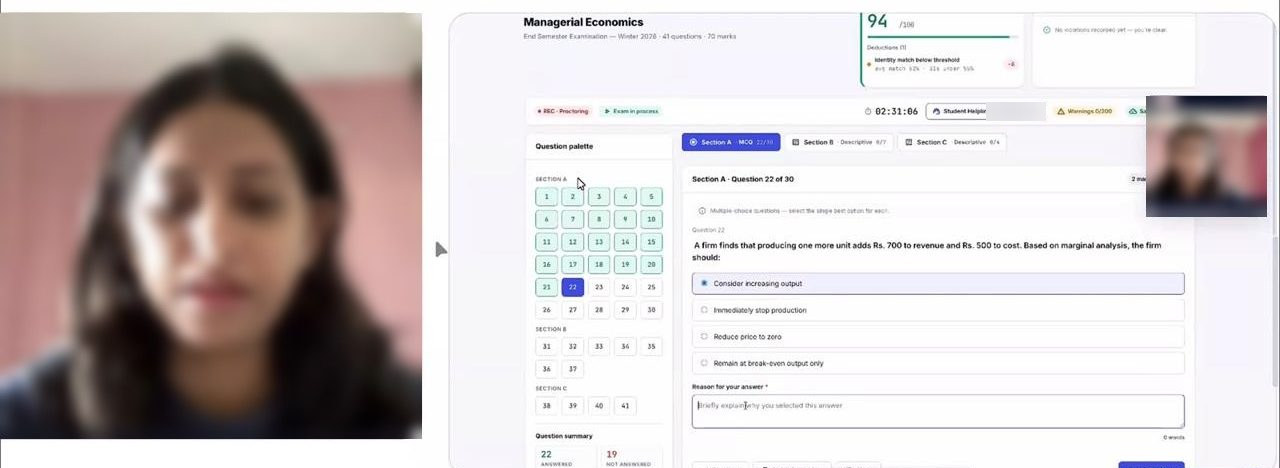
What candidates see.
- A guided exam screen
- Sections for multiple-choice and descriptive answers with progress, the time left and the student helpline at the top, and a small self view so candidates know the session is recorded.
- A reason for every answer
- One question at a time. Each multiple-choice answer comes with a short written reason, which helps confirm genuine understanding.
- Question palette
- Answered, marked for review and not visited, colour-coded by section.
- Descriptive answers
- A rich-text editor for long answers, with an optional PDF or photo of working uploaded within a short time window.
Behind the scenes
Trained proctors supervise every live batch, each with an assigned set of candidates, while a shared wall display gives the whole team one view of the examination. AI flags what it sees; a person decides.
By role
One module, and a view for each person in the examination.
Controller of Examinations
One command view of every examination, before, during and after.
- A subject and syllabus registry, exam registration and scheduling, and admit cards.
- A blueprint and question setting by teams of setters, a Head Examiner and moderators.
- Question sets A, B and C, released only with two controller signatures.
- Live oversight on exam day, with candidate access and proctor reports.
- Result tabulation and signed publishing, with question challenges and re-evaluation.
Question setters
Write better papers faster, from your own material.
- A question bank of many question types, each tagged to Bloom’s levels, with bulk upload, answer keys and rubrics.
- An AI question generator that drafts questions from your institution’s own study material.
- Every AI-drafted question is saved as a draft for a person to check before it’s submitted.
Proctors
See every candidate, and act on what matters.
- A live console with each candidate’s status, warnings and access requests.
- AI-assisted flags for an absent face, more than one person, phones and books, looking away and voices.
- Escalations that need a person, and an incident log of every decision.
Evaluators and coordinators
From final marks to published results, with nothing changed on the way.
- Objective answers are auto-marked; only the rest need a human.
- Evaluation and moderation, then tabulation of the final marks.
- Publishing checks the figures again and refuses if anything has changed.
Students
A guided exam, and a way to be heard.
- A mock test, so candidates can practise first.
- Sections for multiple-choice and descriptive answers with progress, the time left and the student helpline at the top, and a small self view so candidates know the session is recorded.
- A private chat with the proctor, and the right to challenge a question or ask for re-evaluation.
What the exam module includes
- AI, human or combined proctoring, chosen per examination
- Candidate identity through a photo ID check-in and a face match
- Questions generated from the syllabus with AI or added manually, in nine types
- Two-step verification before any paper is released
- Encrypted questions and exam sets
- Analytics of the integrity score
- Recordings and screenshots of the students’ activity during the exam
- An integrity score that flags absence, face movement and multiple voices
- Evaluation queue and answer-key unlock after the examination
- Each question routed to the faculty member who authored it
- Results on the student’s record in Walnut LMS
- Conducted as per prevailing UGC Regulations
- AI-assisted flags for phones and books, voices and leaving full screen
- Automatic termination is off by default: a third warning asks the proctor to confirm
- A mock test, so candidates can practise first
Getting started
Three steps to a proposal you can compare.
- 1
Tell us about your examinations
Leave your details in the form. Your mobile number is verified by a one-time code, and a Walnut consultant gets in touch.
- 2
See an examination run
We walk you through the exam module with sample data, and show how it would run for your institution.
- 3
Review your proposal
The price of the examinations service: as a share of programme revenue, or as a one-time payment.
Two ways to pay
- Revenue sharing. Pay as your programmes grow.
- One-time payment. A fixed price, agreed up front.
The price is shared in your proposal.
The regulation it answers to
Proctored examinations conducted as per prevailing UGC Regulations.
Frequently asked questions
Before you get in touch.
Something we haven’t answered? Ask it in the form and a consultant replies.
How are online examinations proctored?
With AI proctoring, human proctoring, or both together, chosen for each examination. Trained proctors supervise every live batch, each with an assigned set of candidates. AI flags what it sees; a human proctor decides, and automatic termination is off by default.
How do you know the right person is sitting the paper?
Through an identity check-in with photo ID and a face match before entry, a verification lobby and liveness checks during the examination.
Can the AI end a candidate’s exam by itself?
Not by default: automatic termination is off, and a third warning asks the proctor to confirm. AI-assisted proctoring flags and warns; a human proctor decides whether to end an exam.
How is the question paper kept sealed?
Question sets A, B and C are encrypted and sealed. A set is released only when two controllers have signed for it; a sealed set can’t be released on one person’s signature.
What if a candidate cannot get in, or loses the connection?
A candidate who cannot enter automatically asks the proctor, who checks the camera and approves or rejects, or issues an entry code. Access and connection issues are sorted in a private chat with the proctor, who can also add minutes for genuine delays.
Who marks the answer scripts?
Objective answers are auto-marked. For the rest, the exam coordinator chooses one of six allocation policies, from one evaluator for a whole script to routing each answer to the faculty who authored the question, then hands the scripts to evaluators.
Is it conducted as per UGC Regulations?
Proctored examinations are conducted as per prevailing UGC Regulations.
How is it priced?
In one of two ways: revenue sharing, where the service is priced as a percentage of programme revenue, or a one-time payment, a fixed price agreed up front. The price is shared in your proposal.
See one examination run, start to finish.
A walk through the exam module with sample data, and how it would run for your institution. It costs nothing and commits you to nothing.
Prefer to talk? Call or WhatsApp us toll-free on 9667502212, or write to support@walnutdatatech.com.