Walnut Data Tech

Tell us about your institution.

Leave your details and a Walnut consultant will get in touch to understand what you need and show you what fits. We confirm your details with a one-time code. No payment here, no commitment.

I’m interested in

Pick your country code, then type the number.

Fill in every field above to get your OTP. We use these details only to respond to your enquiry. See our privacy policy and terms.

For universities, colleges, schools, institutes and students

Your online programme, from set-up to outcomes.

One partner for11 service areas67 services in all

Set up

Build the digital campus

  • Infrastructure Set-up
  • Content Creation & Set-up
  • Cloud data centre
  • Content digitisation
See the set-up services

Enrol

Reach, advise and admit students

  • Marketing & Brand Outreach
  • Counselling & Admission Support
  • Admission Management
See the enrolment services

Run

Teach, support and stay compliant

  • Walnut LMS
  • Student Support Services
  • Reporting & Regulatory Support
  • Automation & AI
See the services that run it

Exam

Secure, live-proctored online exams

  • AI, human or combined proctoring, chosen per examination
  • Two-step verification before any paper is released
  • Results on the student’s record in Walnut LMS
See the exam module

Outcomes

Turn learning into careers

  • Apprenticeship & Placement Assistance
  • Apprenticeship opportunities
  • Placement assistance
See the outcome services

Point at a stage, or tap it, to see what it covers. Take everything, or only what you need.

See what you get

Who we work with

Built for universities, colleges, schools, institutes and their students.

One partner, and a different job for each. Pick the one that sounds like you.

  • Universities

    Launch, run and grow online and distance programmes

    • Courses in the UGC four quadrants
    • Proctored examinations
    • Admissions to placement, covered
    • Reports for UGC/DEB and the ABC
  • Colleges

    Many batches and many faculty, on one platform

    • Batches, each with its own faculty
    • Study material approved before it is seen
    • Answer sheets marked on screen
    • Self-directed courses for adult learners
  • Schools

    Teaching, marking and improvement in one loop

    • Lessons on the NCERT curriculum map
    • Answer sheets marked on screen
    • An improvement plan for every student
    • Progress that parents can follow
  • Institutes

    Your courses under your own name, with certificates that verify

    • Your own logo and colours
    • Live and recorded lectures
    • Study hours and attempts, tracked
    • Certificates anyone can verify
  • Students

    Everything for your course behind one login

    • 24x7 access
    • Live classes
    • Gradebook & performance tracking
    • UGC-DEB compliant LMS

Overview

What Walnut provides: the platforms, and the services around them.

Platforms are the software your administrators, faculty and students sign in to. Services are what Walnut’s teams do for your programmes. You can take either, or both.

Platforms

Services, across the life of a programme

For universities and institutions running online programmes

Take the complete stack, or only the areas you need. Pick a stage to see what Walnut does in it.

Infrastructure Set-up

The cloud foundation your online campus runs on.

  • Cloud data centre
  • Integrated admissions, student and learning systems
  • University website for online programmes
  • Mobile learning platform
  • Admission and fee payment gateway
  • Messaging platform
  • and 2 more

Content Creation & Set-up

Faculty knowledge, turned into digital learning.

  • Content digitisation
  • Access through LMS and mobile app
  • Video recording and production
  • Existing video, made available
  • Syllabus-aligned customisation
  • Self-assessment and practice
  • and 4 more

11 service areas, 67 services in all. .

Walnut LMS

One learning platform, from the first lecture to the final result.

Walnut LMS runs online and blended programmes for universities, colleges, schools and institutes, with secure proctored examinations and five teaching and assessment apps built in.

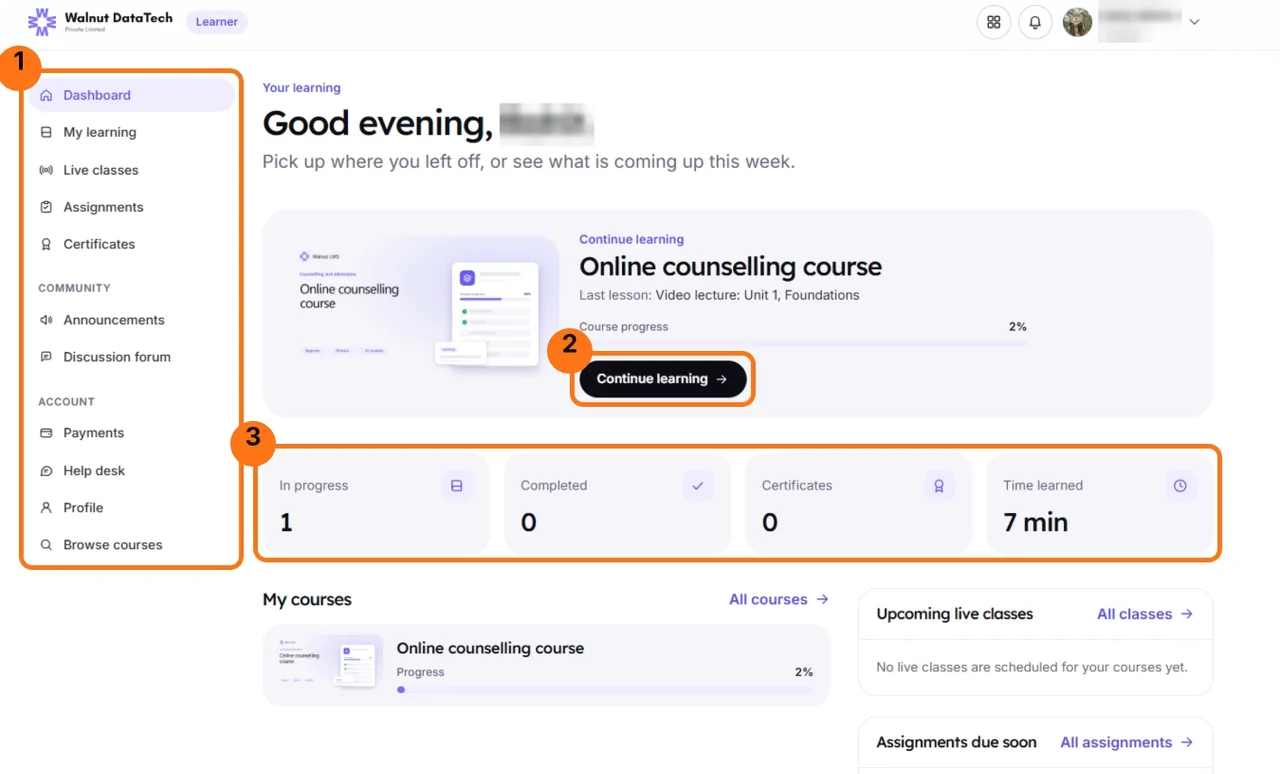
The student dashboard on Walnut LMS: the menu, the course to continue and progress at a glance, numbered as in the learner walkthrough. The student’s name is blurred.

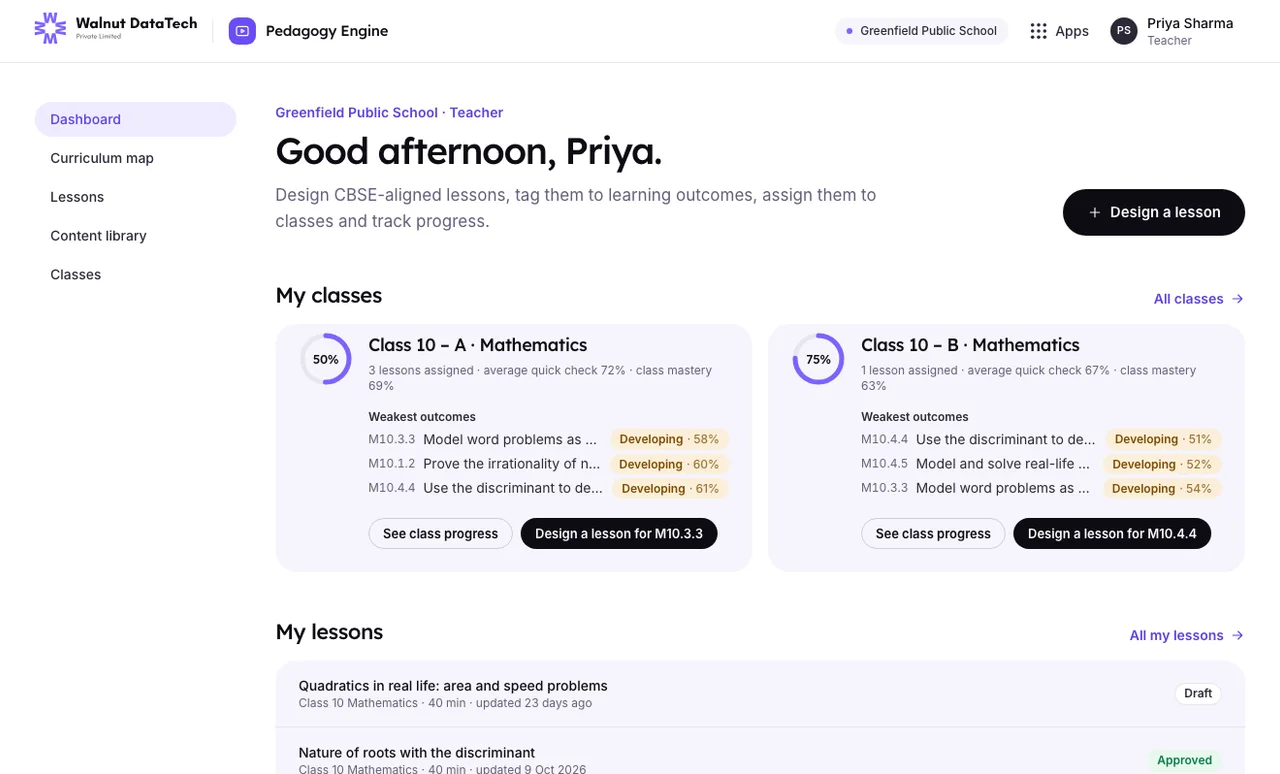
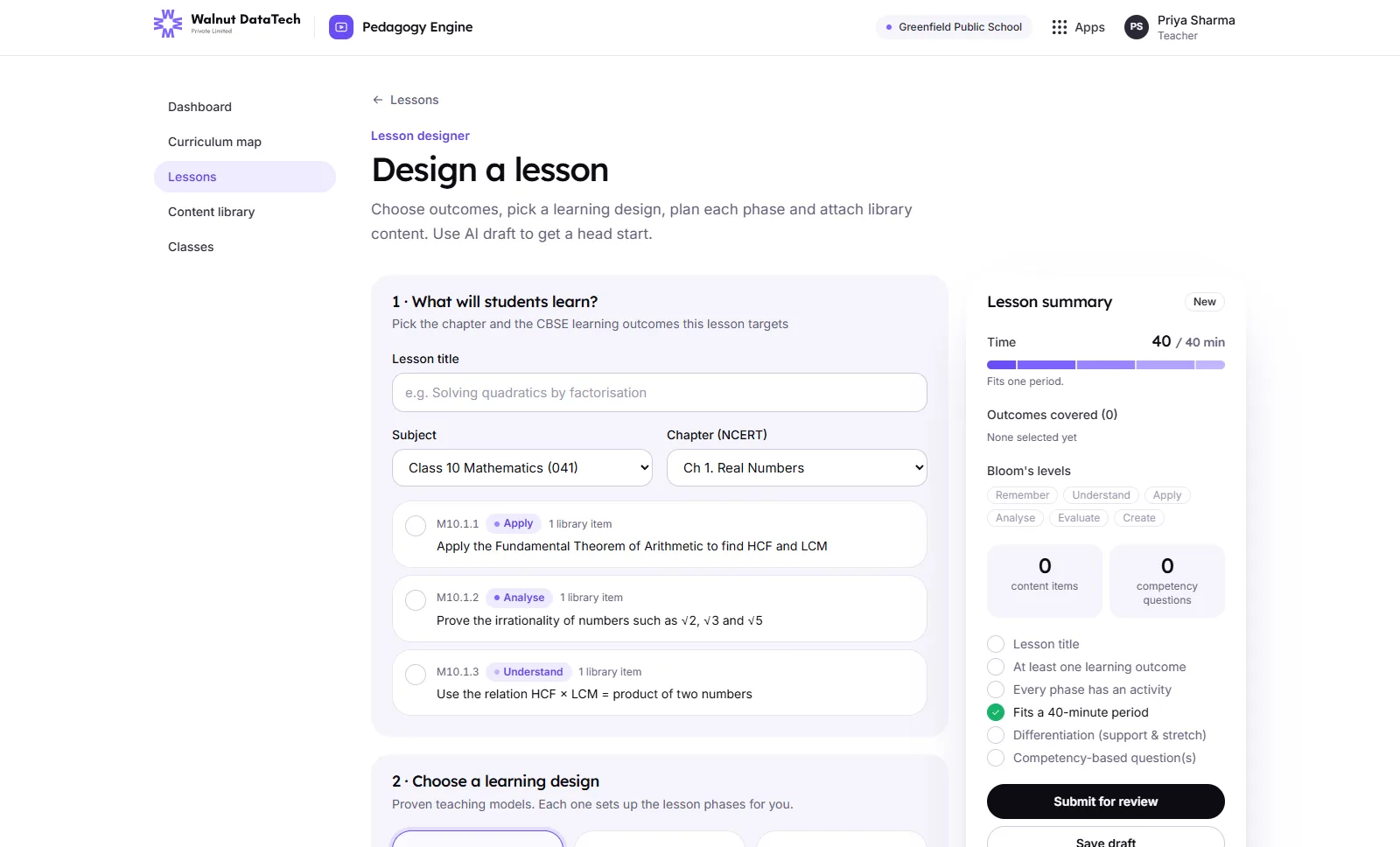
Real screens of Walnut LMS, with sample data. The student dashboard is from the learner walkthrough, with its numbered marks.

Inside Walnut LMS

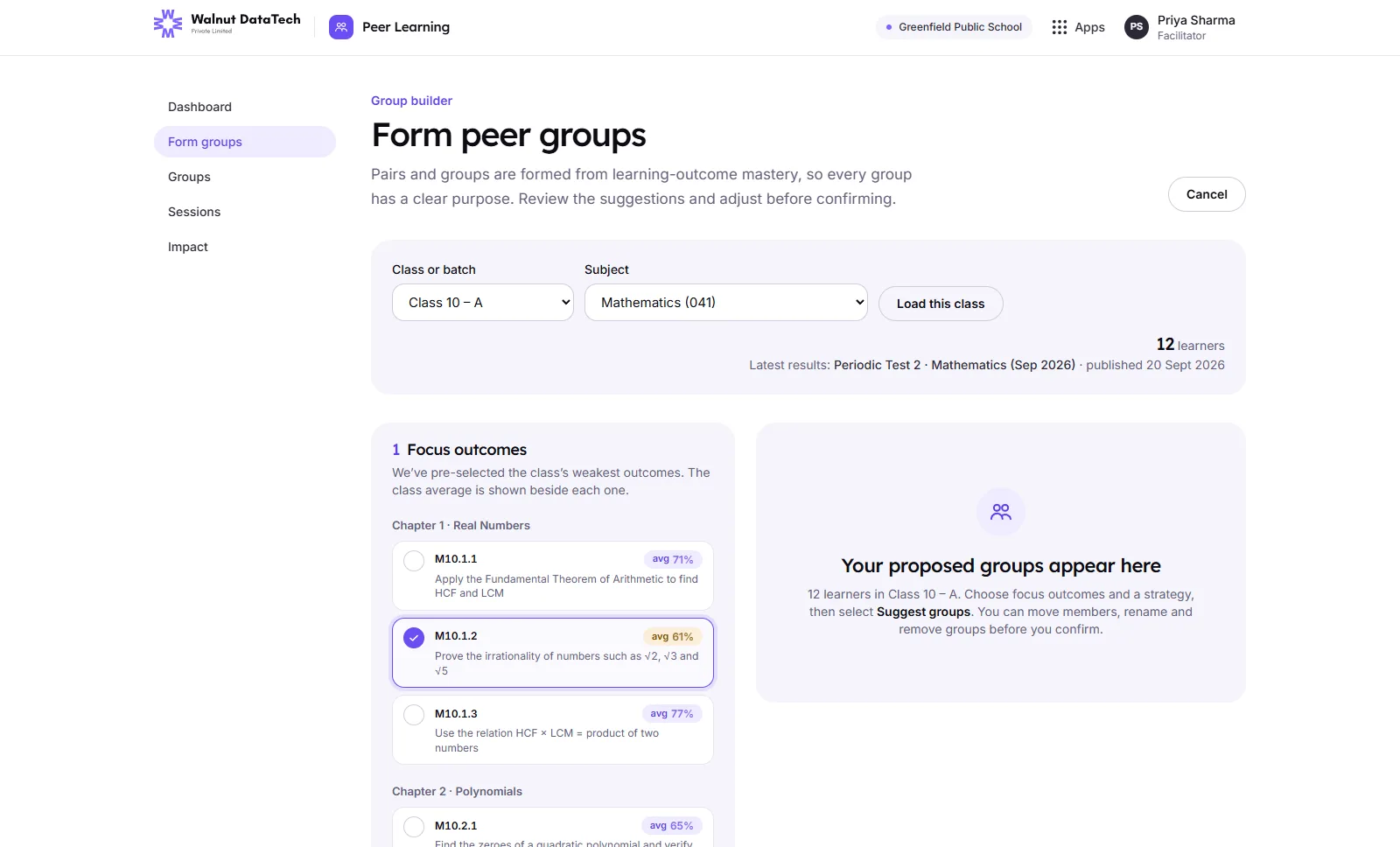
Five apps for teaching, marking and improvement

For schools, colleges and lifelong learners

Each app works on its own, and they become more useful together: results from evaluation shape improvement plans, lessons and peer groups. Take one app, a bundle or all five.

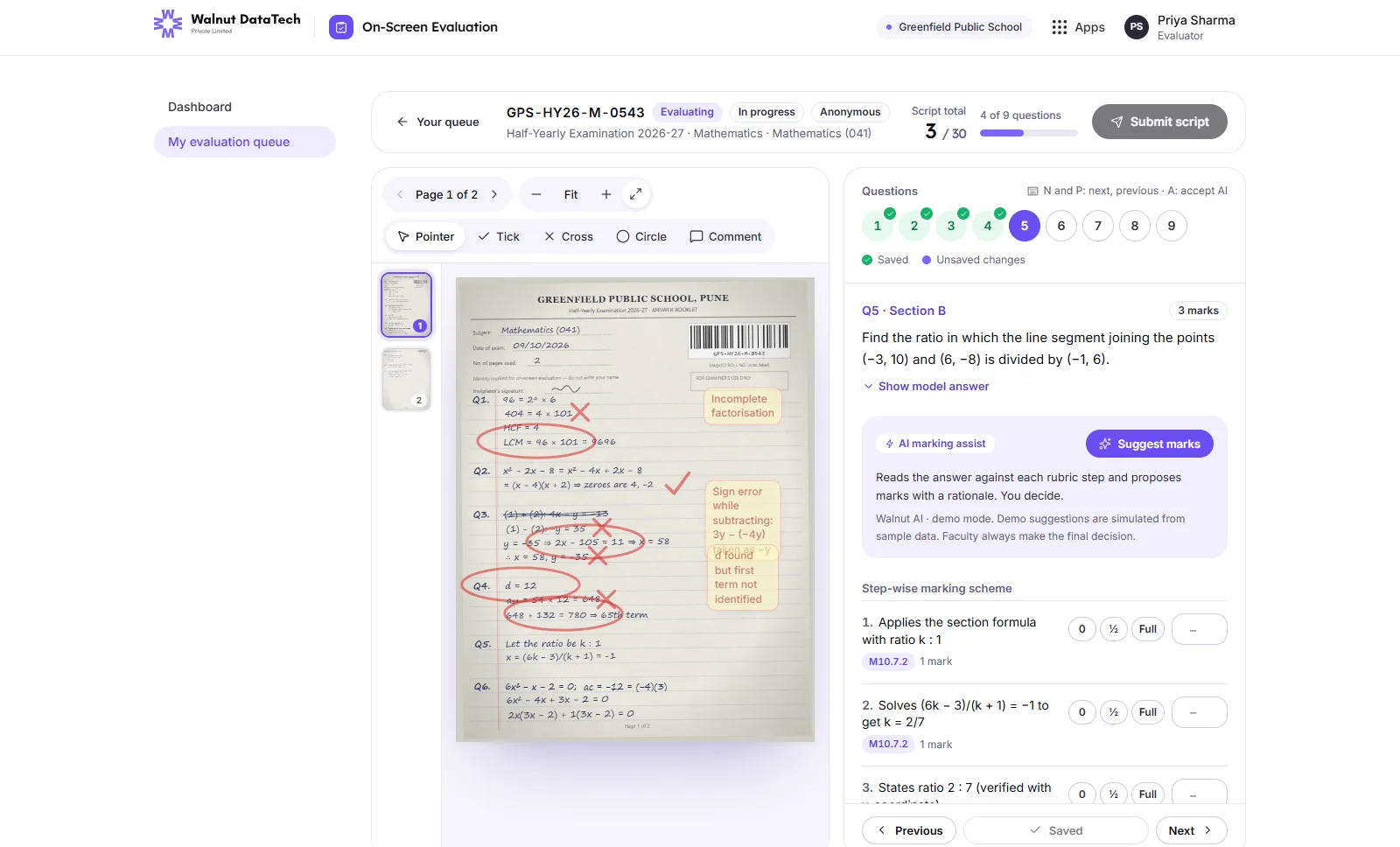
On-Screen Evaluation: a scanned mathematics answer sheet marked with ticks, crosses and comments, beside the question, the AI marking assist and the step-wise marking scheme. Sample data.

For exam cells, evaluators and moderators in schools and colleges.

Every course in the UGC four quadrants

For universities and their online and distance programmes

  1. Quadrant 1

    e-Tutorial

    Audio and video lectures, animations, virtual labs and simulations, with full video transcriptions.

  2. Quadrant 2

    e-Content

    Self-instructional reading material, e-books, PDFs, illustrations, case studies, presentations and supplementary documents.

  3. Quadrant 3

    Web resources and discussion

    Curated web links, open-source content, historical overviews and further articles, with discussion spaces for peer interaction and doubt clearing.

  4. Quadrant 4

    Self-assessment

    MCQs, quizzes and problem sets with solutions, assignments, FAQs and feedback that clears common misconceptions.

How it differs from a typical LMS

AspectA typical LMSWalnut LMS
Course structureModules and files in whatever order the author chose.Every course organised in the UGC four quadrants: e-tutorial, e-content, web resources and discussion, self-assessment. Ready for regulatory review.
ExaminationsA quiz tool. Serious examinations happen somewhere else.A complete examination module inside the LMS: question banks, exam committee, secure paper release, AI and human proctoring, evaluation and results.
Candidate identityA password.Live Aadhaar eKYC or document capture, a face match before entry, a verification lobby and liveness checks during the examination.
Question settingTyped in one at a time.Generated from the uploaded syllabus with AI, added manually or uploaded in bulk, in nine question types, reviewed by faculty.
MarkingAuto-marked objective questions only.On-Screen Evaluation of scanned answer sheets, step by step, with AI-suggested marks that faculty accept or override.
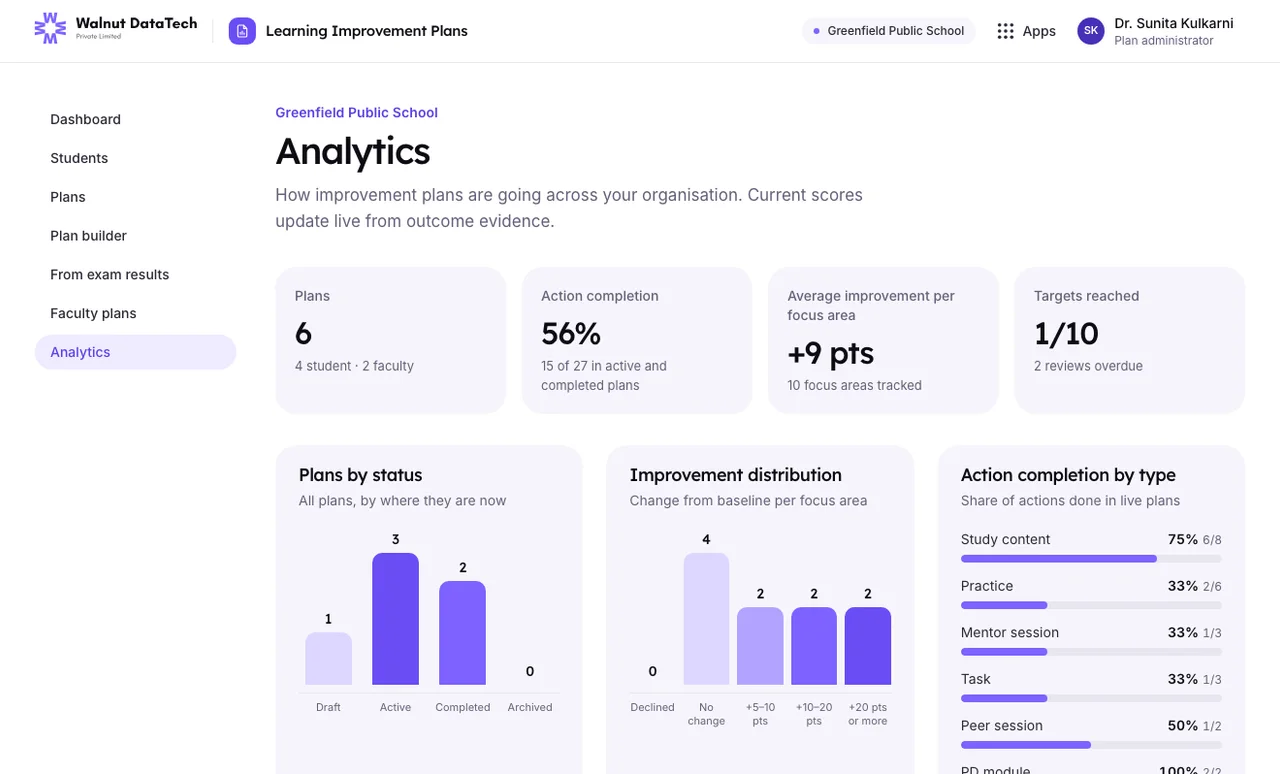
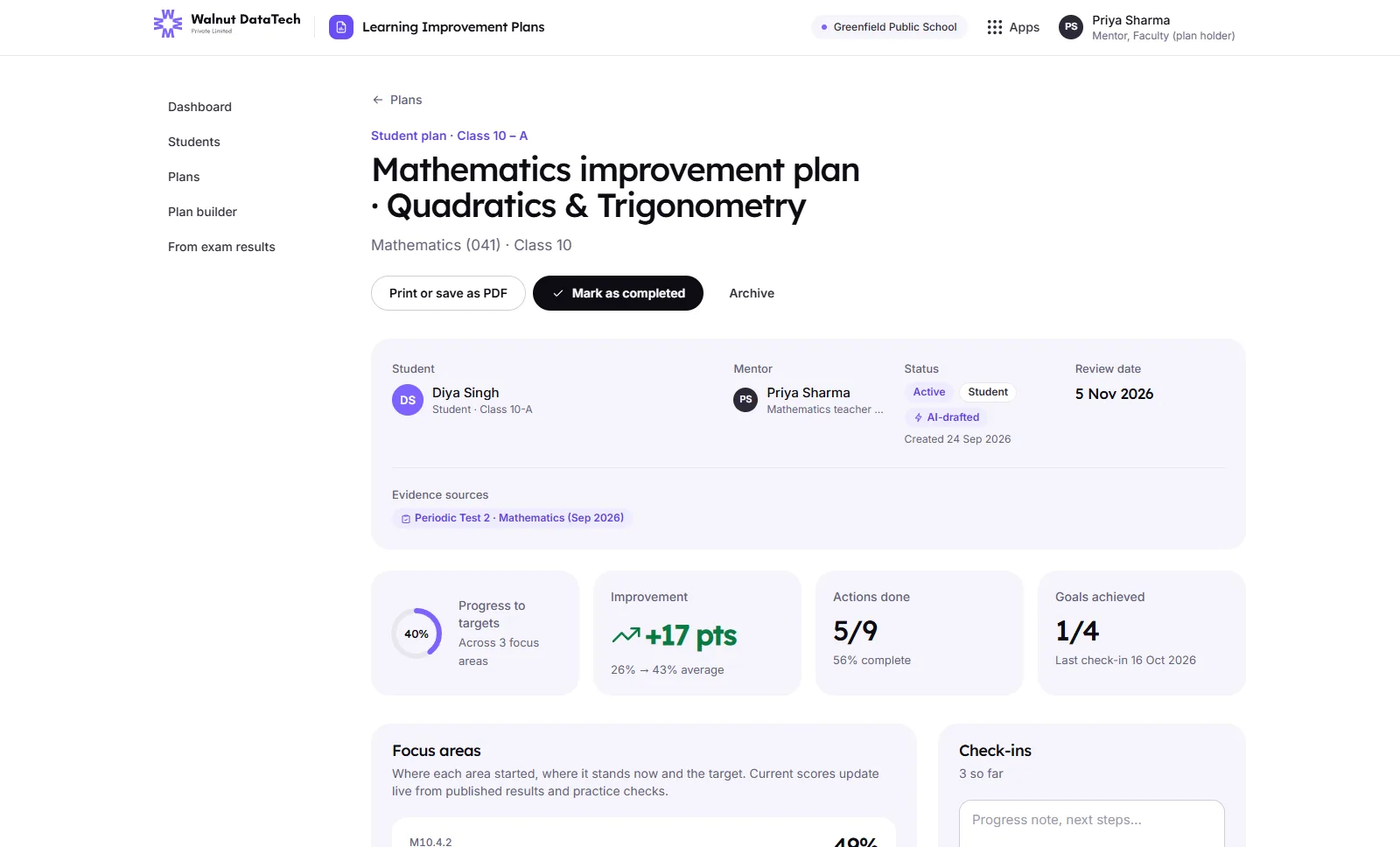
After the resultA grade book.Learning Improvement Plans for students and faculty, peer groups and the next lesson, all tied to the same learning outcomes.
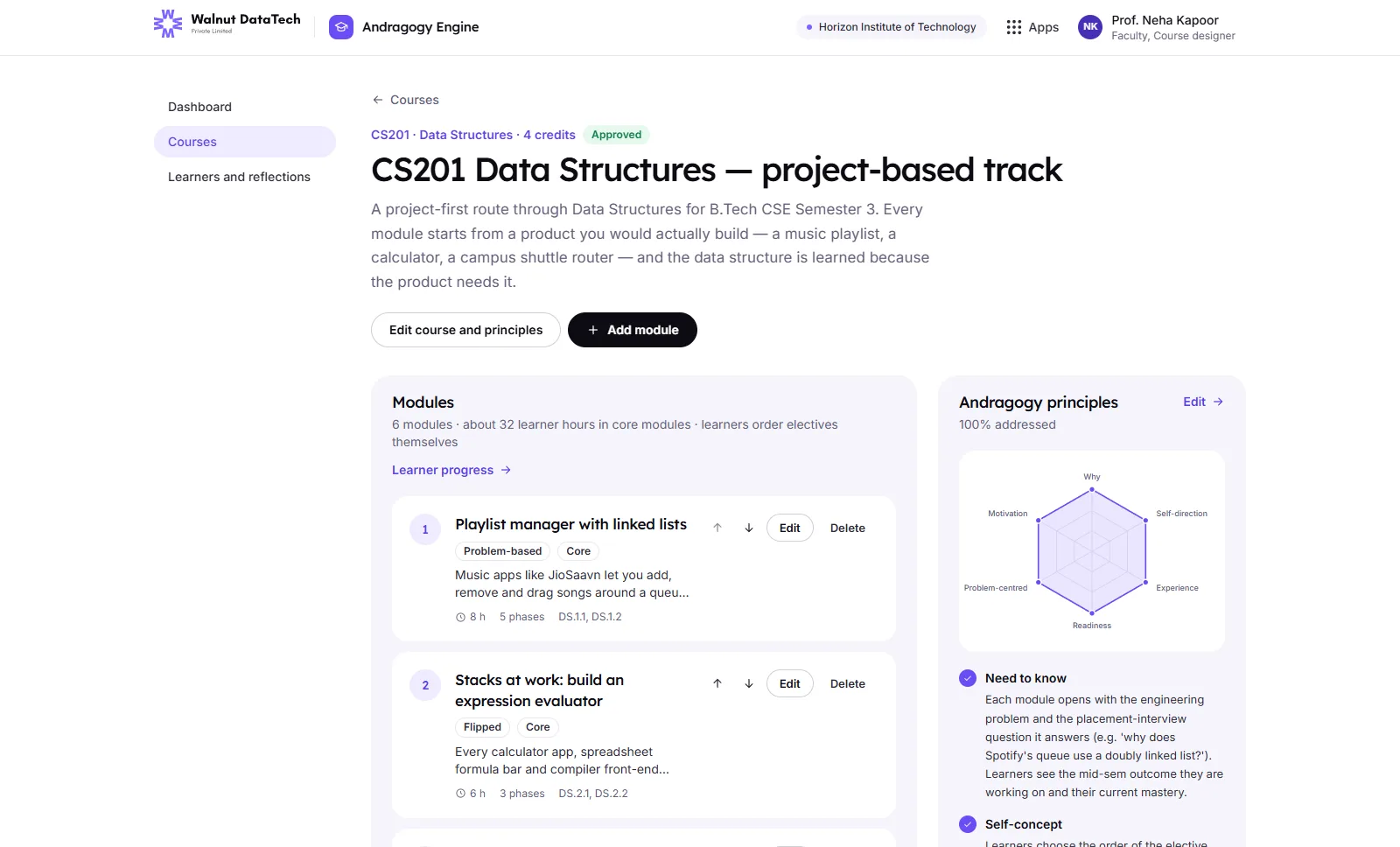
Teaching modelOne format for everyone.Pedagogy Engine for school teaching on the NCERT map; Andragogy Engine for adult, self-directed learning.
Fees and financeA separate ERP.Student fees dashboard, pending dues, finance report, student loans and MLC bifurcation, in the same login.
Reports for regulatorsExport a spreadsheet and fill in the forms.Internal examination and verification reports, attendance and progress reports, with UGC/DEB and Academic Bank of Credit support through Walnut’s university services.
Branding and institutionsThe vendor’s look, one institution per instance.A super admin runs many institutions, each with its own logo, colours, roles and settings.

Four logins, each with its own view

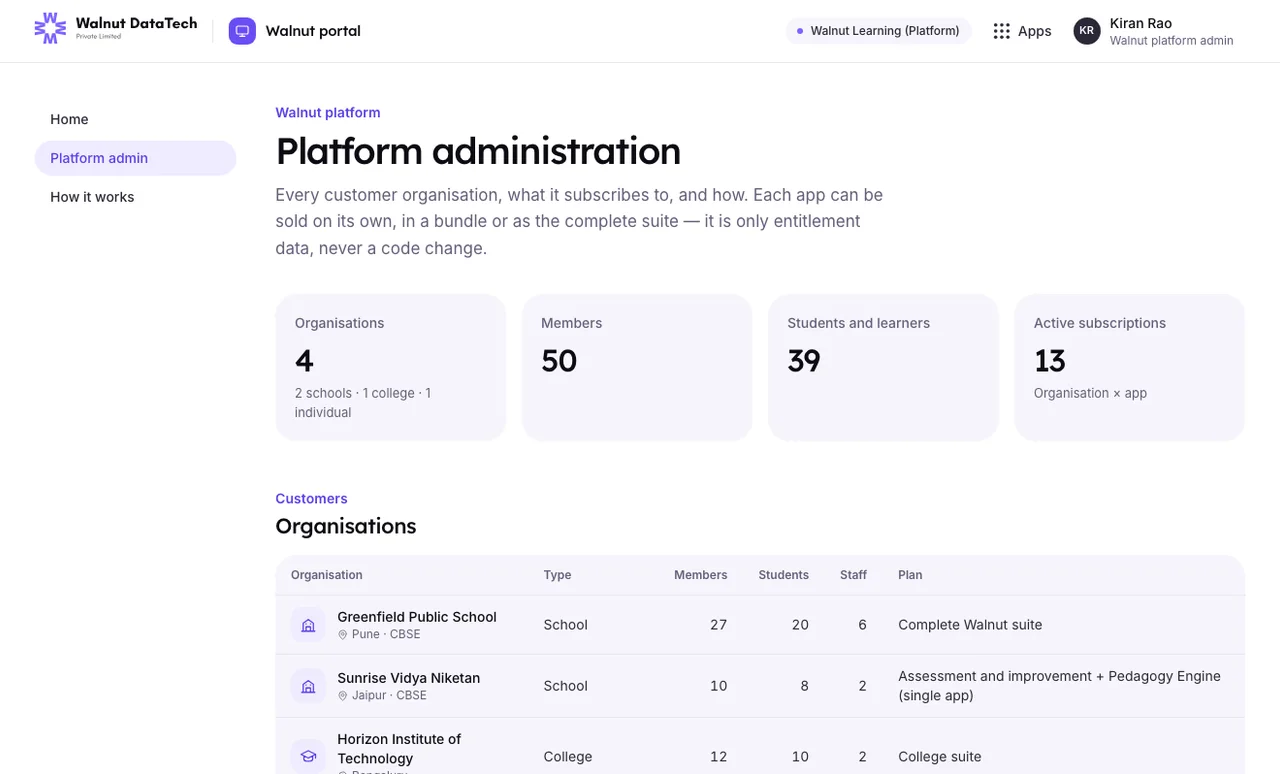
For administrators, faculty, students and the platform owner

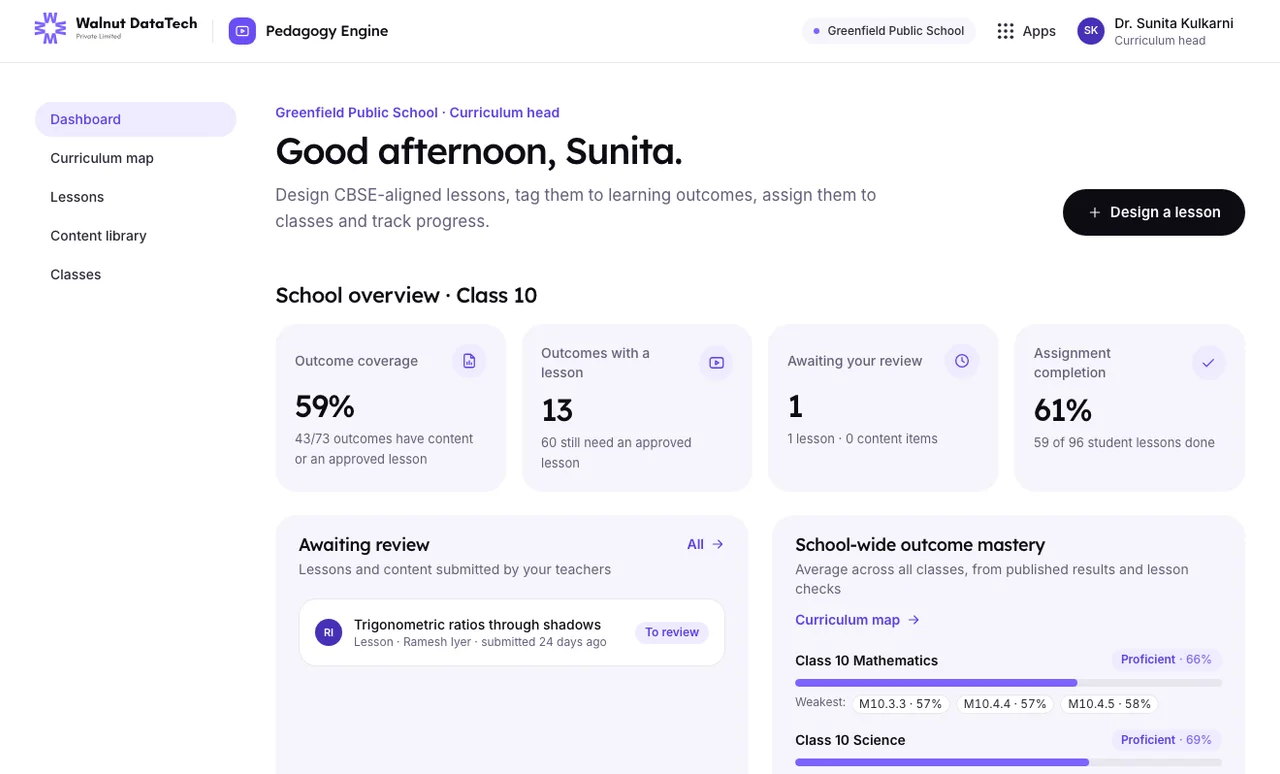
A principal’s dashboard for a sample school: outcome coverage, lessons awaiting review and outcome mastery across the school, class by class. Sample data.

The institution’s academic and programme office

  • Students: add and manage students, attendance, fees dashboard and pending dues, progress and self-assessment reports, transfers and cancelled applications
  • Programmes: create programmes with level, duration, seats, semesters and session; manage courses, batches and faculty
  • Blueprints: academic and examination blueprints, with AI extraction of modules, units and topics from an uploaded syllabus
  • Assignments: create them for a programme and subject, filter by session, batch, semester and date, track submitted and pending work and marks
  • Teaching: schedule live lectures, approve content and manage discussions
  • Learning analytics: activity dashboard, engagement hours by subject, assessment attempts, study-hour distribution and hourly activity
  • Finance: finance dashboard and report, student loans, MLC bifurcation
  • Examinations: internal examination and verification reports
  • Blogs, helpdesk tickets and employee search

Walnut Exam Module

Secure, live-proctored online exams.

How Walnut runs and monitors every online examination, from the candidate wall to the final answer. This is the module as it runs today for a state university’s online and distance programmes: trained proctors, automatic integrity checks and a guided exam screen, operated end to end by Walnut.

For institutions that examine online, and the students who sit the paper

Before exam day: how the paper is set

For the Controller of Examinations and question setters

Your own teams set the paper, and it stays sealed until two controllers have signed for it.

  1. Plan the examinationRegister subjects and their syllabus, schedule each examination and issue admit cards.
  2. Build the blueprintAn examination blueprint for each paper, with AI extraction of modules, units and topics from an uploaded syllabus.
  3. Tag to Bloom’s taxonomySetters write questions in a question bank of many question types, each tagged to Bloom’s levels, with bulk upload, answer keys and rubrics.
  4. Draft with AI, check by handAn AI question generator drafts questions from your institution’s own study material. Every draft is saved for a person to check before it is submitted.
  5. Review and moderateA Head Examiner and moderators review the questions the setters write.
  6. Encrypt, seal and releaseQuestion sets A, B and C are encrypted and sealed. A set is released only when two controllers have signed for it.

Before the paper: how a student gets in

For the students who sit the paper

Every candidate is checked before the paper opens, so the right person sits it.

  1. System checkThe candidate signs in, passes a system check and allows the camera when asked.
  2. Photo ID checkAn identity check-in with photo ID, before the paper opens.
  3. Live face matchAn identity check-in on camera: the face is matched before entry.
  4. Verification lobbyDocument and AI checks in a verification lobby. A candidate who cannot enter automatically asks the proctor, who checks the camera and approves or rejects, or issues an entry code.
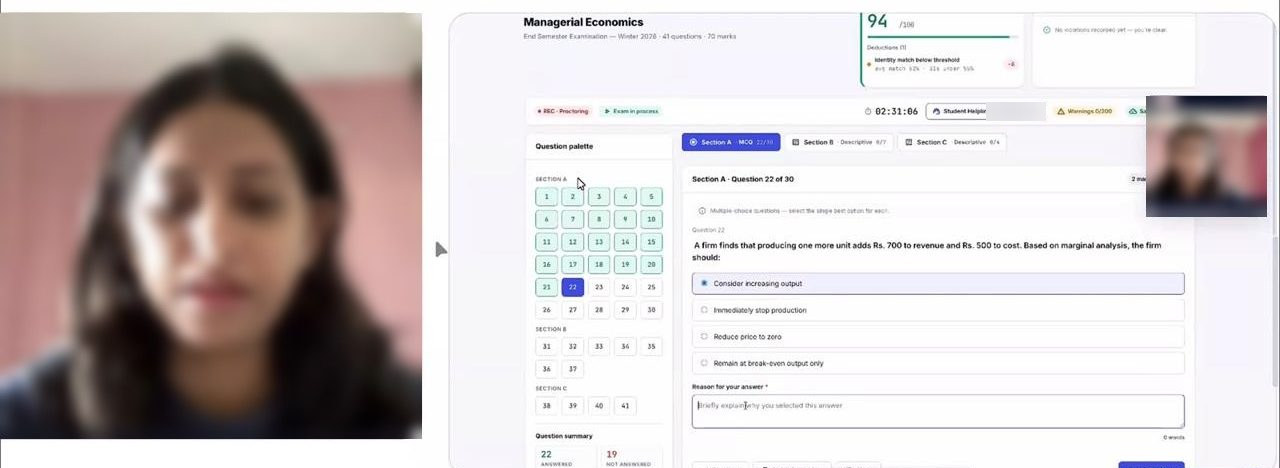
  5. The paper opensA guided exam screen, with liveness checks during the examination.

During the paper: what the proctor and the student see

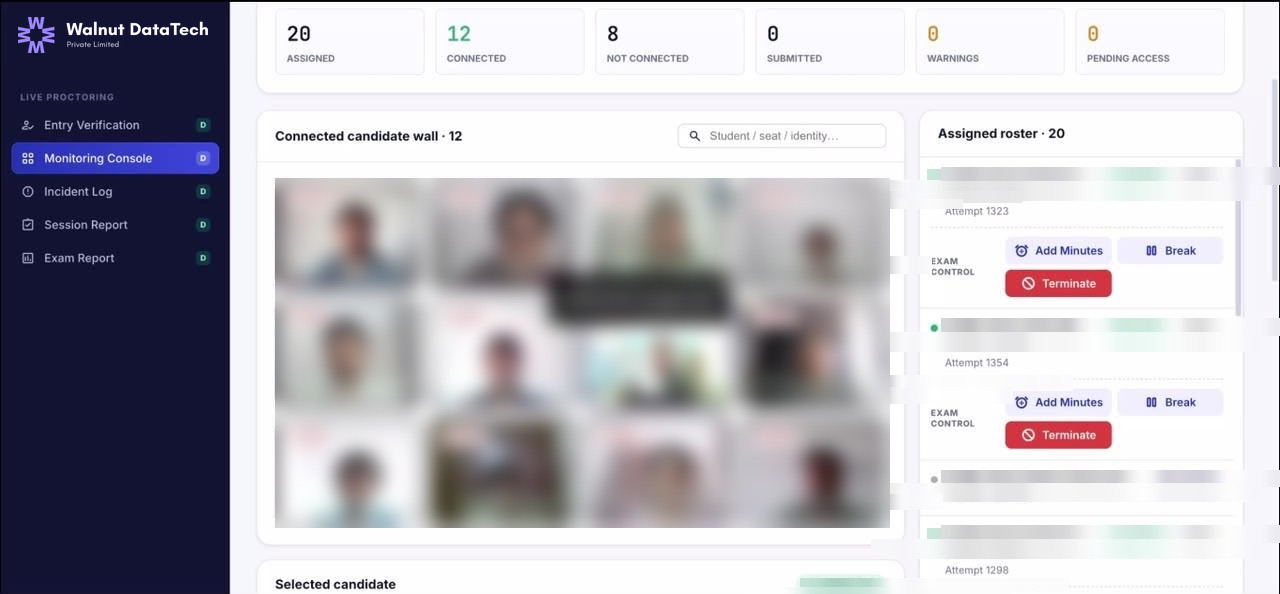
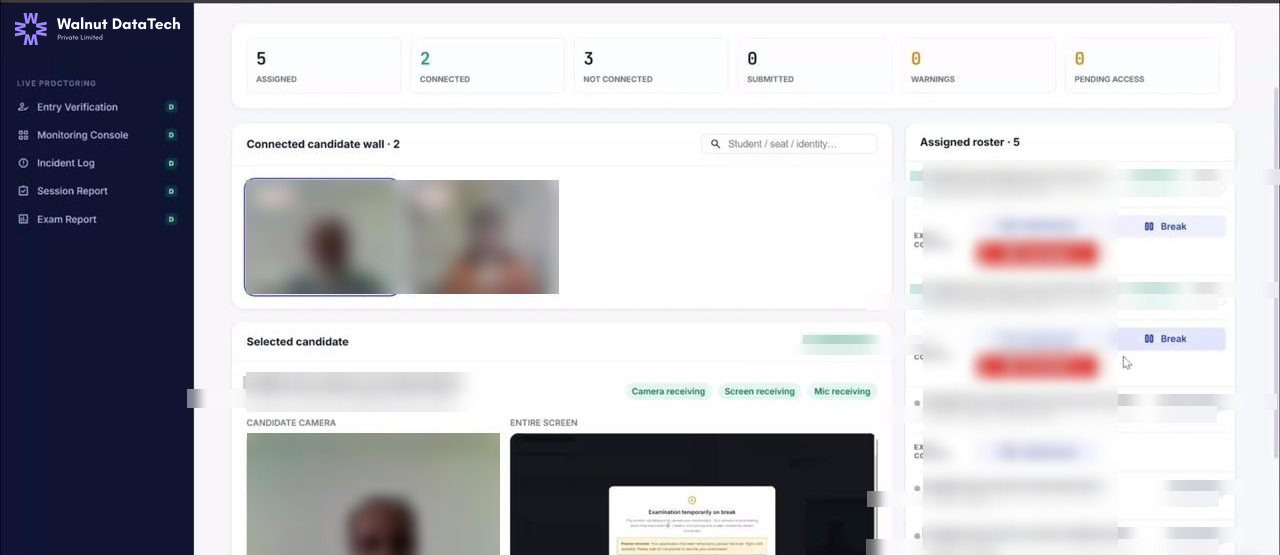
The live proctoring console: counts of assigned, connected, not connected, submitted, warnings and pending access; a wall of live camera tiles; and the assigned roster with Add Minutes, Break and Terminate for each candidate. Candidates blurred.

Every candidate, on one console.

Live counts
Assigned, connected, not connected, submitted, warnings and pending access, at the top of the console.
Candidate wall
A live camera tile for every connected candidate. A tile turns dark when a camera is off and a Break label shows who is paused.
Assigned roster
Each candidate’s status and exam controls, with a one-click Resume Exam for a paused candidate.
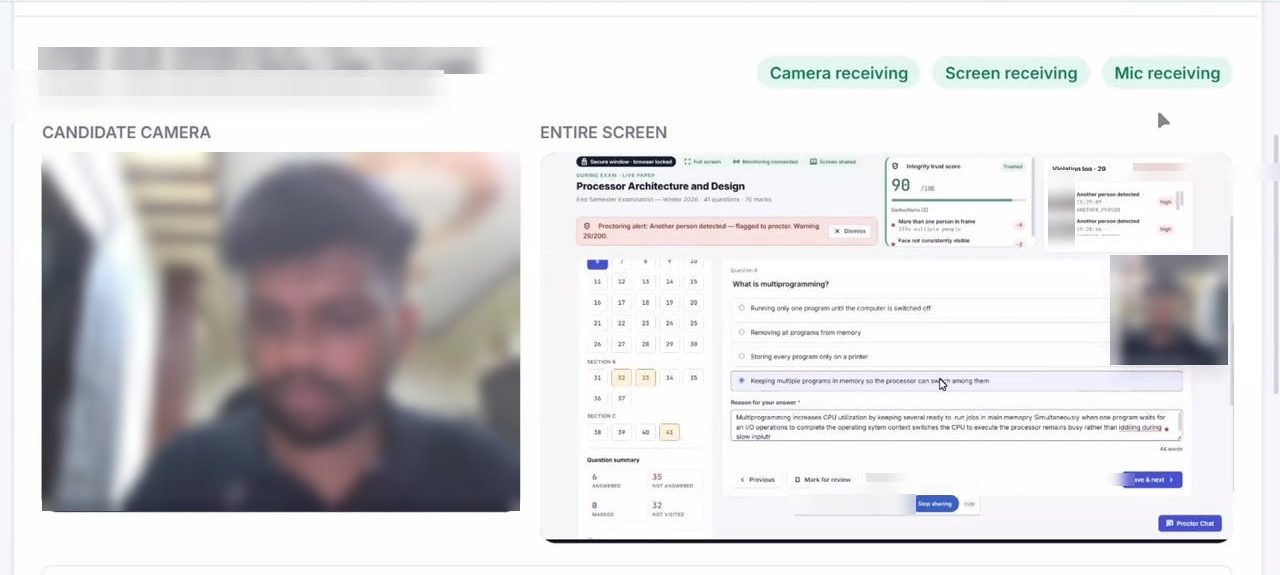
Camera, screen and mic
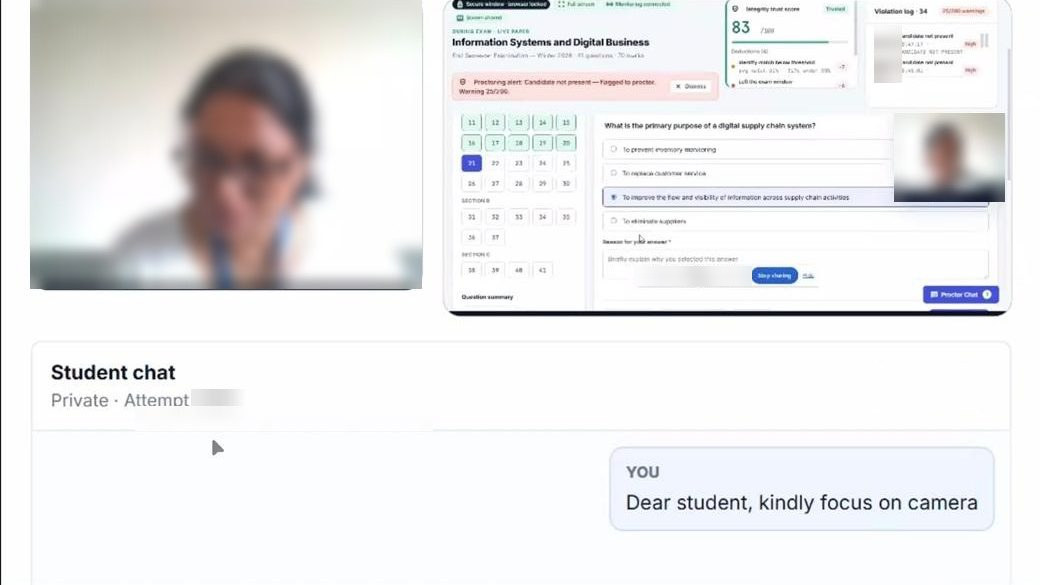
Select a candidate to open the session: the webcam on the left, the entire screen on the right, and the microphone, all live, so the proctor sees exactly what they are doing.

Behind the scenes

Trained proctors supervise every live batch, each with an assigned set of candidates, while a shared wall display gives the whole team one view of the examination. AI flags what it sees; a person decides.

After the paper: evaluation and results

For exam coordinators, evaluators and the Controller of Examinations

Objective answers are auto-marked; only the rest need a human.

Allocation policy

The exam coordinator chooses how answer scripts are distributed, then hands them to evaluators. Six ways:

  • Whole paperOne candidate’s entire script goes to one evaluator.
  • Question-wiseEach question is marked by one evaluator across every script.
  • Question creatorEach answer is routed to the faculty who authored that question.
  • Round robinScripts are dealt out in rotation for an even count each.
  • Equal workloadBalanced by estimated marking effort rather than script count.
  • ManualThe coordinator assigns every script by hand.

The evaluator pool: question setters, moderators, evaluators and the Head Examiner.

From final marks to published results

Evaluate, moderate, tabulate
Evaluation and moderation, then tabulation of the final marks.
Checked again at publishing
Publishing checks the figures again and refuses if anything has changed.
Digitally signed results
Any change to a published result can be detected. A correction is published as a new, linked revision.
Challenges and re-evaluation
Candidates can challenge a question or ask for re-evaluation.
A tamper-evident audit trail
Each entry in the audit trail is linked to the one before it, so a change to the record shows.

Grievances: raised, reviewed and closed

For students, exam coordinators and faculty

A student can question a question or a mark. Each grievance is routed by rule, decided with a reason and tracked to its close.

During the exam

Question grievance

  1. The student reports a questionFrom the exam screen, while the paper is on.
  2. The coordinator sees them togetherAll grievances in one view, by question.
  3. An expert decidesRouted to the faculty, the chairman or a subject expert, who decides if it is valid.
  4. Action is takenChange the answer key, drop the question or give the marks.

After the result

Marks grievance

  1. The student raises a grievanceAfter viewing the evaluated paper, and tracks its status.
  2. The coordinator assigns itTo the faculty or the evaluator.
  3. The faculty respondsWith a reason and a decision. Re-evaluation can go to a different evaluator, with an optional blind review.
  4. Changed or closedIf the marks change, the coordinator reviews and approves. If not, the grievance is closed.

Closure: every grievance closed and the final marks verified, then the result is locked and the final result is published.

What the exam module includes

  • AI, human or combined proctoring, chosen per examination
  • Candidate identity through a live Aadhaar check and face match
  • Questions generated from the syllabus with AI or added manually, in nine types
  • Two-step verification before any paper is released
  • Encrypted questions and exam sets
  • Analytics of the integrity score
  • Recordings and screenshots of the students’ activity during the exam
  • An integrity score that flags absence, face movement and multiple voices
  • Evaluation queue and answer-key unlock after the examination
  • Each question routed to the faculty member who authored it
  • Results on the student’s record in Walnut LMS
  • Conducted as per prevailing UGC Regulations
  • AI-assisted flags for phones and books, voices and leaving full screen
  • Automatic termination is off by default: a third warning asks the proctor to confirm
  • A mock test, so candidates can practise first

Who it’s for

The problem you bring, and what Walnut does about it.

The problem

Online and distance programmes have to satisfy UGC and DEB norms: four-quadrant content for every course, proctored examinations, records for the regulators and the Academic Bank of Credit, and fee collection at scale, often across several systems that do not talk to each other.

What Walnut does for your university

Walnut LMS structures every course in the four quadrants, runs examinations through its own examination module with AI and human proctoring, keeps admissions, fees, loans and examination data on one student record, and produces the internal examination, verification and finance reports your office is asked for.

  • UGC four-quadrant content for every course
  • Proctored examinations with Aadhaar identity checks
  • Programme, semester, session and batch structure
  • Internal examination, verification and finance reports

Working with us

From a first conversation to a proposal you can compare.

  1. 1

    Tell us about your institution

    Leave your details in the form. We confirm them with a one-time code, and a Walnut consultant gets in touch.

  2. 2

    See it with your kind of programme

    We show you Walnut LMS with sample data from your kind of programme, with the exam module and the teaching apps, and help you choose what to switch on.

  3. 3

    Review your proposal

    The service areas you chose, with the price of each: as a share of programme revenue, or as a one-time payment.

Two ways to pay

Revenue sharing

Pay as your programmes grow.

Each service is priced as a percentage of programme revenue.

One-time payment

A fixed price, agreed up front.

Each service is priced once, with no share of revenue.

The price of each service is shared in your proposal.

Built around the regulations you answer to

Content delivery
Digital content delivered through LMS and mobile app in accordance with UGC Regulations.
Examinations
Proctored examinations conducted as per prevailing UGC Regulations.
Reporting
Institutional reporting for UGC/DEB, with Academic Bank of Credit registration and data sharing.

Frequently asked questions

Before you get in touch.

Something we haven’t answered? Ask it in the form and a consultant replies.

What does Walnut Data Tech do?

Technology and services to launch, run and grow online programmes: 11 service areas in five stages. Set up (infrastructure and content), enrol (marketing, counselling and admissions), run (Walnut LMS, student support, reporting and automation), exam (proctored examinations) and outcomes (apprenticeship and placement assistance).

Do we have to take everything?

No. You can start from the complete stack or choose only the service areas you need. The five apps inside Walnut LMS can also be taken one at a time, as a bundle or all together.

How is it priced?

In one of two ways: revenue sharing, where each service is priced as a percentage of programme revenue, or a one-time payment, where each service has a fixed price agreed up front. The price of each service is shared in your proposal.

What happens after we send the form?

A Walnut consultant gets in touch to understand what you need, shows you Walnut LMS with sample data from your kind of programme, and sends a proposal for the service areas you choose.

Tell us about your institution. We’ll show you what Walnut would do for it.

A consultation costs nothing and commits you to nothing.

Prefer to talk? Call or WhatsApp us toll-free on 9667502212, or write to support@walnutdatatech.com.

Live demo

Tell us who you are, then open the demo.

The demo opens as soon as you send this. Our team may get in touch about the product.

We use these details only to follow up about Walnut. See our privacy policy.