Online Proctored Examinations

Secure online examinations with AI and human proctoring, from enrolment to results.

Delivered on the Walnut Exam Module, the examination platform inside Walnut LMS: question banks generated from the syllabus, an exam committee, secure paper release, Aadhaar-verified candidates, AI and human proctoring, evaluation, results and the consolidated marks list, with self-enrolment, fees and notifications handled in the same place. Conducted as per prevailing UGC Regulations.

Key features

What sets Proctored Exams apart.

  • AI, human or combined proctoring, chosen per examination
  • Candidate identity through a live Aadhaar check and face match
  • Questions generated from the syllabus with AI or added manually, in nine types
  • Two-step verification before any paper is released
  • Encrypted questions and exam sets
  • Analytics of the integrity score
  • Recordings and screenshots of the students’ activity during the exam
  • An integrity score that flags absence, face movement and multiple voices
  • Evaluation queue and answer-key unlock after the examination
  • Each question routed to the faculty member who authored it
  • Results on the student’s record in Walnut LMS
  • Conducted as per prevailing UGC Regulations

The Walnut Exam Module, live

Secure, live-proctored online exams.

How Walnut runs and monitors every online examination, from the candidate wall to the final answer. This is the module as it runs today for a state university’s online and distance programmes: trained proctors, automatic integrity checks and a guided exam screen, operated end to end by Walnut.

Behind the scenes

The proctoring war room

Trained proctors supervise every live batch, each with an assigned set of candidates, while a shared wall display gives the whole team one view of the examination. AI flags what it sees; a person decides.

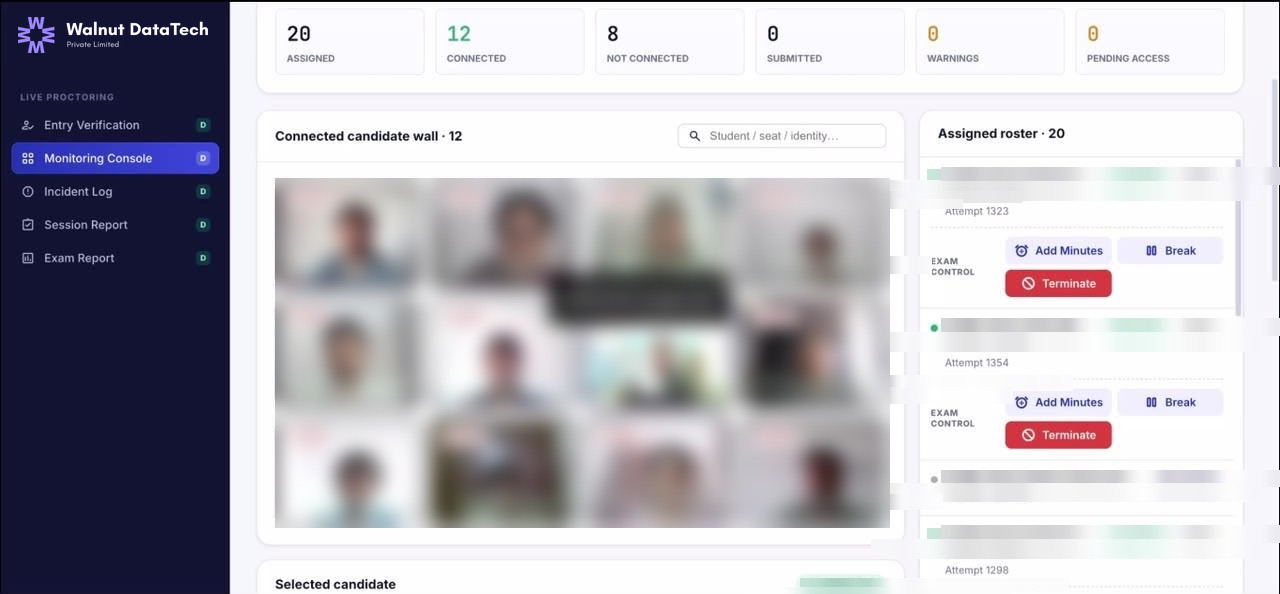
  1. The live proctoring console: counts of assigned, connected, not connected, submitted, warnings and pending access; a wall of live camera tiles; and the assigned roster with Add Minutes, Break and Terminate for each candidate. Candidates blurred.

    01Live monitoring

    Every candidate, on one console.

    • Live counts Assigned, connected, not connected, submitted, warnings and pending access, at the top of the console.
    • Candidate wall A live camera tile for every connected candidate. A tile turns dark when a camera is off and a Break label shows who is paused.
    • Assigned roster Each candidate’s status and exam controls, with a one-click Resume Exam for a paused candidate.
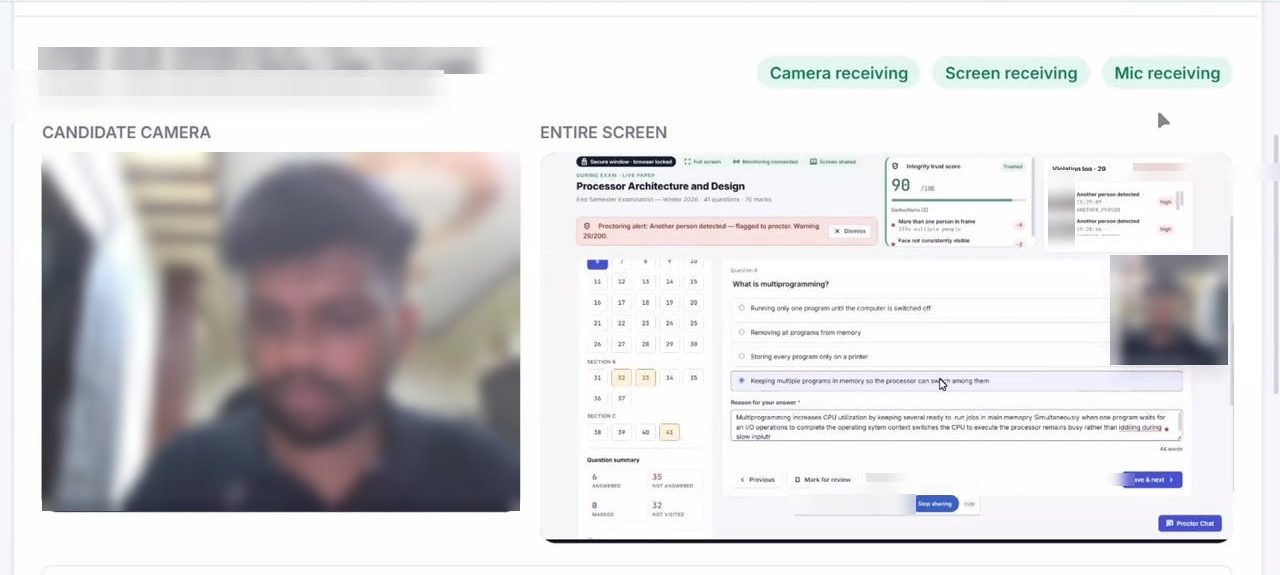
    • Camera, screen and mic Select a candidate to open the session: the webcam on the left, the entire screen on the right, and the microphone, all live, so the proctor sees exactly what they are doing.
  2. A candidate’s session seen by the proctor: the webcam beside the candidate’s whole screen, where a proctoring alert reads “Another person detected”, the integrity trust score shows 90 out of 100 with its deductions, and the violation log lists the event. Candidate blurred.

    02Integrity, automatically

    AI flags; proctors decide.

    • Proctoring alerts Another person detected, candidate not present, left the exam window, looking away from the screen. Each is flagged to the proctor and shown to the candidate with the reason and a running warning count.
    • Integrity trust score A live score out of 100 with every deduction listed: face not consistently visible, left the exam window and for how long. Deductions are proportionate; a small issue costs a little, nothing is an automatic penalty.
    • Violation log Every event time-stamped with a snapshot, kept for review.
    • Review threshold When the score falls below the threshold the session is marked for review, and a human proctor decides; automatic termination is off by default.
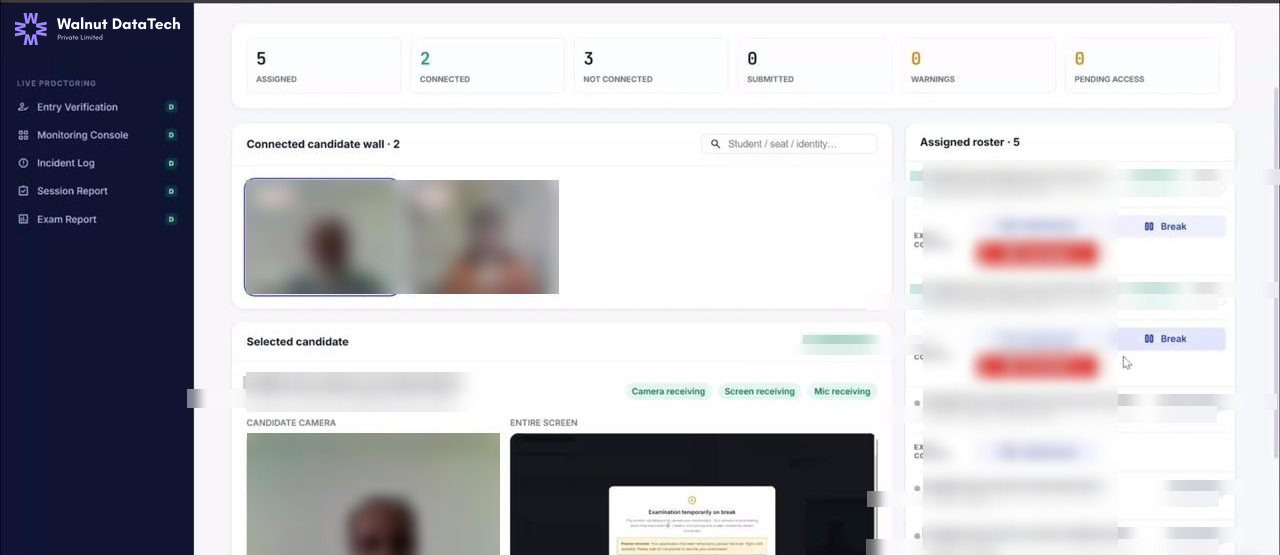
  3. Pausing an examination from the proctor console: the roster’s Break control beside each candidate, and the selected candidate’s locked screen reading “Examination temporarily on break” while the camera stays connected. Candidates blurred.

    03Proctor controls

    Time, breaks, access and resumes.

    • Add minutes, break, terminate For every candidate in the roster: extra minutes for genuine delays, a Break that locks the exam screen while monitoring stays connected, and Terminate in serious cases.
    • Manual access requests A candidate who cannot enter automatically asks the proctor, who checks the camera and chooses Approve or Reject.
    • Resume with a remark A session closed for a violation can be resumed if the proctor finds it justified. Every resume needs a written reason, so there is an audit trail of who resumed which exam and why.
    • Status at a glance Not started, in process, on break, submitted, closed due to violation.
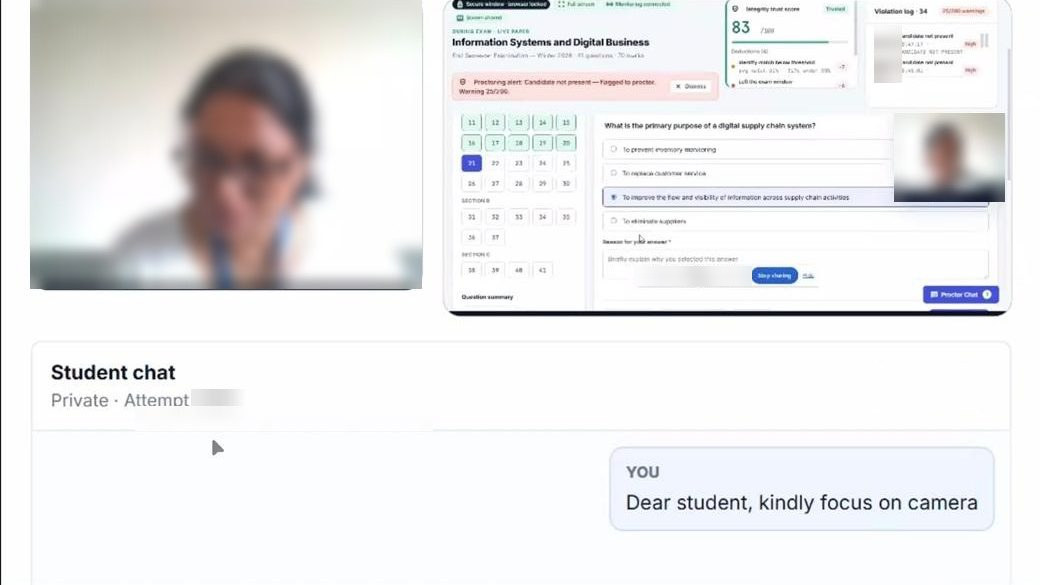
  4. The proctor’s private student chat under a candidate’s session, with the message “Dear student, kindly focus on camera”. Candidate blurred.

    04Talking to students

    Private chat, in real time.

    • One private chat per attempt Proctors and candidates talk without disturbing the rest of the batch.
    • Clear, polite guidance “Dear student, kindly focus on camera.” “Speaking in the exam is not allowed.”
    • Help with problems “Kindly use a stable internet connection and re-login.” Access and connection issues are sorted in the chat.
    • Questions answered Students can ask about their score and their warnings, and get an answer during the exam.
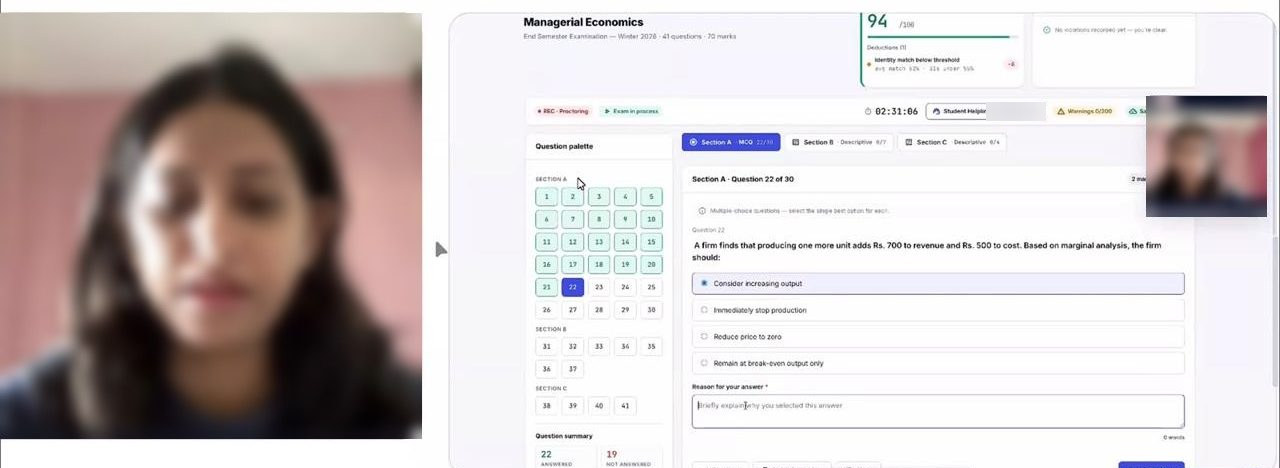
  5. A candidate’s examination as the proctor sees it: the candidate’s camera beside their exam screen, a Managerial Economics paper with sections for MCQ and descriptive answers, the question palette, the timer, a multiple-choice question with a “Reason for your answer” box, and the candidate’s own camera view. Candidate blurred.

    05The student’s exam

    What candidates see.

    • A guided exam screen Sections for multiple-choice and descriptive answers with progress, the time left and the student helpline at the top, and a small self view so candidates know the session is recorded.
    • A reason for every answer One question at a time. Each multiple-choice answer comes with a short written reason, which helps confirm genuine understanding.
    • Question palette Answered, marked for review and not visited, colour-coded by section.
    • Descriptive answers A rich-text editor for long answers, with an optional PDF or photo of working uploaded within a short time window.

Inside the module

Inside the Walnut Exam Module: seven areas.

What the module covers, from the question bank to the published result. All of it is built into Walnut LMS, and the services listed below run on it.

  1. Proctoring

    Choose the invigilation each examination needs.

    • AI proctoring that watches every candidate
    • Human proctors with a live view
    • Both together for high-stakes papers
  2. Candidate verification

    The right person sits the paper.

    • Live Aadhaar check (eKYC or document capture)
    • Face match before entry
    • Verification lobby with document and AI checks
    • Liveness during the exam, incident log and secure entry
  3. Question bank

    Upload the syllabus, then build the paper.

    • Questions generated with AI from the syllabus
    • Manual and bulk upload
    • Nine question types, from MCQ to long-form
  4. Exam committee

    Governance built into the module.

    • Set the exam chairperson and faculty
    • Set question sets
    • Cross-centre oversight
  5. Administration and delivery

    From question-set allocation to the exam window.

    • Allocation to setters and faculty
    • Secure paper release with two-step verification
    • Controller dashboard and exam window
  6. Command centre

    Every candidate, tracked individually.

    • Add students to each examination
    • Analytics that flag absence and candidates who leave the exam window
    • Admit cards and readiness checks
  7. Evaluation and results

    Structured evaluation for academic teams.

    • Evaluation queue
    • Answer key unlock
    • My result and post-exam workflows

What’s included

11 modules. Take them all, or only what you need.

  1. 01

    AI, human or combined proctoring

    AI proctoring, human proctoring, or both together, chosen for each examination.

  2. 02

    Candidate identity verification

    A live Aadhaar check (eKYC or document capture), a face match before entry and liveness checks during the examination.

  3. 03

    Question bank with AI generation

    Questions generated from the uploaded syllabus with AI, added manually, uploaded in bulk or digitised from the University’s question banks: MCQ, single choice, multiple select, true or false, fill in the blanks, match the following, descriptive and long-form, or from PDF and DOC files.

  4. 04

    Exam committee

    Set the exam chairperson, faculty and question sets, with cross-centre oversight.

  5. 05

    Examination administration and delivery

    Allocation to setters and faculty, question sets, two-step verification before a paper is released, a controller dashboard and the exam window.

  6. 06

    Command centre and analytics

    Add students to each examination, track each one, and flag candidates who are absent or navigate away from the exam window.

  7. 07

    Self-enrolment and examination fees

    Students enrol themselves for examinations online; examination fees are collected and reconciled.

  8. 08

    Examination notifications

    Notifications through website, email, SMS and WhatsApp.

  9. 09

    Candidate journey

    Admit card and readiness checks, a verification lobby, live oversight, an incident log with secure entry, and result checking.

  10. 10

    Evaluation and results

    An evaluation queue for faculty, answer key unlock, results and post-examination workflows.

  11. 11

    Examination data and the consolidated marks list

    Consolidation and management of student examination data, with the consolidated marks list (CML) ready to download.

Pricing

Priced the way that suits you.

Select Proctored Exams modules under either model. Your proposal sets out the detail.

Revenue sharing

Pay as your programmes grow.

Each service is priced as a percentage of programme revenue.

One-time payment

A fixed price, agreed up front.

Each service is priced once, with no share of revenue.

Add Proctored Exams to your solution.

Pick the modules you need, choose how you’d like to engage, and send us your configuration.

Live demo

Tell us who you are, then open the demo.

The demo opens as soon as you send this. Our team may get in touch about the product.

We use these details only to follow up about Walnut. See our privacy policy.