Walnut LMS

One learning platform, from the first lecture to the final result.

Walnut LMS runs online and blended programmes for universities, schools and institutions: course content in the UGC four-quadrant format, live and recorded lectures, assignments, self-assessment, attendance, fees and learning analytics, with secure proctored examinations and five teaching and assessment apps built in. Administrators, faculty, students and the super admin each have their own login.

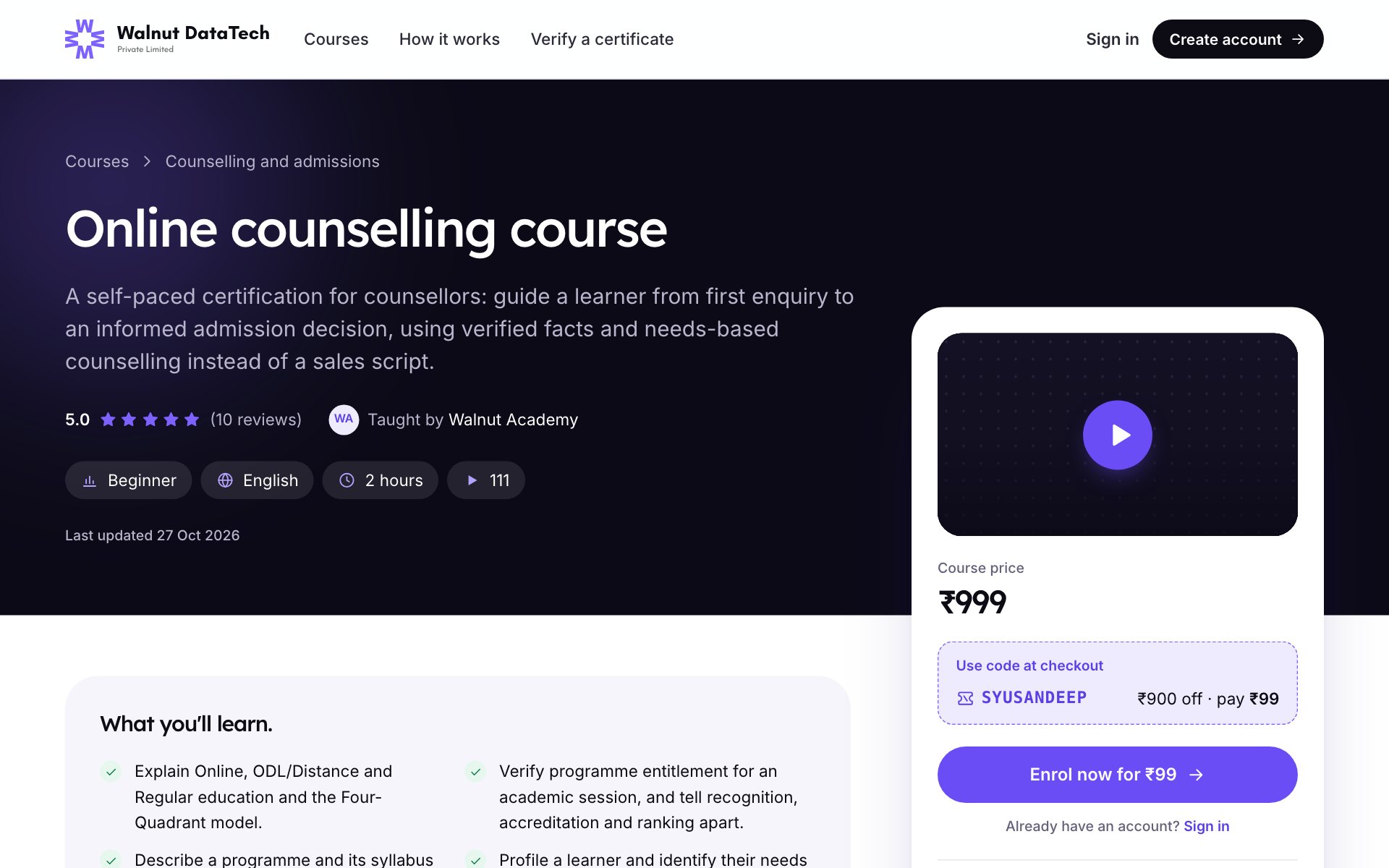
A course page on Walnut LMS: the Online Counselling Course, with its lessons, duration, price, a checkout offer code and the Enrol button.

Who it is for

Built for universities, schools and institutions.

Each brings a different problem to a learning platform. Choose yours.

The problem

Online and distance programmes have to satisfy UGC and DEB norms: four-quadrant content for every course, proctored examinations, records for the regulators and the Academic Bank of Credit, and fee collection at scale, often across several systems that do not talk to each other.

What Walnut LMS does

Walnut LMS structures every course in the four quadrants, runs examinations through its own examination module with AI and human proctoring, keeps admissions, fees, loans and examination data on one student record, and produces the internal examination, verification and finance reports your office is asked for.

  • UGC four-quadrant content for every course
  • Proctored examinations with Aadhaar identity checks
  • Programme, semester, session and batch structure
  • Internal examination, verification and finance reports

The problem

Teaching, marking and improvement live in separate places. Marks are entered by hand, a result rarely changes the next lesson, and parents see little of how their child is doing.

What Walnut LMS does

The five teaching and assessment apps inside the LMS close that loop. Answer sheets are marked on screen with AI assistance, every result feeds a learning improvement plan, lessons are designed on the NCERT curriculum map, and peer groups form around the outcomes a class finds hard.

  • On-screen evaluation of scanned answer sheets
  • An improvement plan for every student and teacher
  • CBSE-aligned lesson design with the Pedagogy Engine
  • Attendance, assignments and progress that parents can follow

The problem

Many batches, many faculty, study material that nobody formally approves, and learners who need skills they can show an employer.

What Walnut LMS does

Walnut LMS gives each batch its own courses and faculty, routes study material through a faculty approval workflow, lets adult learners set their own goals with the Andragogy Engine, tracks self-assessment attempts and study hours, and issues certificates that anyone can verify by number.

  • Batch management with faculty assigned per course
  • Content approval by session, batch, programme, semester and subject
  • Self-directed courses with the Andragogy Engine
  • Certificates verified on Walnut LMS

How it is different

An LMS that follows the UGC four-quadrant approach.

Most learning platforms store files and quizzes. Walnut LMS organises every course the way the UGC e-learning model expects, and carries examinations, marking and improvement inside the same system.

Quadrant 1

e-Tutorial

Audio and video lectures, animations, virtual labs and simulations, with full video transcriptions.

Quadrant 2

e-Content

Self-instructional reading material, e-books, PDFs, illustrations, case studies, presentations and supplementary documents.

Quadrant 3

Web resources and discussion

Curated web links, open-source content, historical overviews and further articles, with discussion spaces for peer interaction and doubt clearing.

Quadrant 4

Self-assessment

MCQs, quizzes and problem sets with solutions, assignments, FAQs and feedback that clears common misconceptions.

Walnut LMS compared with a typical learning management system
Where it mattersA typical LMSWalnut LMS
Course structureModules and files in whatever order the author chose.Every course organised in the UGC four quadrants: e-tutorial, e-content, web resources and discussion, self-assessment. Ready for regulatory review.
ExaminationsA quiz tool. Serious examinations happen somewhere else.A complete examination module inside the LMS: question banks, exam committee, secure paper release, AI and human proctoring, evaluation and results.
Candidate identityA password.Live Aadhaar eKYC or document capture, a face match before entry, a verification lobby and liveness checks during the examination.
Question settingTyped in one at a time.Generated from the uploaded syllabus with AI, added manually or uploaded in bulk, in nine question types, reviewed by faculty.
MarkingAuto-marked objective questions only.On-Screen Evaluation of scanned answer sheets, step by step, with AI-suggested marks that faculty accept or override.
After the resultA grade book.Learning Improvement Plans for students and faculty, peer groups and the next lesson, all tied to the same learning outcomes.
Teaching modelOne format for everyone.Pedagogy Engine for school teaching on the NCERT map; Andragogy Engine for adult, self-directed learning.
Fees and financeA separate ERP.Student fees dashboard, pending dues, finance report, student loans and MLC bifurcation, in the same login.
Reports for regulatorsExport a spreadsheet and fill in the forms.Internal examination and verification reports, attendance and progress reports, with UGC/DEB and Academic Bank of Credit support through Walnut’s university services.
Branding and institutionsThe vendor’s look, one institution per instance.A super admin runs many institutions, each with its own logo, colours, roles and settings.

Key features

27 things people do on Walnut LMS, by login.

Administrators, faculty, students and the super admin each sign in to their own view.

The institution’s academic and programme office

  • Students add and manage students, attendance, fees dashboard and pending dues, progress and self-assessment reports, transfers and cancelled applications
  • Programmes create programmes with level, duration, seats, semesters and session; manage courses, batches and faculty
  • Blueprints academic and examination blueprints, with AI extraction of modules, units and topics from an uploaded syllabus
  • Assignments create them for a programme and subject, filter by session, batch, semester and date, track submitted and pending work and marks
  • Teaching schedule live lectures, approve content and manage discussions
  • Learning analytics activity dashboard, engagement hours by subject, assessment attempts, study-hour distribution and hourly activity
  • Finance finance dashboard and report, student loans, MLC bifurcation
  • Examinations internal examination and verification reports
  • Blogs, helpdesk tickets and employee search

Teachers and course coordinators

  • Review and approve study material before students see it
  • Narrow the review list by session, batch, programme, semester and subject
  • Track content that is pending, approved or rejected
  • Check syllabus alignment subject by subject
  • Run live lectures and discussions for your courses
  • Mark on screen and publish outcome-wise results with the teaching apps

Learners in every programme

  • My courses enrolled courses and their study materials
  • Recorded and live video lectures
  • PDFs, notes and e-books
  • Assignments view, submit and see marks
  • Self-assessment MCQs, quizzes and practice tests
  • Attendance record
  • Progress report and results
  • Fees dashboard and payment history

The platform owner, across institutions

  • Add and manage several institutions on one platform
  • Set roles and access for administrators, faculty and students
  • Each institution’s logo, colours and branding
  • LMS configuration and permissions

Teaching and assessment apps, part of Walnut LMS

Five connected apps for teaching, assessment and improvement.

Mark answer sheets on screen, design better lessons and turn every result into a plan for each learner. Each app works on its own, and they share one language: the learning outcome.

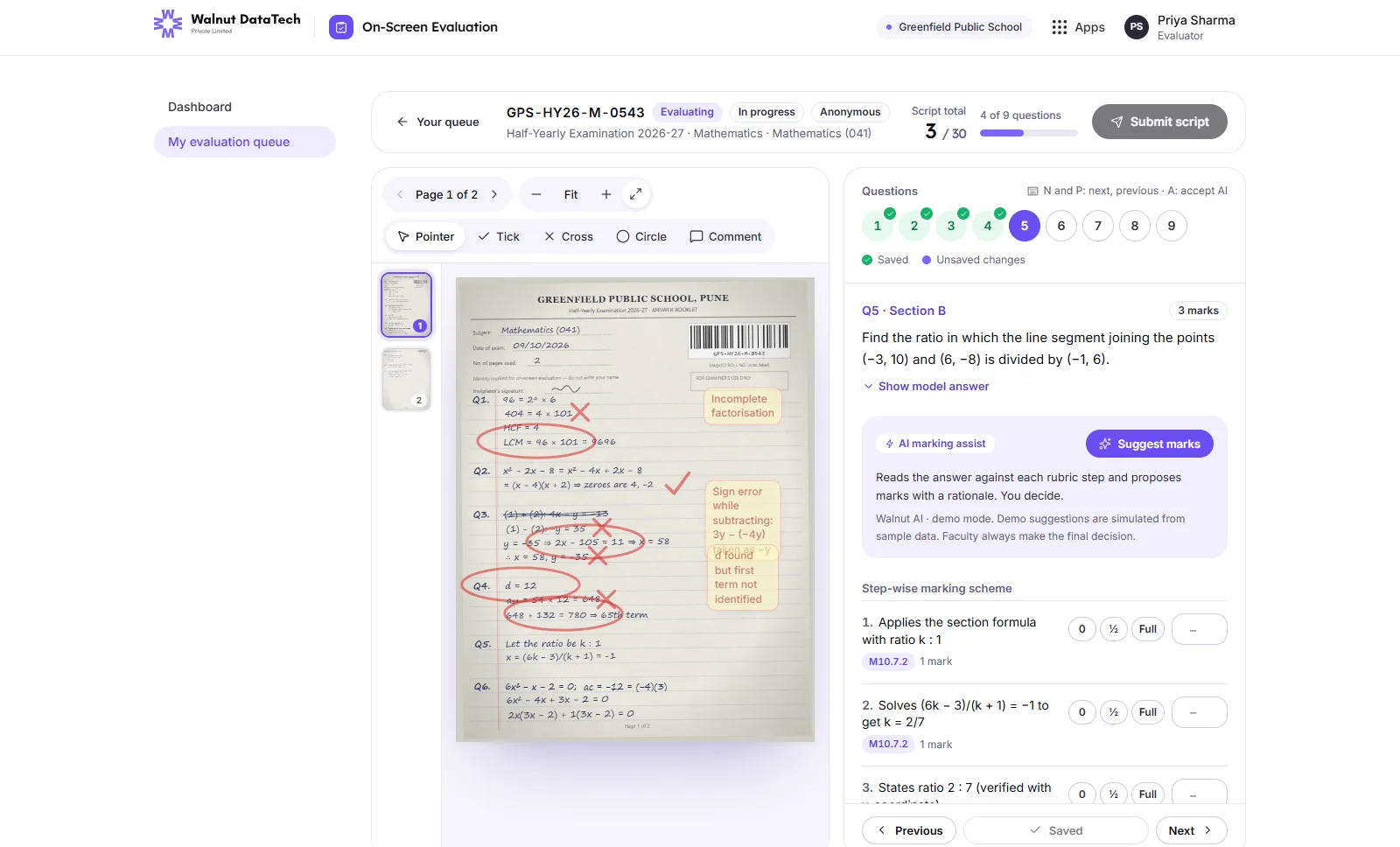
  • On-Screen Evaluation: a scanned mathematics answer sheet marked with ticks, crosses and comments, beside the question, the AI marking assist and the step-wise marking scheme. Sample data.

    On-Screen Evaluation

    Mark scanned answer sheets on screen, step by step, with AI suggestions you control.

    • Upload question papers, marking schemes and scanned answer sheets, then assign them to evaluators.
    • Award marks for each step of the marking scheme, with ticks, crosses and comments on the page.
    All about On-Screen Evaluation
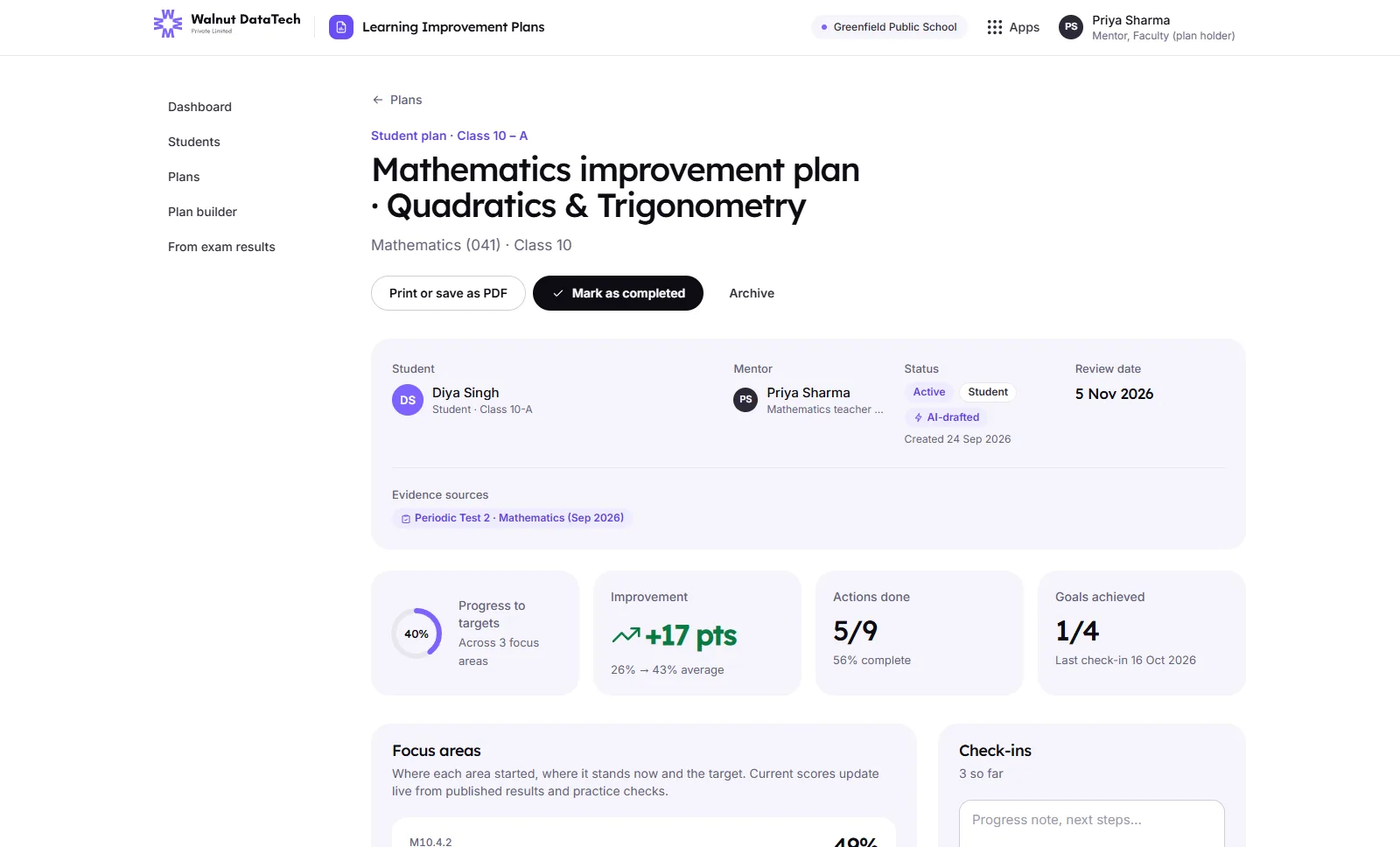
  • Learning Improvement Plans: a student’s mathematics improvement plan with progress to targets, improvement in points, actions done, goals achieved and focus areas. Sample data.

    Learning Improvement Plans

    Turn results into a personal improvement plan for every student and teacher.

    • Plans start from each learner’s weakest learning outcomes, with a baseline and a target.
    • Suggested goals, practice and content, with mentor check-ins and progress tracking.
    All about Learning Improvement Plans
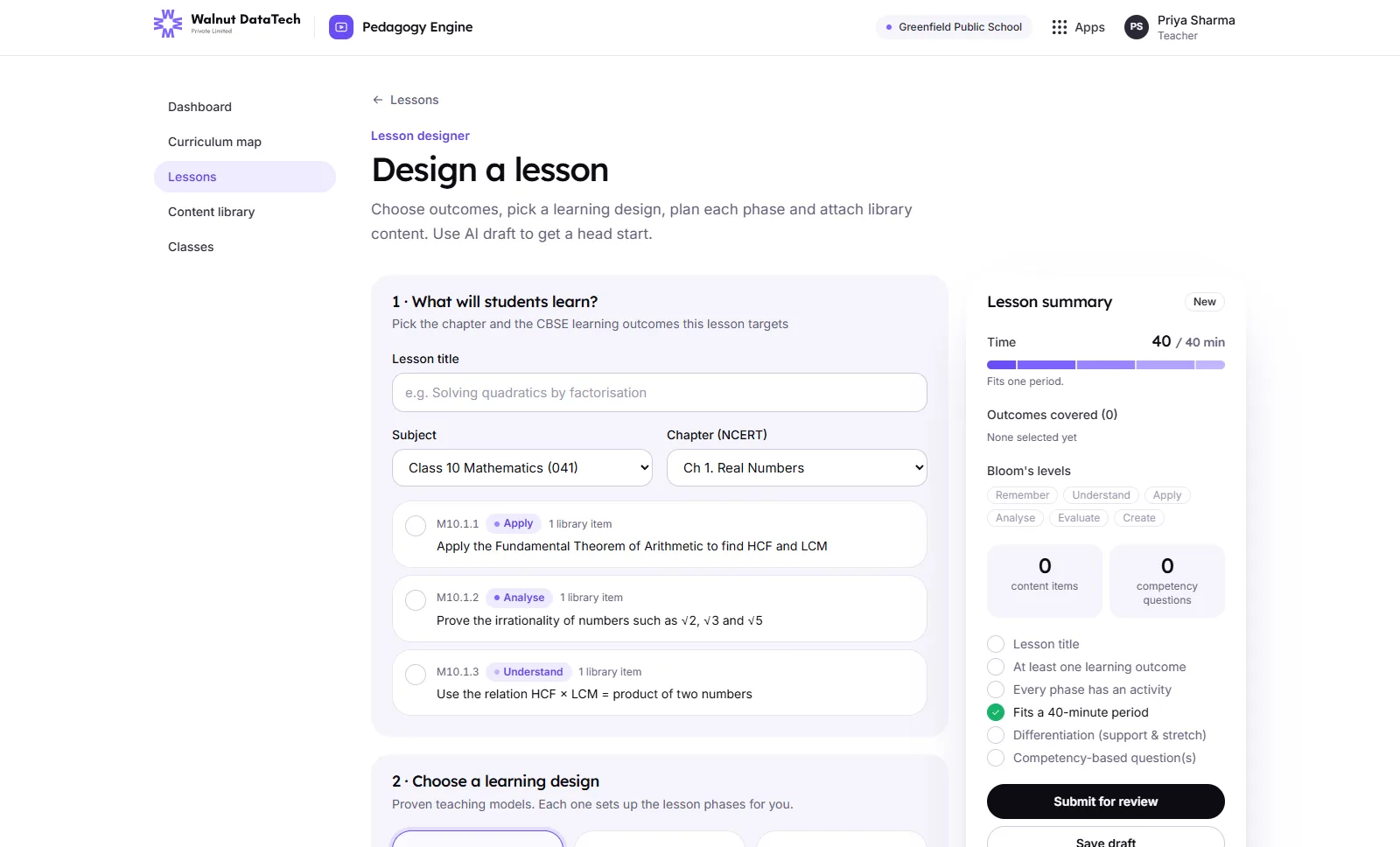
  • Pedagogy Engine: the lesson designer, choosing a chapter and CBSE learning outcomes for a Class 10 mathematics lesson, with a lesson summary and checklist. Sample data.

    Pedagogy Engine

    Design CBSE-aligned lessons with proven teaching models and track class progress.

    • A curriculum map of NCERT chapters and learning outcomes, with coverage gaps highlighted.
    • A lesson designer built on 5E, gradual release and experiential models, with an AI first draft.
    All about Pedagogy Engine
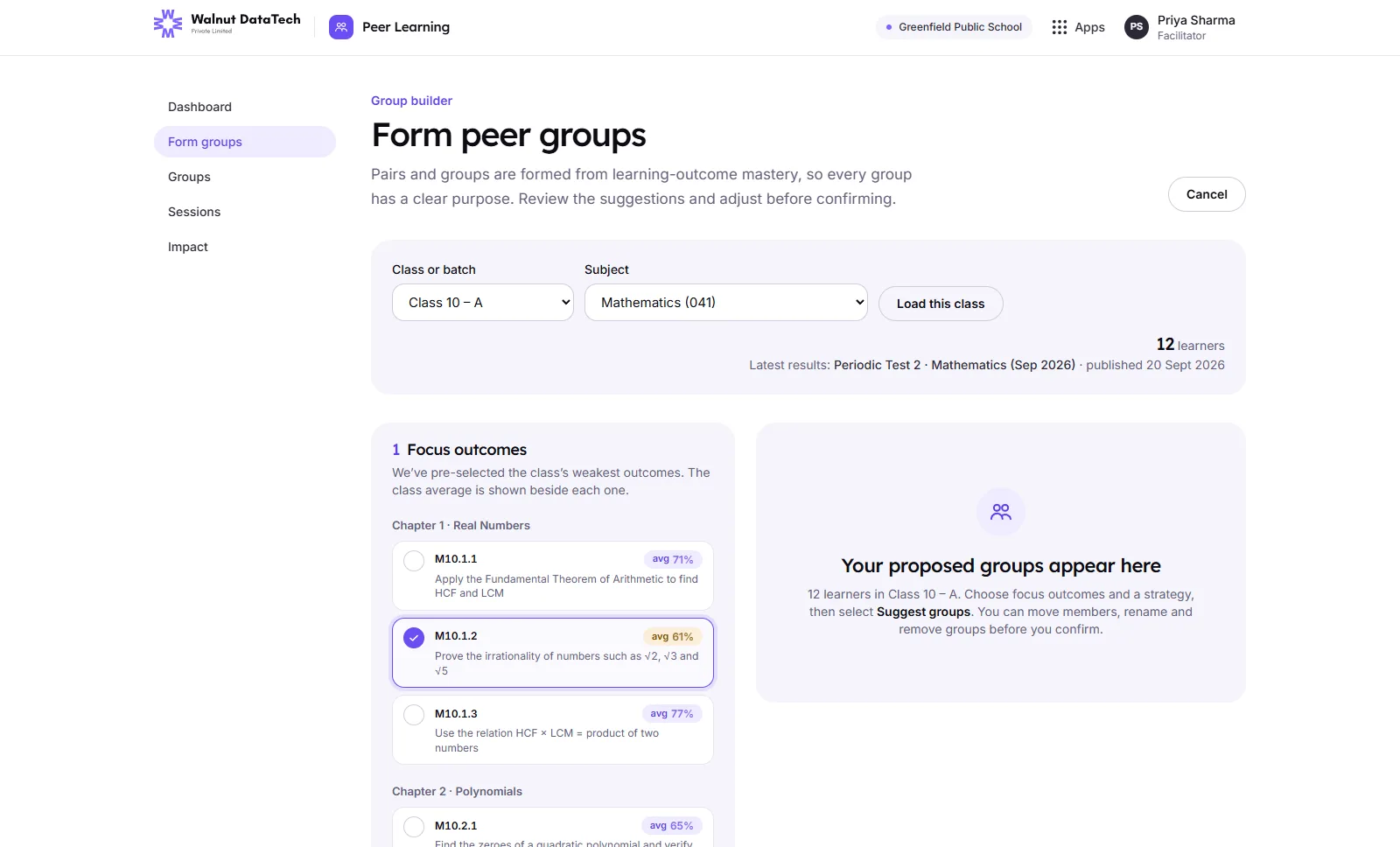
  • Peer Learning: the group builder, choosing a class’s weakest learning outcomes, with the class average beside each, to form peer groups. Sample data.

    Peer Learning

    Form pairs and study groups from real outcome data, then run and measure sessions.

    • Suggested pairs and groups that match strong and developing learners on the same outcomes.
    • Sessions with agendas, attendance and shared tasks.
    All about Peer Learning
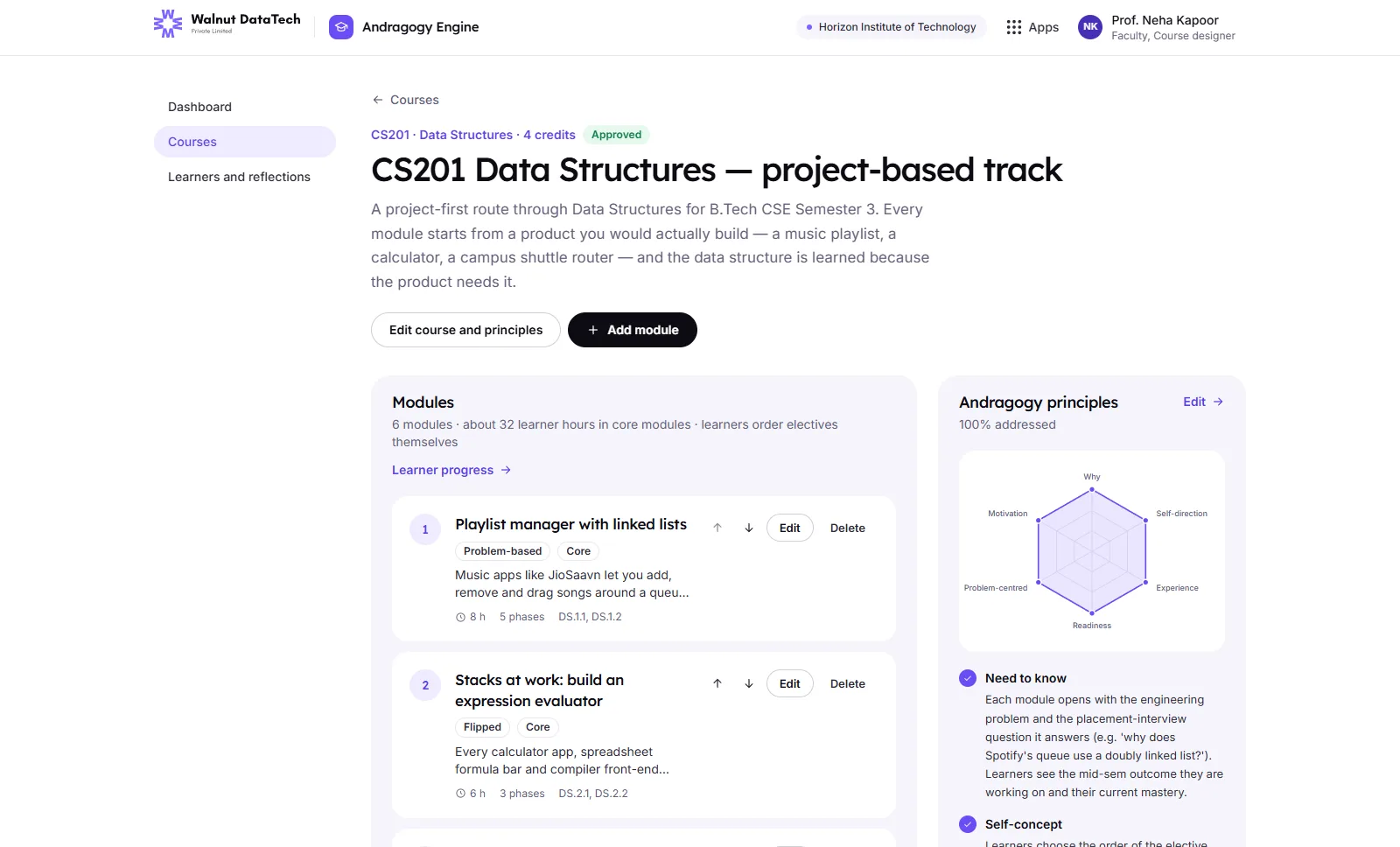
  • Andragogy Engine: a project-based college course with its modules and learning types, and a chart of how fully it addresses adult-learning principles. Sample data.

    Andragogy Engine

    Design self-directed courses for college students, working professionals and teachers.

    • Course design around adult-learning principles, with a completeness check.
    • Module templates for experiential, problem-based, case and flipped learning.
    All about Andragogy Engine

Proctored examinations

Examinations run inside the LMS, not beside it.

The Walnut Exam Module takes a paper from the question bank to the published result, and Walnut’s own proctors run it live. Every candidate is on one console with camera, screen and microphone; AI flags what it sees and a trained proctor decides; candidates get a guided exam screen with a reason for every answer. Conducted as per prevailing UGC Regulations.

Each examination is invigilated the way it needs: AI proctoring, human proctoring, or AI and human together.

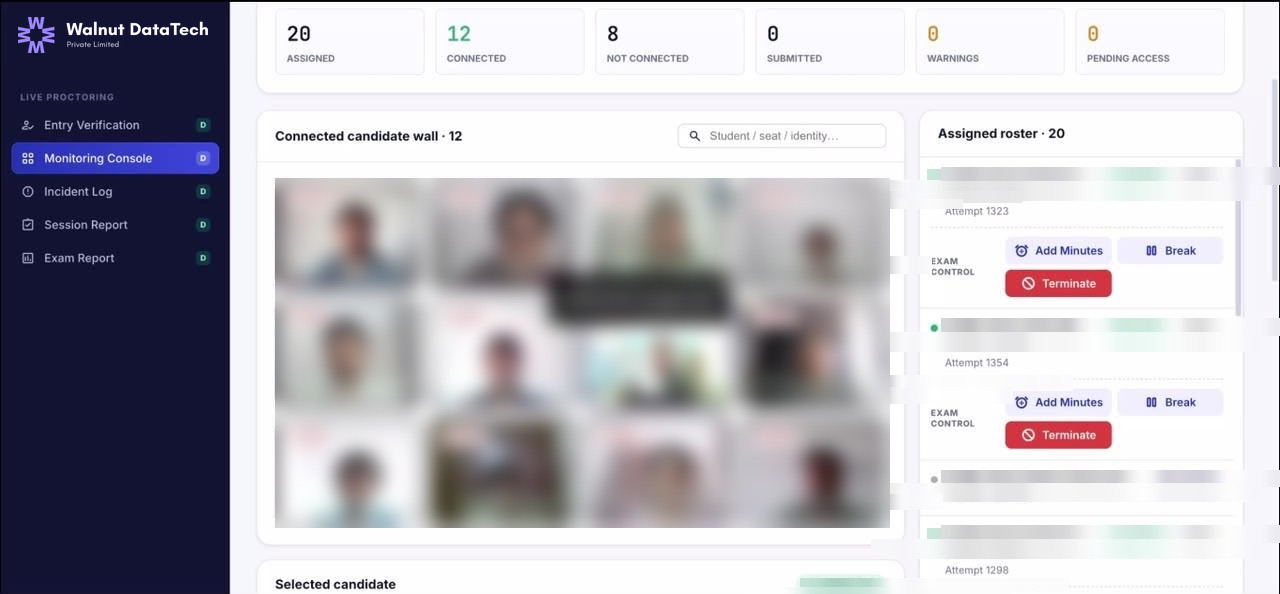
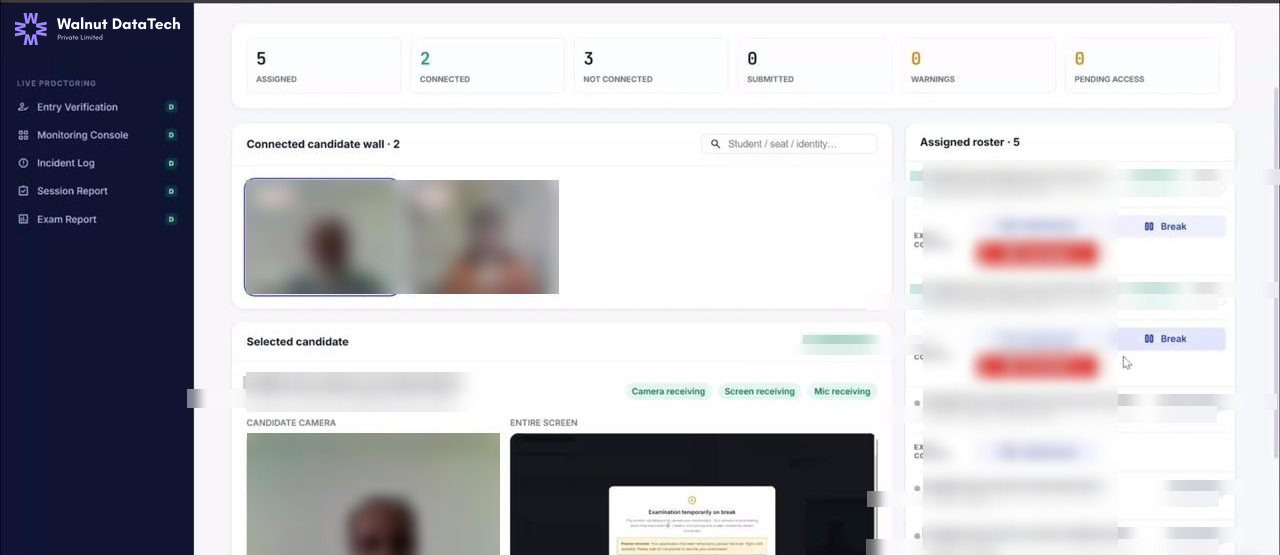
The live proctoring console: counts of assigned, connected, not connected, submitted, warnings and pending access; a wall of live camera tiles; and the assigned roster with Add Minutes, Break and Terminate for each candidate. Candidates blurred.

01Live monitoring

Every candidate, on one console.

  • Live counts Assigned, connected, not connected, submitted, warnings and pending access, at the top of the console.
  • Candidate wall A live camera tile for every connected candidate. A tile turns dark when a camera is off and a Break label shows who is paused.
  • Assigned roster Each candidate’s status and exam controls, with a one-click Resume Exam for a paused candidate.
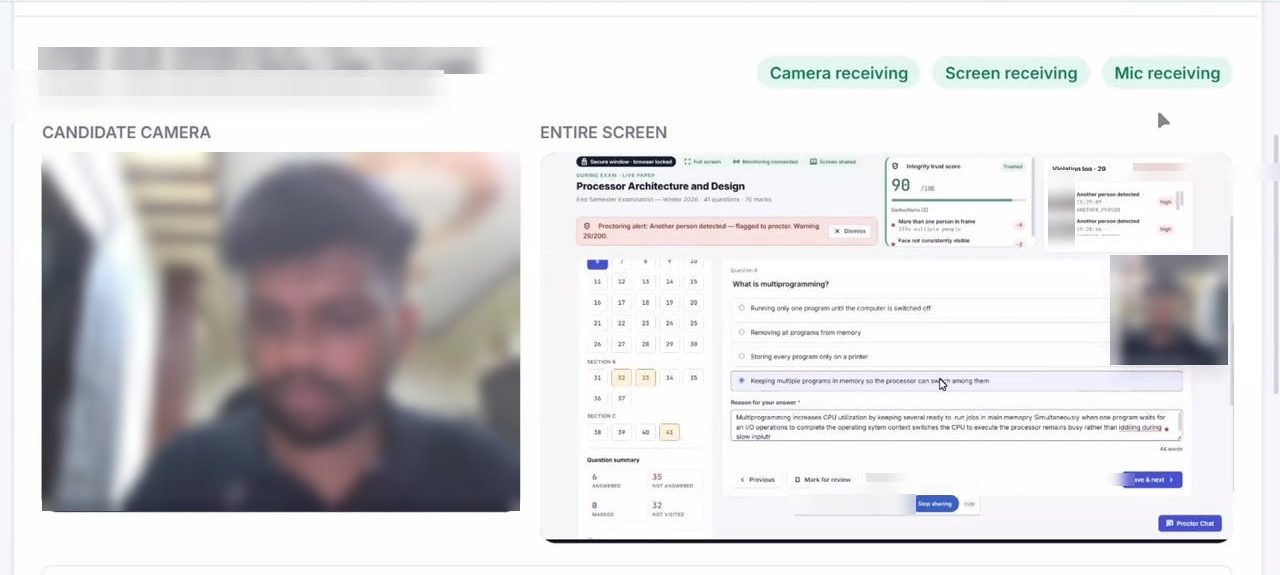
  • Camera, screen and mic Select a candidate to open the session: the webcam on the left, the entire screen on the right, and the microphone, all live, so the proctor sees exactly what they are doing.
A candidate’s session seen by the proctor: the webcam beside the candidate’s whole screen, where a proctoring alert reads “Another person detected”, the integrity trust score shows 90 out of 100 with its deductions, and the violation log lists the event. Candidate blurred.

02Integrity, automatically

AI flags; proctors decide.

  • Proctoring alerts Another person detected, candidate not present, left the exam window, looking away from the screen. Each is flagged to the proctor and shown to the candidate with the reason and a running warning count.
  • Integrity trust score A live score out of 100 with every deduction listed: face not consistently visible, left the exam window and for how long. Deductions are proportionate; a small issue costs a little, nothing is an automatic penalty.
  • Violation log Every event time-stamped with a snapshot, kept for review.
  • Review threshold When the score falls below the threshold the session is marked for review, and a human proctor decides; automatic termination is off by default.
Pausing an examination from the proctor console: the roster’s Break control beside each candidate, and the selected candidate’s locked screen reading “Examination temporarily on break” while the camera stays connected. Candidates blurred.

03Proctor controls

Time, breaks, access and resumes.

  • Add minutes, break, terminate For every candidate in the roster: extra minutes for genuine delays, a Break that locks the exam screen while monitoring stays connected, and Terminate in serious cases.
  • Manual access requests A candidate who cannot enter automatically asks the proctor, who checks the camera and chooses Approve or Reject.
  • Resume with a remark A session closed for a violation can be resumed if the proctor finds it justified. Every resume needs a written reason, so there is an audit trail of who resumed which exam and why.
  • Status at a glance Not started, in process, on break, submitted, closed due to violation.
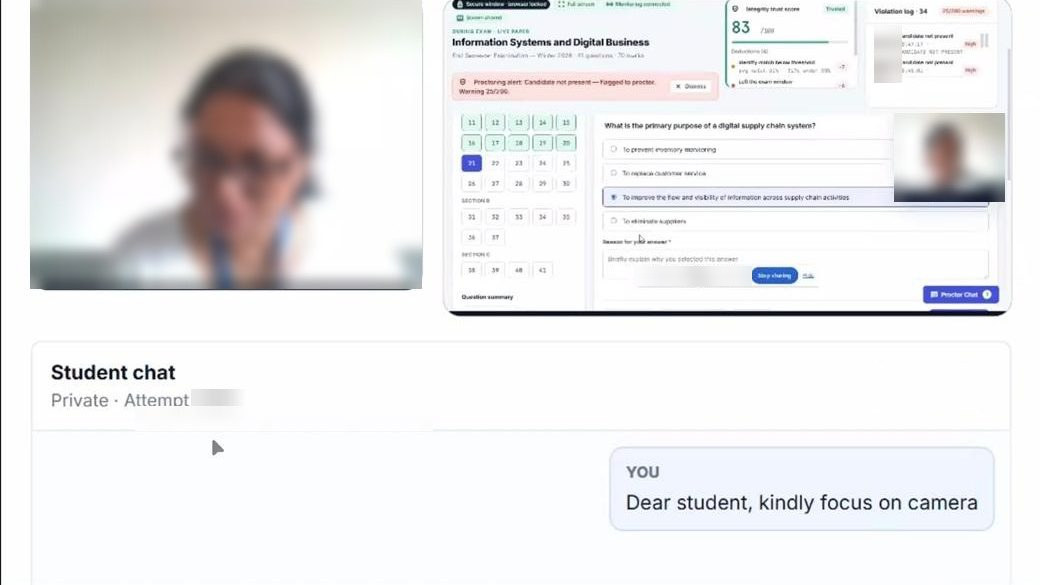
The proctor’s private student chat under a candidate’s session, with the message “Dear student, kindly focus on camera”. Candidate blurred.

04Talking to students

Private chat, in real time.

  • One private chat per attempt Proctors and candidates talk without disturbing the rest of the batch.
  • Clear, polite guidance “Dear student, kindly focus on camera.” “Speaking in the exam is not allowed.”
  • Help with problems “Kindly use a stable internet connection and re-login.” Access and connection issues are sorted in the chat.
  • Questions answered Students can ask about their score and their warnings, and get an answer during the exam.
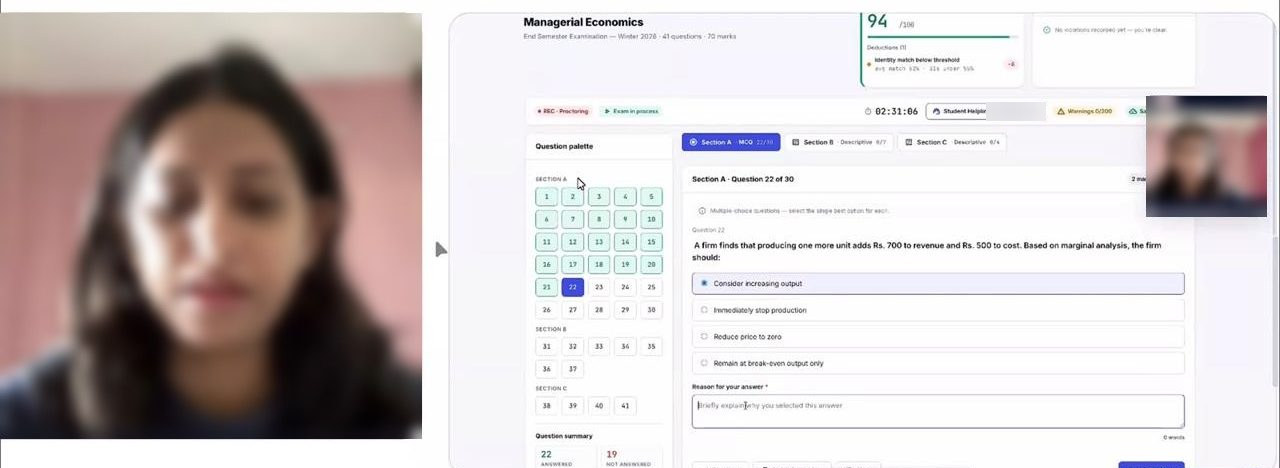
A candidate’s examination as the proctor sees it: the candidate’s camera beside their exam screen, a Managerial Economics paper with sections for MCQ and descriptive answers, the question palette, the timer, a multiple-choice question with a “Reason for your answer” box, and the candidate’s own camera view. Candidate blurred.

05The student’s exam

What candidates see.

  • A guided exam screen Sections for multiple-choice and descriptive answers with progress, the time left and the student helpline at the top, and a small self view so candidates know the session is recorded.
  • A reason for every answer One question at a time. Each multiple-choice answer comes with a short written reason, which helps confirm genuine understanding.
  • Question palette Answered, marked for review and not visited, colour-coded by section.
  • Descriptive answers A rich-text editor for long answers, with an optional PDF or photo of working uploaded within a short time window.
Also in the module
Proctoring, candidate verification, question bank, exam committee, administration and delivery, command centre, evaluation and results. See each part
Question types
MCQ, single choice, multiple select, true or false, fill in the blanks, match the following, descriptive, long-form, upload from PDF or DOC.

Walnut LMS

See Walnut LMS with your own programmes

Tell us whether you run a university, a school or an institution. We will show you the LMS with sample data from your kind of programme, with the Walnut Exam Module and the teaching apps, and help you choose what to switch on.

Add Walnut LMS to my solutionTalk to us

We use these details only to respond to your enquiry. See our privacy policy and terms.

Live demo

Tell us who you are, then open the demo.

The demo opens as soon as you send this. Our team may get in touch about the product.

We use these details only to follow up about Walnut. See our privacy policy.